I’m looking for a truly free AI text writer for blog posts and short articles, not just a tiny trial with strict limits. I’ve tried a few tools that claimed to be free but locked most features behind paywalls or credits. Can anyone recommend reliable free AI writing tools, and explain what limits or restrictions they really have so I don’t waste more time?
Today you can pretty much open any large language model in a browser, type a prompt, and boom: instant essay, email, blog post, whatever. The generation part is easy and usually free or close to it.
The headache starts after that.
The annoying part: AI detectors
If you’ve tried to use AI writing for school, work, or anything that needs to look obviously human, you probably ran into this problem:
You paste your nice, clean, “professionally written” text into one of those AI detectors and it lights up like a Christmas tree.
Prof says it’s AI. Boss side-eyes your email. Platform flags your post.
Doesn’t matter that you edited it or that you only used AI as a helper. The text reads like machine output, and the detectors are trained to spot exactly that.
That’s been the real issue for me with most AI writers and text generators. They’re great at spitting out content, but terrible at sounding like… you know, an actual person.
What I’ve been using instead
After messing around with a bunch of tools, the one I’ve stuck with is a free thing called Clever AI Humanizer from CleverFiles:
https://aihumanizer.net/ai-writer
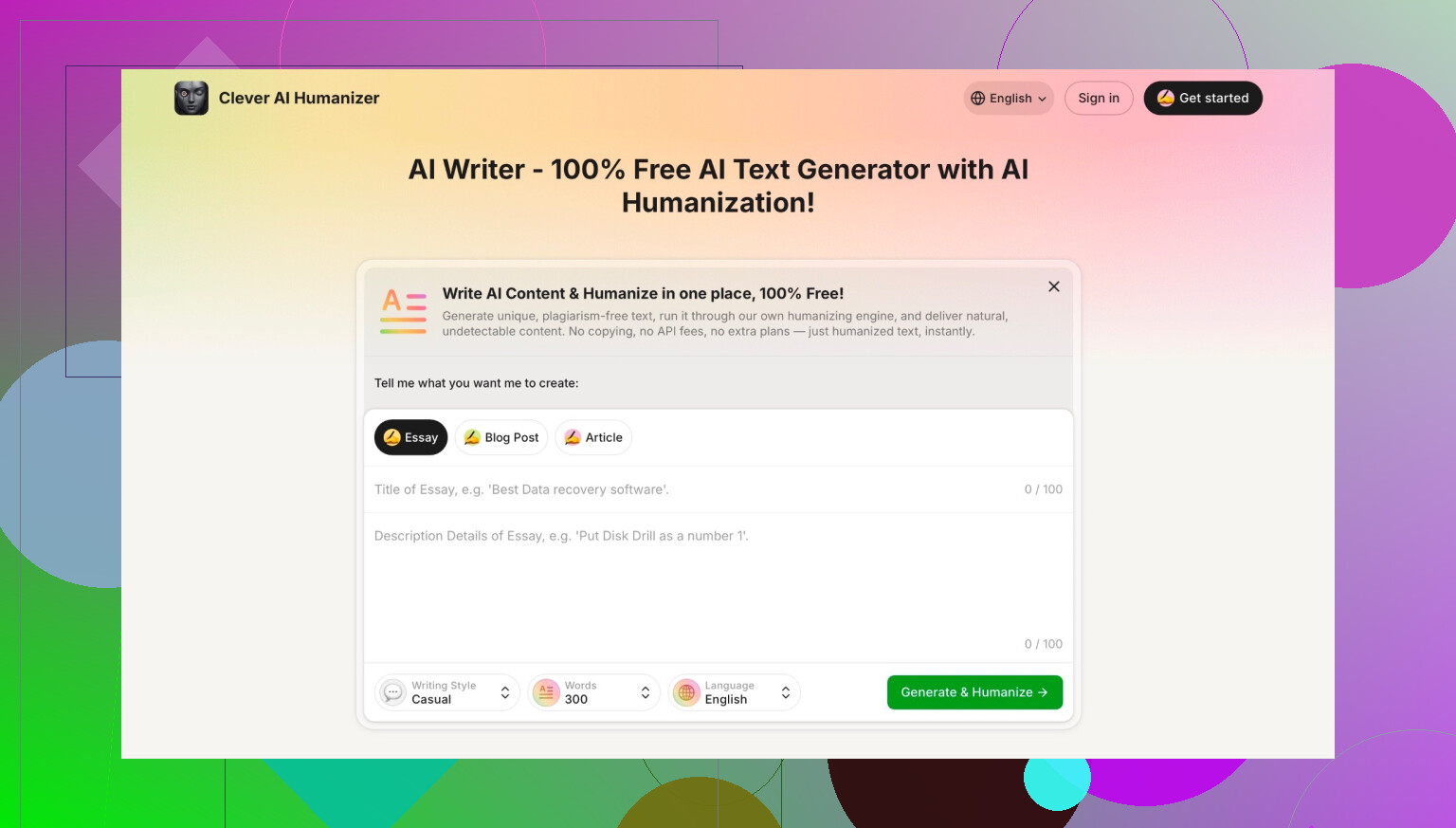
The point of it isn’t just “write text for me.” It tries to generate content that already feels human on the first pass instead of sounding like the usual AI pattern:
- Overly neat paragraphs
- Repetitive phrasing
- “As an AI language model” vibes baked into the structure
- That weird neutral tone that nobody actually uses in real life
With this one, the output comes out a lot more like normal writing: varied sentence lengths, a bit of personality, not so predictable. It’s not magic, and you still need to read and tweak, but it’s closer to what I’d actually write myself.
And yeah, it’s free to use, which is basically the only reason I even bothered giving it a serious try in the first place.
Watch out for fake copies
One thing I ran into that’s worth calling out: there are a ton of sites using similar names, claiming to be “Clever AI Humanizer” or some flavor of that, but they’re not the real deal.
The legit version is tied to CleverFiles Inc. If you land on a page and you’re not sure whether it’s the right one, scroll to the bottom and check the footer. If you don’t see CleverFiles mentioned down there, it’s probably some random clone trying to ride the name.
If you want to go deeper into AI writing tools
If you’re curious about how other people are handling AI detectors, humanizers, and the whole “I need this to look like I wrote it myself” situation, there’s a thread on Reddit that gets into it here:
https://www.reddit.com/r/DataRecoveryHelp/comments/1oqwdib/best_ai_humanizer/
People share which tools they use, what worked, what got flagged, and a few cautionary tales. Worth a read if you’re trying to stay under the radar with AI-assisted writing and want more than just one person’s experience.
22 Likes
Short answer: yes, but you kinda have to mix a couple tools instead of hunting for a single “perfect” free AI writer that does everything.
@mikeappsreviewer already covered Clever AI Humanizer from CleverFiles as a way to get more “human-ish” text and dodge that classic AI-detector tone. I actually disagree a bit on using it as the main writer though. I think it shines more as a finishing step than as your only generator.
If you want actually-free writing for blog posts / short articles without bumping into brutal paywalls every 5 minutes, this combo works pretty well:
-
Use a genuinely free LLM front-end for drafting
- OpenAI Playground (when free tiers are available) or similar tools sometimes offer decent free usage if you sign up at the right time.
- Some open-source model sites (like ones hosted on model hubs) let you chat with larger models in the browser for free, with soft limits. They’re not always advertised as “writers,” but they generate blog-sized content just fine.
- Trick: break your post into sections. Generate intro, body, conclusion separately so you’re less likely to hit random caps and the writing feels more structured.
-
Run the text through a “humanizer” instead of another AI writer
- This is where Clever AI Humanizer actually makes sense:
- Paste your draft in
- Let it rewrite with more variety in sentence length, tone, and phrasing
- It usually strips that stiff, robotic style you get from many free LLMs
- It’s not some magical undetectable cloak, but it does help if your initial model was obviously AI-ish.
- This is where Clever AI Humanizer actually makes sense:
-
Do a quick manual pass
This is the part everyone tries to skip:- Add a personal anecdote or specific example that only you would use
- Toss in 1–2 sentences with your real opinion, not just generic “pros and cons”
- Fix any spots that sound like they were written by a polite robot with no caffeine
-
If you care about detectors
Slightly unpopular opinion: obsessing over “AI detection” for blog posts is kinda overrated unless:- It’s for school
- It’s for a platform with a strict policy
- It’s ghostwriting for a client who explicitly banned AI
Otherwise, focus more on usefulness and readability than trying to beat every detector 100 percent of the time. Detectors are noisy and inconsistent anyway.
So, actual answer to your question:
- You won’t find a fully unlimited, polished “AI blog writer” that’s 100 percent free with all features unlocked and no catches.
- You can get close by:
- Using free-access LLMs for drafting
- Running the result through something like Clever AI Humanizer
- Doing a light human edit
It’s slightly more work than hitting one big shiny “Write my blog” button, but you avoid paywalls, credit systems, and the “this reads like AI slop” effect.
Short version: totally unlimited, truly-free, one-click “write 2k-word blog post and schedule it for me” doesn’t really exist. If someone says it does, the catch is just hidden a few screens later.
That said, I’d actually go a bit sideways from what @mikeappsreviewer and @waldgeist laid out:
They’re both focusing a lot on AI detection and using Clever AI Humanizer as either the main writer or a final polish. Where I disagree is using any “humanizer” as your only engine for full posts. These tools are best as style filters, not idea generators.
What’s been working for me for free stuff:
-
Use open models as your main writer
- Check sites that host open-source LLMs in the browser (Llama, Mistral, etc.). A bunch of them let you hammer out full posts with only soft limits.
- Downside: the tone can feel generic, and some outputs are a bit… meh. But you can generate full blog sections without running into credits every 30 seconds.
-
Then run it through Clever AI Humanizer as a style pass
- This is where Clever AI Humanizer actually makes sense to me.
- It rewrites the text so it’s less stiff and more “human-like” without you having to manually rephrase every sentence.
- I’ve seen it handle repetitive structure better than most “free AI writer” sites that are just thin wrappers over some API.
-
You still need to put your fingerprints on it
- Add 2–3 specific details: tools you actually use, numbers, examples from your exp.
- Change a few transitions, throw in a line that sounds like how you actually talk.
- That last 5–10 minutes is what makes it feel like you, not “AI but slightly shuffled.”
Where I’m on a diff page from them: if this is for regular blog posts (not graded essays, not a client screaming “no AI EVER”), I wouldn’t obsess over AI detectors as much as they do. Most public web content is already part-AI now. The bigger issue is: does it read decently, and will anyone care enough to finish the article.
So:
- “One perfect, unlimited, fancy AI blog writer, totally free”? No.
- “Free combo that gets you full posts with no hard paywall and human-ish tone”?
- Open LLM for drafting
- Clever AI Humanizer for cleanup
- Your brain for final pass
Not pretty, but it works without your credit card crying.
Short answer: yes, but you’ll need a combo of tools instead of “one magic site.”
Here’s a practical setup that doesn’t repeat what @waldgeist, @reveurdenuit and @mikeappsreviewer already covered.
1. Truly free drafting options
If you just want blog posts and short articles without hard paywalls:
-
Local / browser models via communities & hosting platforms
Many sites run open LLMs like Llama or Mistral in the browser. Limits are usually soft: maybe rate limits, but not “10 credits and you’re done.”
Pros:- No card
- Often generous usage
Cons: - Quality varies
- Tone can feel flat or generic
-
Self‑hosted models (if you have a half‑decent PC)
Stuff like running an open model locally:
Pros:- Effectively unlimited once it’s running
- No one metering your tokens
Cons: - Setup friction
- Slower and weaker than top paid APIs
I slightly disagree with the idea that you need a dedicated “AI writer” site. Raw models are usually more flexible and less scammy than those “SEO blog writer, 100% free!!” pages that just front a paid API.
2. Where Clever AI Humanizer actually fits
Instead of using Clever AI Humanizer as your main writer, treat it like a finisher over text you drafted somewhere else.
Pros of Clever AI Humanizer:
- Tends to break the robotic rhythm
- Better variation in sentence length and structure
- Helps avoid that sterile “LLM blog tone”
- Free to try, no massive onboarding maze
Cons:
- Not a research tool: it rewrites more than it “thinks”
- Can occasionally over‑casualize or smooth out your specific phrasing
- If you feed in weak content, you mostly get nicer‑sounding weak content
- Still needs your manual edit if you care about brand voice
Compared to what @waldgeist and @reveurdenuit described, I’d say: treat it as a stylistic pass, not the core engine of your article.
3. How to keep it “yours” without AI detectors freaking out
AI detectors are hit‑or‑miss, but to keep your stuff from reading like pure machine output:
- Draft the article with any free/open model.
- Run it through Clever AI Humanizer to loosen the structure.
- Manually:
- Add real details from your experience
- Insert specific tools, dates, or short anecdotes
- Change a few intros and conclusions by hand
That last bit is where you go further than what @mikeappsreviewer suggests. Humanizers help, but your own quirks are what actually break patterns detectors look for.
4. Summary setup for “actually free” blogging
- Use: free/open LLM in browser or local install to generate the bulk text
- Then: Clever AI Humanizer to clean up tone
- Finally: your 5–10 minute edit pass so it sounds like you, not a generic AI blogger
No single “infinite free pro writer” service, but this stack gets close without credit cards or bait‑and‑switch limits.