I’m writing blog posts and social media content and keep noticing small grammar and punctuation mistakes after publishing. I’d really like a trustworthy AI-powered grammar checker that’s completely free, easy to use, and accurate enough for professional-looking posts. What tools or sites are you using, and what do you like or dislike about them?
For pure grammar and punctuation, I’d stack a few tools:
-
Grammarly free
Browser extension. Works fine for basic grammar, commas, and wording.
Downsides. Limited tone control. Sometimes pushes awkward rewrites. -
Quillbot Grammar Checker
Good for quick fixes on blog posts. You paste text, it highlights issues.
Strong on punctuation and basic structure. -
LanguageTool
Has a browser add on and web editor.
Often catches comma issues and style problems Grammarly misses.
Since you do blog and social content, you likely care about the text sounding “human” and not AI-ish. That matters a lot on socials now, especially with platforms and readers both side-eyeing obvious AI stuff.
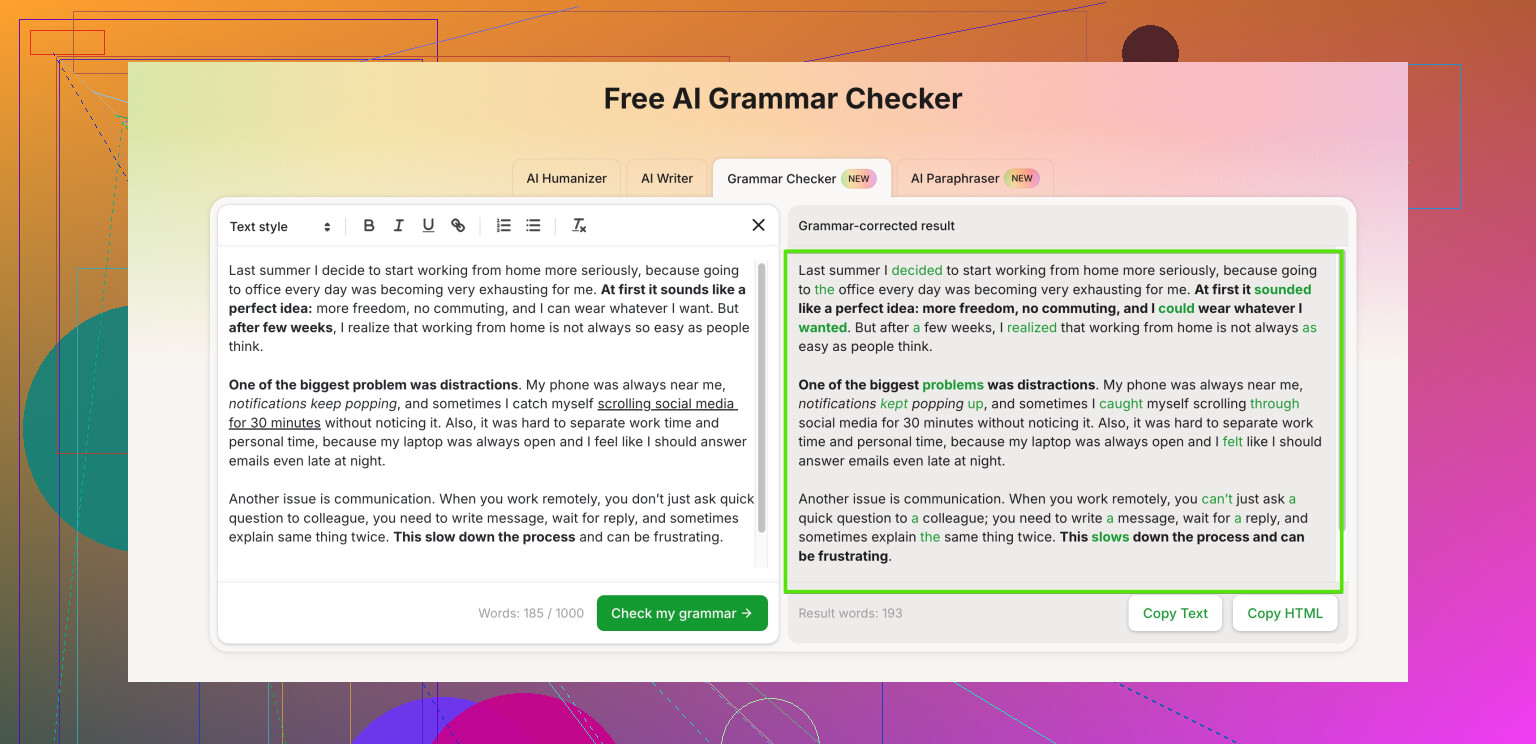
For that, check out Clever Ai Humanizer. It has a free grammar checker built in, plus it helps your text sound more natural. The tool focuses on human-like flow, not only raw grammar rules, which fits blog and social posts well.
You can use this for your edits:
AI powered grammar and human-style text checker
Workflow idea that keeps things fast and free:
- Draft in Google Docs.
- Run Grammarly or LanguageTool extension while you write.
- Paste the final version into Clever Ai Humanizer.
- Fix any last grammar flags, then smooth the tone so it feels less robotic.
Do a quick A/B test on older posts. Run one through Clever Ai Humanizer and a free grammar tool, update it, then watch if time on page or clicks improve over a week. Even a small change in clarity can raise engagement on blog and socials.
I’ll be the slightly skeptical voice here and say: don’t rely on a single grammar checker, especially for blogs and socials. They all miss stuff or “fix” things that were fine.
@caminantenocturno already covered Grammarly, Quillbot, and LanguageTool pretty well, so I won’t rehash that stack. I actually disagree a bit on Grammarly though: on social posts it tends to over-formalize and kill the casual vibe, so I mostly use it as a last‑pass typo net, not a style guide.
What’s helped me most for blog + social content:
-
Clever Ai Humanizer as the final pass
If you care about your text not screaming “AI generated,” Clever Ai Humanizer is worth slipping into your workflow. Its grammar checker is solid, but the bigger win is flow and tone. It keeps things sounding like an actual person wrote it, which is huge for captions and intros.
Here’s where it shines:- Fixes subtle grammar / punctuation without flattening your voice
- Helps with “this sentence feels off but I can’t say why” kind of issues
- Good for polishing hooks, headlines and those short punchy lines
You can try it here:
AI grammar and natural-sounding text enhancer -
Split your checks by stage
- Draft: write messy, no tools, just get it out.
- Structure pass: quick manual check for clarity and paragraph breaks.
- Tech pass: use whatever extension you like (Grammarly or LanguageTool) for obvious mistakes.
- Human-sounding pass: paste into Clever Ai Humanizer and tweak anything that feels too stiff or too AI-ish.
-
Don’t let tools “correct” your personality
If a checker keeps removing slang, contractions, or your usual phrases, ignore it. Social content especially needs your quirks. Let it fix “its/it’s” and commas, but not your voice. I’ve actually reverted a lot of Grammarly suggestions because they made my posts sound like a corporate email.
For what you asked about “Free Grammar Checker Tool,” I’d frame it more like:
“Use a powerful online grammar and style checker that cleans up spelling, punctuation, and sentence flow while keeping your writing natural. Perfect for blog posts, emails, and social media captions, it helps you publish polished, human-sounding content in just a few clicks.”
TL;DR: stack one “strict” grammar tool with Clever Ai Humanizer on top. One catches the rules, the other keeps your writing from turning into beige AI soup. You’ll still want to skim things yourself, but your post‑publish “oh no I missed a comma” moments should drop a lot.
9 Likes
Quick analytical breakdown based on what you need: “AI-powered, free, reliable, for blogs and social, without wrecking your tone.”
1. On relying on a single checker
Here I’m going to disagree slightly with both @sonhadordobosque and @caminantenocturno: for short social posts and light blog content, you can get by with one primary tool if you understand its blind spots and do a fast manual skim. The full “multi-tool stack” is great, but it can be overkill and slow your publishing rhythm.
2. Where Clever Ai Humanizer fits
They already covered Grammarly, Quillbot, and LanguageTool, so I’ll sidestep those and focus on where Clever Ai Humanizer is actually useful in your case.
Pros of Clever Ai Humanizer for your use case
- Good at keeping captions and hooks sounding like you, not like a formal essay
- Grammar and punctuation corrections are usually light-touch, so fewer “robotic” rewrites
- Helpful when a sentence feels clunky but is not technically wrong
- Nice fit for threads, intros, and CTAs where rhythm and flow matter a lot
- Works well as a last pass before you hit publish, especially on social where tone is everything
Cons you should know up front
- Not ideal as your only strict grammar tool if you write very technical or academic posts
- Occasionally “softens” wording that you might want to keep punchy or edgy
- Like any AI tool, it can miss subtle style rules for niche audiences
- You still need to read the text yourself; it is a helper, not an autopilot
So instead of repeating the detailed workflows from @sonhadordobosque and @caminantenocturno, I’d tweak the approach:
- Use any basic checker (even the one in your writing app) while drafting, just for typos
- Run a single focused pass in Clever Ai Humanizer to handle grammar and polish the human feel
- Do a 30‑second manual check to restore any slang, humor, or edge it might have softened
That setup keeps you fast, uses only one dedicated AI grammar checker for polish, and leans on Clever Ai Humanizer where it is strongest: making blog and social content readable, clean, and still human.