My drive suddenly shows as a RAW partition after a restart, and now Windows won’t let me open it. It has important photos and work files that I really need to recover, but I’m trying to avoid expensive software if possible. Is there a free data recovery method or tool that actually works for a RAW partition without making things worse?
I’ve had this happen, and yeah, you can pull files off a RAW partition without formatting it first. I did it twice on old external drives. In both cases, formatting was the one thing I avoided until the end. If Windows is pushing you to format right away, ignore it for now.
A RAW partition usually means the file system got mangled badly enough that Windows stops recognizing it. The data is often still there. The drive lost its directory structure, or part of it, so File Explorer acts like the disk is empty or broken. Annoying, but not always fatal.
If it were my drive, I’d keep the order simple:
- Do nothing to the RAW partition.
- Copy out anything important first.
- See if repair makes sense after recovery.
- Format only when your files are already safe somewhere else.
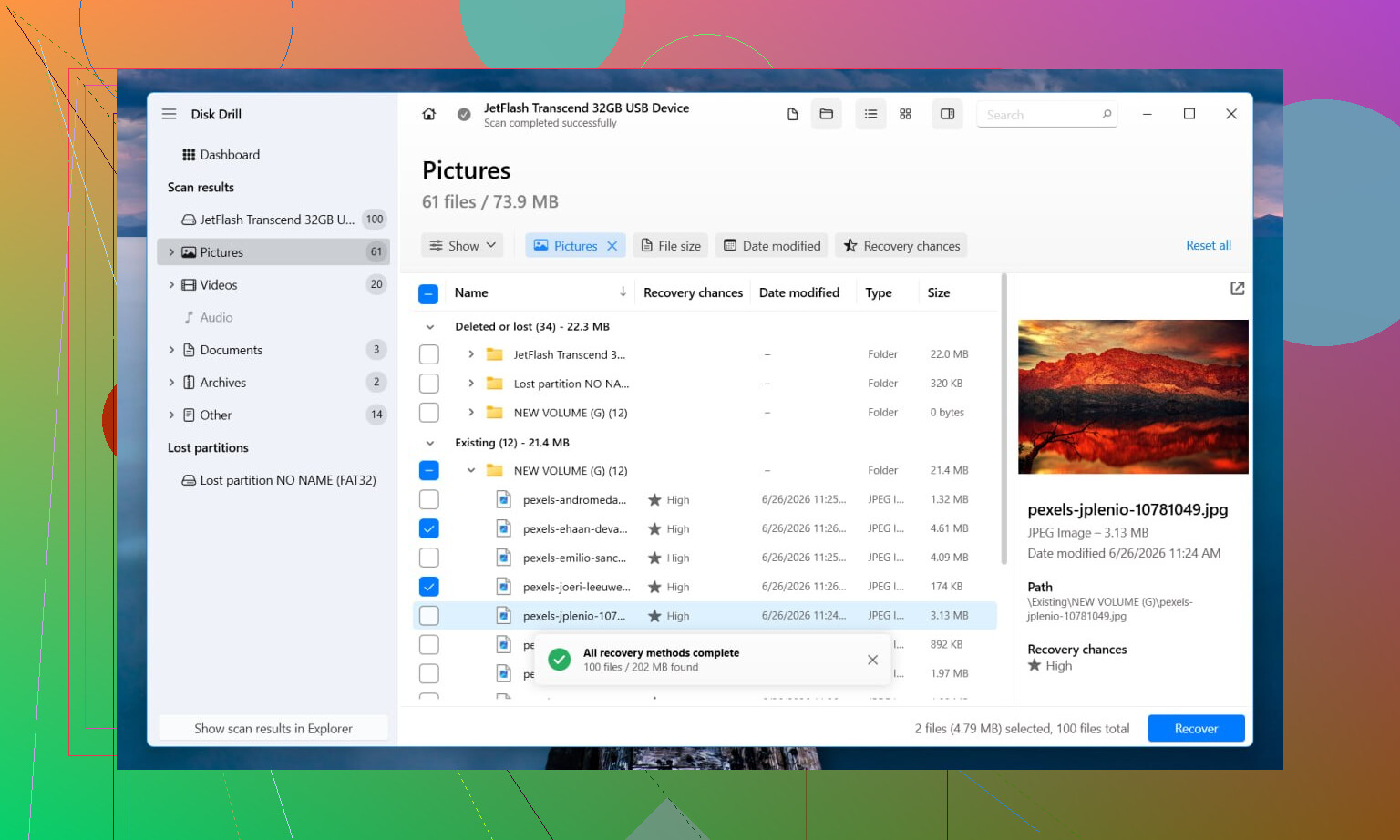
For recovery, I’d start with Disk Drill. I used it because it handles two different situations decently well. If some file system info is still readable, it tends to recover files with names and folders intact. If the file system is cooked, it switches over to file signature scanning and looks for known file types straight from the disk surface. That’s slower and messier, but it beats staring at a RAW label in Windows and getting nowhere.
The steps are plain enough:
- Install Disk Drill on a different drive. Don’t put it on the damaged one.
- Pick the RAW partition or the whole disk.
- Hit Search for Lost Data. If it’s an external device and it asks for a mode, use Universal Scan. I’d save Advanced Camera Recovery for SD cards or drone media.
- Wait for the scan to finish. Don’t stop early unless you have to.
- Preview files before recovering them. I learned this the hard way. A filename showing up means nothing if the file won’t open.
- Recover everything to another disk.
If you want a no-cost route, TestDisk and PhotoRec are the usual pair. TestDisk sometimes repairs partition or file system damage well enough to make the volume readable again. PhotoRec skips the broken file system and carves files out by type. It works, though it’s rough around the edges. You usually lose original filenames and folder layout, so after recovery you end up with a giant pile of files named by sequence. Sorting that mess takes time. Ask me how I know, lol.
Once the important stuff is copied off, then I’d look at repair. If TestDisk rebuilds the partition cleanly, great, done. If it doesn’t, I’d stop fighting it, make a fresh partition in Disk Management, do a quick format, and move the recovered files back.
One thing I would not shrug off, weird drive behavior. Clicking noises, sudden disconnects, the drive dropping out mid-scan, scans freezing in the same spot. I’ve seen all of those turn into hardware failure. At that point, repeated retries are risky. If the files matter, stop there and hand it to a recovery shop before the drive gets worse.
12 Likes
Yes, free recovery from a RAW partition is possible. It depends on what failed.
I agree with @mikeappsreviewer on one big point. Do not format first. I disagree a bit on trying repairs too early, though. If the files matter, I would not attempt any write-based fix before making a full byte-for-byte image of the drive. RAW sometimes means file system damage. It also sometimes means the drive is failing and feeding bad data.
My order would be:
- Check SMART health with CrystalDiskInfo.
- If health looks bad, clone the drive first with HDD Raw Copy Tool or ddrescue.
- Run recovery on the clone or image, not the original.
- Save recovered files to a different disk.
- Only then think about repair or format.
For free tools, DMDE has a decent free tier for browsing and pulling files from damaged partitions. R-Studio demo is useful for previewing, even if it does not save everything free. Windows File Recovery is free from Microsoft, but for RAW volumes it is hit or miss and not beginner friendly.
Disk Drill is still one of the easier options if you want less hassle and better preview support. It tends to be faster to sort through than fully free tools, especailly for photos and office files.
Also, disable AutoPlay and stop reopening the drive in Explorer. Every extra poke is a risk if the disk is unstable.
If you want a plain guide, this is a decent place to start for top RAW drive data recovery software and methods:
best RAW drive recovery software for getting files back fast
If the drive clicks, drops offline, or gets stuck at 0 bytes, stop. Free tools wont fix dying hardware.
Yes, possibly free, but I’d split “RAW” into 2 very diff cases:
- file system damage
- hardware starting to die
I agree with @mikeappsreviewer about not formatting first. I also agree with @ombrasilente that checking drive health matters, but I don’t always think people need to jump straight into a full clone if the disk is behaving normally and the data isn’t irreplaceable. For a stable USB drive, sometimes a read-only scan is the faster sanity check.
What I’d do first:
- Open Disk Management and confirm the correct disk size shows up.
- Check SMART if possible.
- Run a non-destructive scan tool, not CHKDSK. CHKDSK on RAW can make a mess, tbh.
If you want truly free, DMDE and PhotoRec are worth trying before paying for anything. DMDE is nicer if the old folder structure is partly there. PhotoRec is great for photos/docs, but it recovers by file type and the sorting afterwrad is pain.
If you want the easiest path, Disk Drill is usually more beginner-friendly for RAW partition recovery, especially for previewing photos and office files before you save them elsewhere. That matters because recovered junk files are super common.
One more thing people skip: try a different USB cable, port, or enclosure if it’s an external drive. Sounds dumb, but I’ve seen bad SATA-to-USB boards make a healthy disk appear RAW.
Also worth reading: practical RAW drive recovery tips from real users
If the drive clicks, vanishes, or scan speed tanks hard, stop messing with it. Free tools won’t magic that back.