I started using Decopy AI Humanizer to make AI-written content sound more natural, but the results have been inconsistent. Some text reads well, while other parts still feel robotic or get flagged by detection tools. I need help figuring out if I’m using it wrong or if this is just how the tool performs. Looking for real user feedback, pros and cons, and whether it’s worth relying on for SEO content.
Decopy AI Humanizer
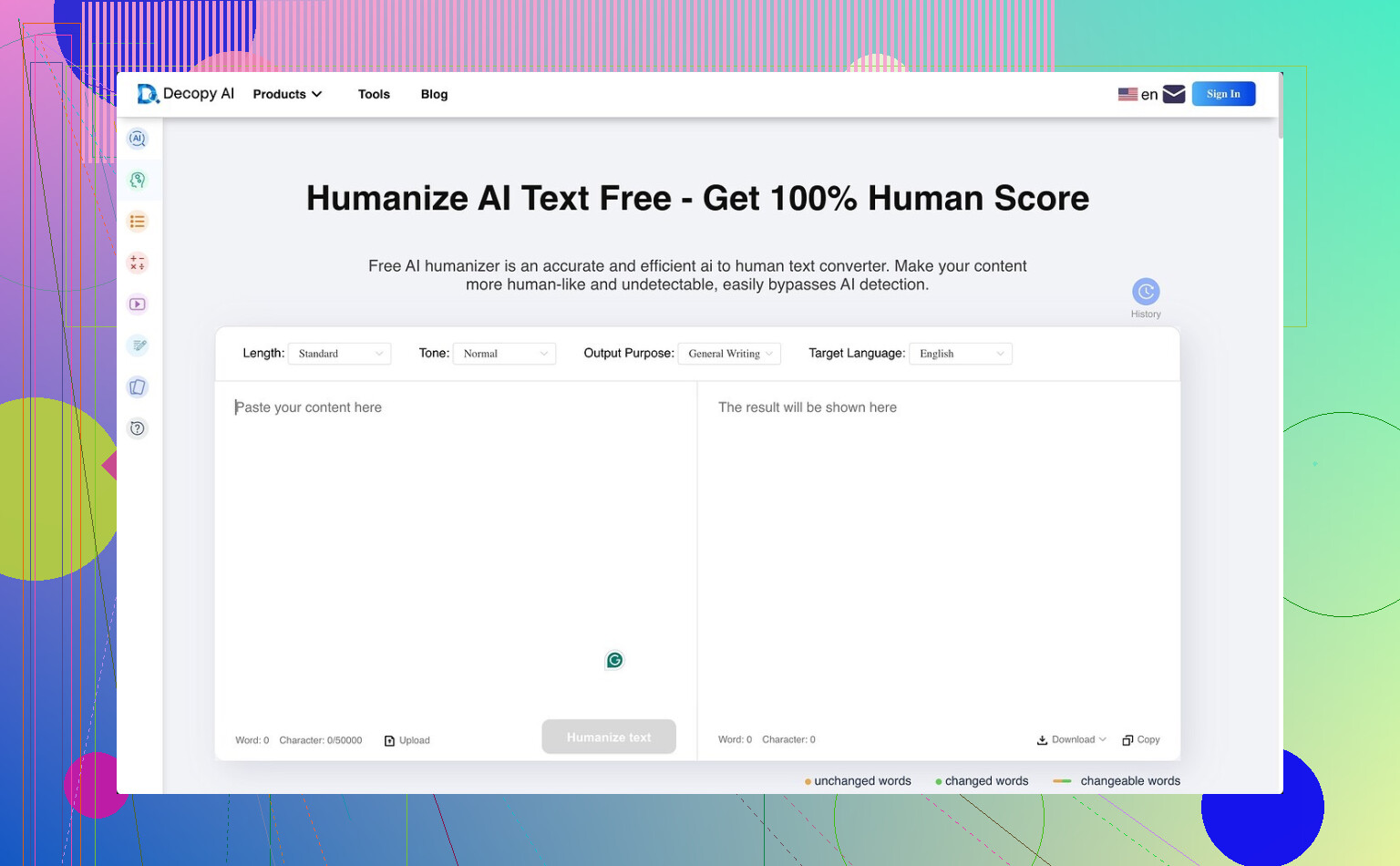
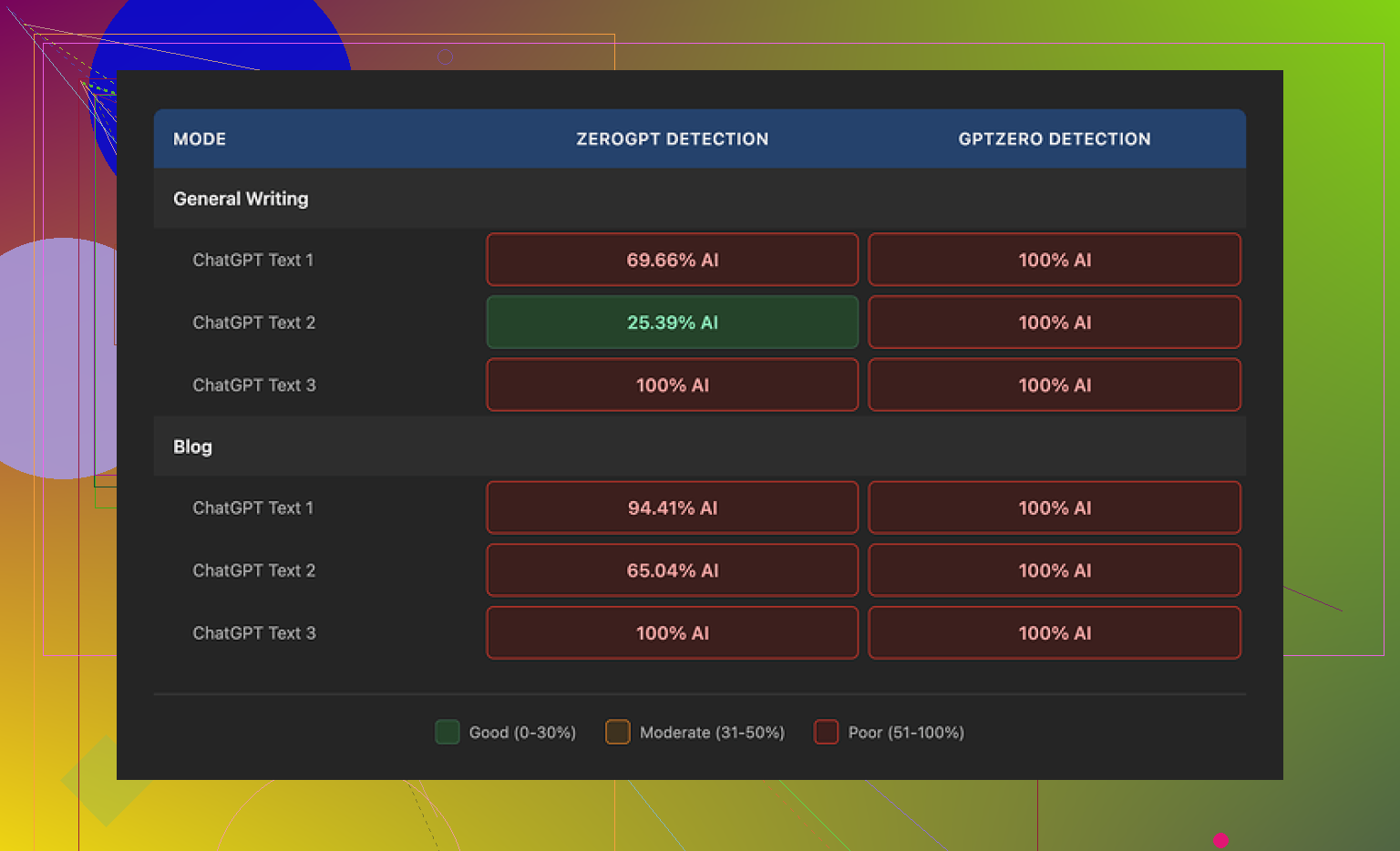
I tried Decopy AI Humanizer for a bit, and on paper it looks kind of stacked for a free tool. You get 500 free runs, up to 50,000 characters in one request, eight tone options, and nine purpose presets. There is also a sentence rewrite option, which I liked more than I expected. If one line comes out weird, you can rerun only that part instead of the whole block. Nice touch. The bad part is the one thing most people came for. It did not hide AI patterns well in my tests. GPTZero flagged every output as 100% AI in both General Writing and Blog modes. ZeroGPT moved around more, roughly 25% to 100%, depending on the sample I fed it.
Where Decopy did better than some other tools I tested was grammar. It did not trash sentence structure or slip in awkward mistakes all over the place. For raw readability, I ended up around 7/10 for Blog mode and 7.5/10 for General Writing. Still, there was a pattern I kept noticing. It flattens the text too much. Blog mode felt like it was written for a small kid. General Writing was a little less stripped down, but I still got phrases like 'digital stuff' and 'totally changing tech,' which made the output feel off. One upside, it usually kept the length close to the source, so it was not chopping everything down for no reason. On privacy, the policy gives a three month retention window and says it follows GDPR and CCPA. I did not see a clear explanation for how submitted text is handled after you paste it in, which bugged me a bit.
After running the same kind of test set side by side, Clever AI Humanizer gave me stronger humanization in practice, and it was free too.
19 Likes
I had a similar run with Decopy. The output is uneven. One paragraph sounds clean, then the next one slips into flat wording and easy AI rhythm. So I partly agree with @mikeappsreviewer on the detector issue, but I think the bigger problem is voice control, not the score from GPTZero or ZeroGPT.
What helped me was changing how I used it. I stopped pasting full articles. Better results came from 2 to 4 paragraphs at a time. I also used the sentence rewrite on the worst lines only. If you rerun everything, Decopy tends to smooth the text too much. You lose your original tone.
A few practical fixes:
-
Feed it rougher source text.
If your draft already sounds polished and uniform, Decopy often makes it more generic. I got better output when my input had contractions, mixed sentence length, and a few opinionated lines. -
Edit after humanizing.
I would not post raw Decopy output. Add one personal example, swap 3 to 5 predictable phrases, and break one sentence pattern in each paragraph. This lowered flags more than another rerun did. -
Avoid chasing detector scores.
Those tools are noisy. If your text reads stiff, fix readability first. If it reads normal, a detector score alone is not much use. -
Watch factual wording.
On some tests, Decopy kept meaning, but softened precise language. Annoying if your post needs accuracy.
For free use, it is decent. For consistency, nah. It feels more like a cleanup tool than a full humanizer tbh.
Yeah, Decopy feels like one of those tools that’s almost useful until you try to rely on it twice in a row.
I mostly agree with @mikeappsreviewer on the detector inconsistency, but I disagree a bit with @voyageurdubois on not caring much about scores. In real use, those flags still matter if you’re submitting work somewhere touchy, so I wouldn’t totally ignore them. Problem is, Decopy doesn’t give stable enough output to trust either the readability side or the detection side.
What stood out to me was this: it tends to keep the same sentence logic even when it swaps the wording. So the text looks “changed” but still thinks like AI, if that makes sense. That’s why some passages still feel robotic even when the vocab is simpler.
My take: use it as a variation generator, not a final humanizer. Pull phrases, steal the occasional rewrite, then manually rebuild transitions and openings yourself. That’s where the fake-sounding rhythm usually hides tbh.
Also, the tone presets felt kinda cosmetic to me. Different flavor, same texture. Not useless, just not super deep.
So yeah, decent for free messing around, not something I’d trust for polished final copy. A bit hit or miss, and the misses are kinda obvious.
I land somewhere between @voyageurdubois, @yozora, and @mikeappsreviewer on this. My bigger gripe with Decopy AI Humanizer is not just detection or tone, it is predictability. After a few tests, you start noticing its fallback habits. It loves safe transitions, balanced sentence lengths, and tidy phrasing. That is exactly what makes some outputs feel machine-smoothed even when they are technically readable.
One small disagreement with @yozora though: I do not think it is great even as a variation generator unless your source draft already has some personality. If the base text is bland, Decopy often just reshuffles blandness.
What I found more useful was judging it by paragraph function:
- intros usually came out weaker
- body paragraphs were acceptable
- conclusions often sounded generic
So I would keep my own intro and ending, then test Decopy only on middle sections where natural voice matters a bit less.
Pros for Decopy AI Humanizer:
- free usage is generous
- interface is simple
- sentence-level rewriting is handy
- usually keeps grammar clean
Cons:
- inconsistent voice
- humanization can feel cosmetic
- detector performance is unreliable
- often over-simplifies wording
- not great at preserving sharp style
If you need something readable fast, Decopy AI Humanizer is fine for drafts. If you need convincing final copy, it still needs heavy human editing. That is where I mostly agree with @voyageurdubois and @mikeappsreviewer.