My iPhone has been running slow lately with app lag, delayed typing, and occasional freezes, and I noticed my storage is almost full. I’m trying to figure out if low storage can actually cause iPhone performance problems or if something else is going on. I need help knowing whether clearing space might fix the lag or if I should troubleshoot a different issue.
iPhone suddenly feels slow? What helped me before I even thought about a reset
I had this on my phone and it was annoying in a dumb, hard-to-describe way. I’d type, then wait for the letters to catch up. Scrolling looked uneven. Apps I opened every day started taking three or four seconds instead of popping up right away. It felt heavy.
The good part is this stuff usually traces back to a few plain causes. Most of them are fixable. I didn’t need a factory reset.
First thing I checked, was it right after an iOS update?
If your phone started dragging right after a major iOS update, I wouldn’t panic on day one.
What I saw after one update was the phone running warm, battery dropping faster, Photos acting weird, and general lag all over the place. From what I could tell, iOS was busy in the background doing cleanup and rebuild work. Photo indexing, app database rebuilding, system optimization, all of it at once.
What worked for me was boring. I left the phone plugged in overnight, on Wi-Fi, for a few nights. Give it around three days. Mine settled down without me touching anything.
If it’s still slow after weeks, and a restart did nothing, then yeah, I’d stop blaming the update.
Storage was the real issue for me
This gets dismissed a lot, but on iPhone low free space causes a pile of weird slowdown.
The trouble zone seems to be when you’re down to roughly 10 to 20 percent free storage, or less. Once I got under that, iOS started acting cramped. Apps took longer to open. The keyboard lagged. UI animations got choppy. It wasn’t random.
Deleting a couple apps didn’t do much. My space wasn’t going to apps anyway. It was going to:
- 4K videos
- long screen recordings
- message attachments
- screenshots I forgot existed
- hundreds, or tbh thousands, of near-duplicate photos
That was the mess.
What I used to clean it up
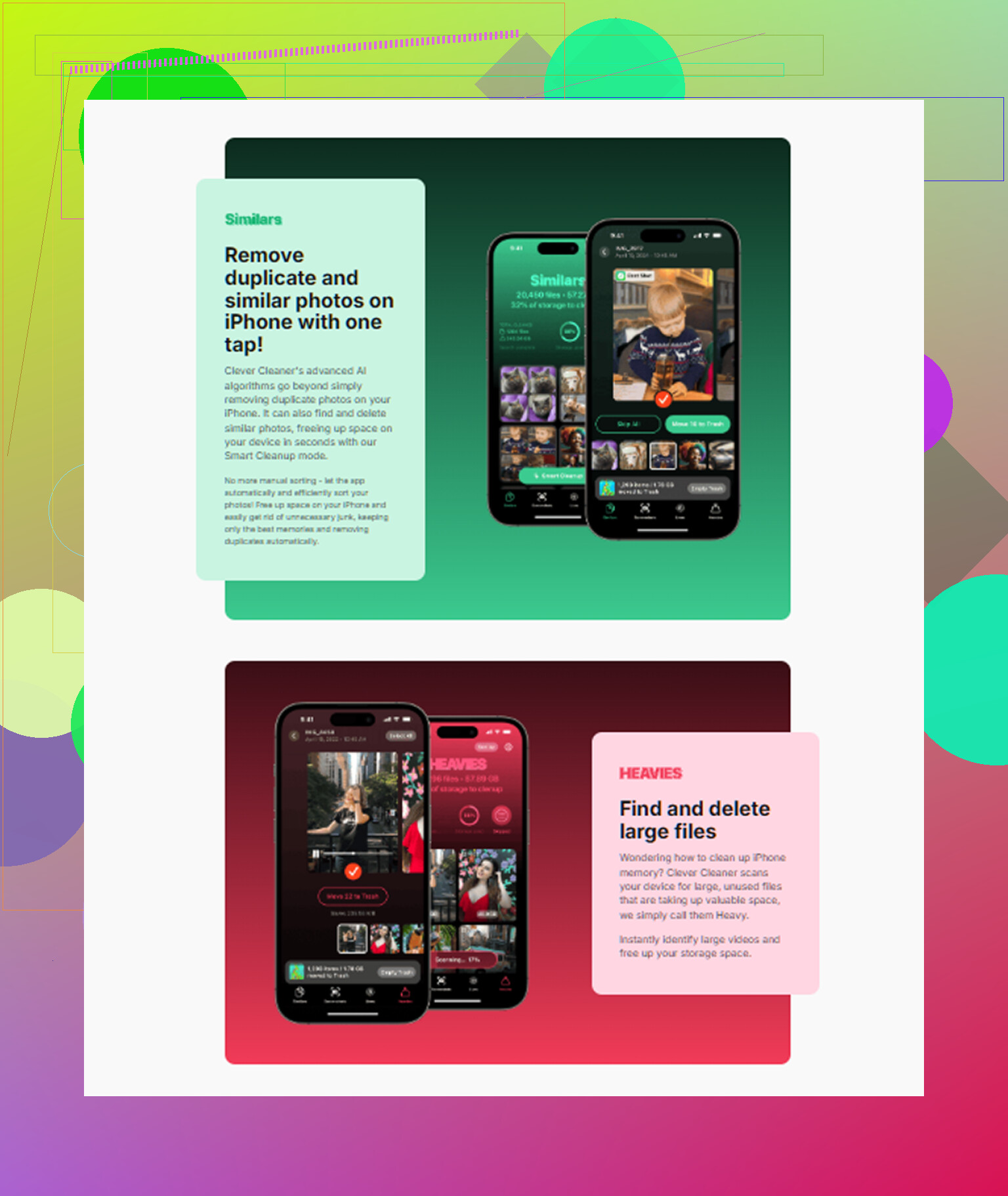
I tried sorting my library by hand and gave up fast. Too many photos. So I used Clever Cleaner, mostly because I was tired of cleaner apps pulling the same routine with ads and locked features.
This one was free when I used it. No ads in my face. No subscription wall. I expected nonsense and got something useful instead.
What I did inside the app
1. I started with Heavies
This was the quickest win.
It lists media from biggest file down to smallest, with the size shown on each item. My top offenders were big 4K clips and old screen recordings. Deleting two or three of those got back multiple gigabytes fast.
If your storage graph looks packed and you want the biggest impact first, start there.
2. Then I checked Similars
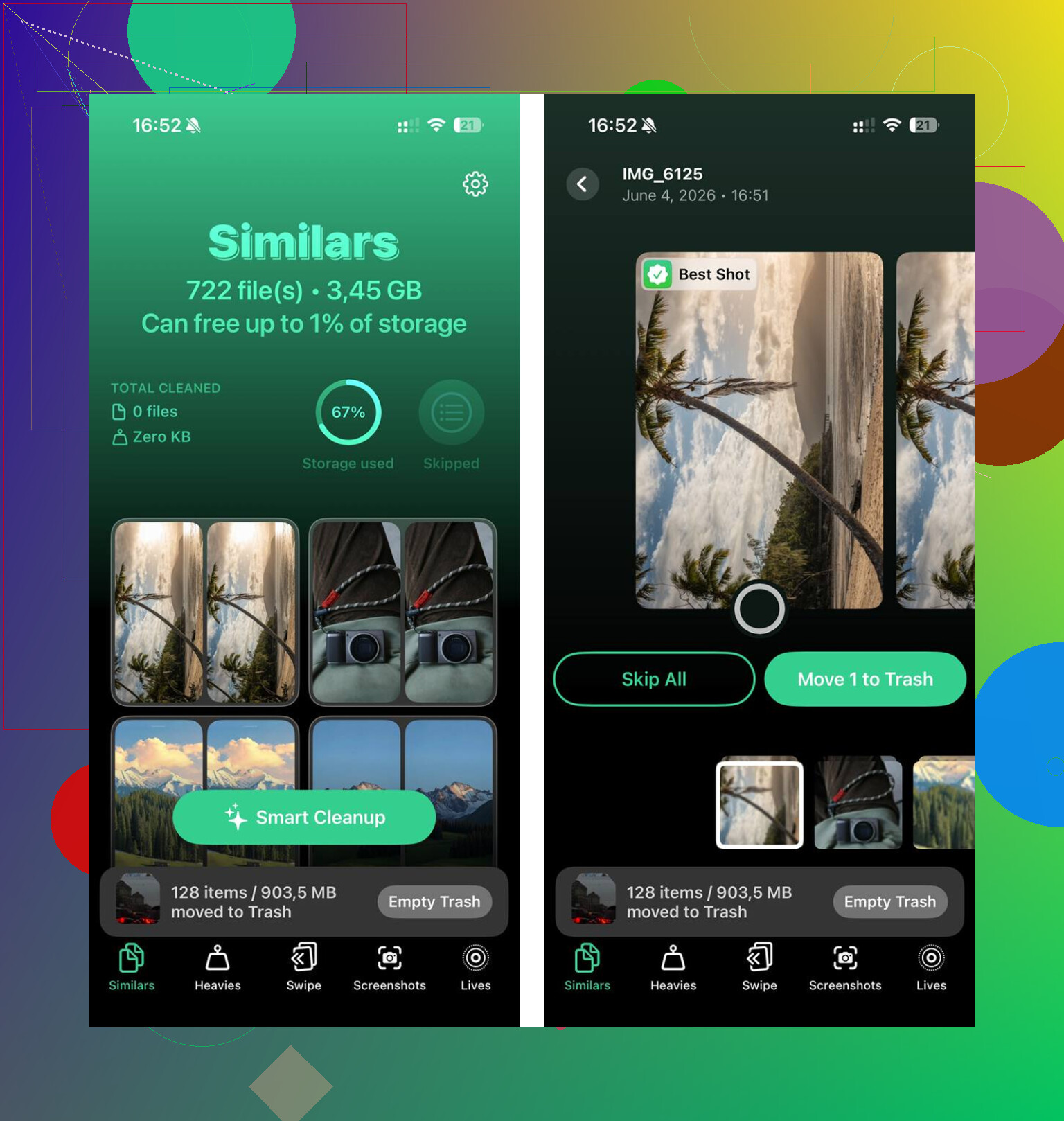
This part helped more than I expected. It grouped photos that were close enough to be the same thing, not only exact duplicates.
So, stuff like:
- ten shots of the same sunset
- burst photos where I needed one frame
- three angles of the same receipt
- repeated pet pics where only one is sharp
It picked a best shot for each group. I still reviewed them myself, but it cut the sorting time way down.
3. I cleared screenshots next
This was embarrassing. I had piles of screenshots sitting there doing nothing.
What made it easier was seeing the file size on each thumbnail before deleting. Once you notice screenshots are eating gigabytes, the decision gets easy.
4. I liked that it stayed on-device
This mattered to me more than the cleanup itself. My photo library has private stuff in it. According to the app flow, it runs on the phone and doesn’t upload your library to outside servers.
For me, that was a big reason I stuck with it.
The step I almost missed
After cleanup, I had to empty Recently Deleted in Photos.
A lot of people skip this, I almost did too. Deleted files sit there for 30 days and still count against your storage until you remove them for good.
Path is:
Photos > Albums > Recently Deleted > Delete All
Do this every time you do a big cleanup.
After I cleared around 15GB and emptied Recently Deleted, my lag was gone. Typing felt normal again. Apps opened like they should. Scrolling stopped feeling sticky.
If storage isn’t the problem
I went through these next because they’re easy to check and they do matter.
Battery Health
Go to:
Settings > Battery
If your battery health is under 80 percent maximum capacity, iPhone performance management starts slowing things down to avoid random shutdowns. If that’s your case, software tweaks won’t fix the core issue. A battery replacement is the move.
Low Power Mode
If you leave Low Power Mode on all the time, turn it off and test the phone for a bit.
It reduces performance to save battery. That tradeoff shows up as lag during regular use. I’ve seen people forget they turned it on days ago.
Background App Refresh
Go to:
Settings > General > Background App Refresh
I turned it off for apps that didn’t need it. When too many apps keep refreshing in the background, the phone feels busier than it should. On an older device, the effect is more obvious.
Keyboard lag only
If the main problem is typing delay, try this:
Settings > General > Transfer or Reset iPhone > Reset > Reset Keyboard Dictionary
I didn’t expect much from this one, but bloated keyboard history and autocorrect data seem to cause lag for some people. Worth trying if the rest of the phone feels fine.
One thing I’d do before all of this
Update your apps.
Open the App Store and hit Update All.
I’ve had post-iOS-update slowdown caused by one or two stale apps that weren’t ready for the new version yet. It looked like an iPhone problem. It ended up being app compatibility. Once those apps updated, the phone felt normal again.
What I’d do in order
If your iPhone feels slow, this is the order I’d use:
- Wait a few days if the issue started right after an iOS update.
- Update all apps.
- Check free storage.
- Remove large videos, screenshots, and duplicate-ish photos.
- Empty Recently Deleted.
- Check Battery Health.
- Turn off Low Power Mode and trim Background App Refresh.
- Reset Keyboard Dictionary if typing is the main issue.
That order saved me time. And, no joke, saved me from doing a full reset for no reason.
42 Likes
Yes, low storage on iPhone is a real performance issue, not a myth.
iOS needs free space for temp files, app caches, swap, updates, and photo processing. When your phone gets close to full, stuff starts dragging. Typing delay, app stalls, camera hiccups, Safari reloads, random freezes, all fit.
I agree with @mikeappsreviewer on the storage part, but I think the 10 to 20 percent rule is a bit loose. On some iPhones, problems start sooner if you shoot lots of video, use iCloud Photos, or keep big apps like TikTok, Instagram, and games. I try to keep at least 15GB free, not a percentage.
A few things I’d check first:
- Settings > General > iPhone Storage. See what is bloating.
- Look for “System Data” spikes. If that is huge, a restart often trims some of it.
- Offload unused apps. Better than deleting if you want your data kept.
- Clear Safari history and website data.
- Delete old Messages attachments. Those eat space fast.
- Make sure the phone is not also low on battery health and storage at the same time. Tha combo feels awful.
One place people miss is Messages and social apps. Photos gets blamed, but giant video threads and app caches are often the hidden pigs.
If your photo library is the main problem, Clever Cleaner is worth a look for finding large files and duplicate shots faster. Then empty Recently Deleted or you freed nothing. Also, this iPhone storage cleanup step by step guide covers the process well.
Short version, yes, near-full storage slows iPhones down. Free up space first. If the lag stays after you recover a decent chunk, then look at battery wear or iOS bugs.
Yep, it’s real. “Low storage causing lag” is not some fake tech superstition.
When iPhones get close to full, iOS has less room for caches, temp files, updates, photo processing, and general background housekeeping. That can show up exactly like you described: keyboard delay, app stutter, random freezes, Safari tabs reloading, camera weirdness. So on that part, @mikeappsreviewer and @nachtschatten are basically right.
Where I slightly disagree is this idea that storage is always the main villain. Sometimes it’s just the trigger. If your phone is older, has weak battery health, and is nearly full, those problems stack. One issue alone might be tolerable. Together, the phone feels cooked.
A few things I’d look at that weren’t really covered much:
- Check if the lag happens more when the phone is hot. Heat throttling is real.
- Look at Accessibility settings. Reduce Motion can make an older iPhone feel snappier even if it doesn’t actually boost raw speed.
- Disable unnecessary widget stacks and heavy lock screen widgets. Those can be sneaky resource hogs.
- If one app is constantly freezing, delete and reinstall just that app. Sometimes the app data is corrupted.
- If mail is laggy, remove and re-add the email account. Mail databases get janky sometimes.
Also, if storage is almost full, don’t just aim to free 2 or 3 GB and call it fixed. That’s usualy not enough. I’d want a real cushion. Like 10GB minimum, more if you shoot lots of video.
And yeah, if your library is the problem, Clever Cleaner is one of the easier ways to clear duplicate photos, screenshots, and large media without doing it all manually. It also shows up in guides covering the best free iPhone cleaning apps for freeing storage fast, which is fair imo.
Short version: myth? No. Totally real. Near-full storage absolutely can make an iPhone lag, but if clearing space helps only a little, battery health and heat are probly the next things to check.
Not a myth, but I’d push back a little on the idea that “full storage = automatic slow iPhone” every time. Usually it’s more like low storage exposes other weak spots. If your iPhone is already juggling an aging battery, thermal throttling, lots of background processes, or a buggy app, being nearly full makes all of that feel worse.
Where I agree with @nachtschatten, @kakeru, and @mikeappsreviewer is the symptom list. Keyboard lag, app pauses, random freezes, Safari tab reloads, camera delays, those are very believable when free space gets tight.
Where I slightly disagree is the common advice to chase a percentage target only. I think behavior matters more than a neat rule. Someone with 8GB free who mostly texts and streams might be fine. Someone with 20GB free but constantly shooting ProRAW, 4K60 video, editing clips, and syncing a giant photo library may still feel slowdown.
A couple angles that weren’t really emphasized:
- iOS can slow down when spotlight indexing goes wild. If search feels bad too, that’s a clue.
- Notification-heavy apps can make the phone feel laggier than storage alone would suggest.
- A stuck cloud sync can mimic “low storage lag” because the device keeps chewing resources.
So yes, free space matters, but I’d test it like this: clear a meaningful chunk, then reboot once, then use the phone for a day. If performance noticeably improves, storage was a real factor. If not, look harder at battery health, heat, and one bad app.
If your photo library is the obvious storage hog, Clever Cleaner is a reasonable shortcut.
Pros:
- fast for finding big videos and duplicate-ish photos
- easier than manual cleanup
- useful if screenshots are your hidden mess
Cons:
- cleaner apps are never perfect at deciding what should go
- you still need to review before deleting
- if storage pressure is from system data or app databases, it won’t magically solve that part
So yeah, low storage causing lag is real. I just wouldn’t treat it as the only suspect. Free space is step one, not the whole diagnosis.
A simpler option is iCloud Photos optimization. Go to Settings > your name > iCloud > Photos. Turn on Sync this iPhone, then select Optimize iPhone Storage.
iOS keeps smaller photo copies on your phone and stores originals in iCloud. A large library might free 10GB or more without sorting thousands of files. Leave your iPhone charging on Wi-Fi overnight. Check storage the next day, becuase optimization takes time. You’ll need enough iCloud space, but it’s alot easier than reviewing every photo.
Restart the phone before you delete a single photo. Half the ‘low storage lag’ I’ve seen is bloated System Data that a reboot trims on its own, and it tells you whether space is really the problem. If it’s still crawling after that, then chase the storage cleanup.