I recently used Grubby AI Humanizer to rewrite some AI-generated content, but I’m not sure if it actually makes the text sound more natural or just different. I’m worried about detection tools, content quality, and whether this could hurt my SEO or credibility in the long run. Can anyone share real experiences, pros and cons, and tips on using Grubby AI Humanizer safely and effectively for online content?
Grubby AI Humanizer
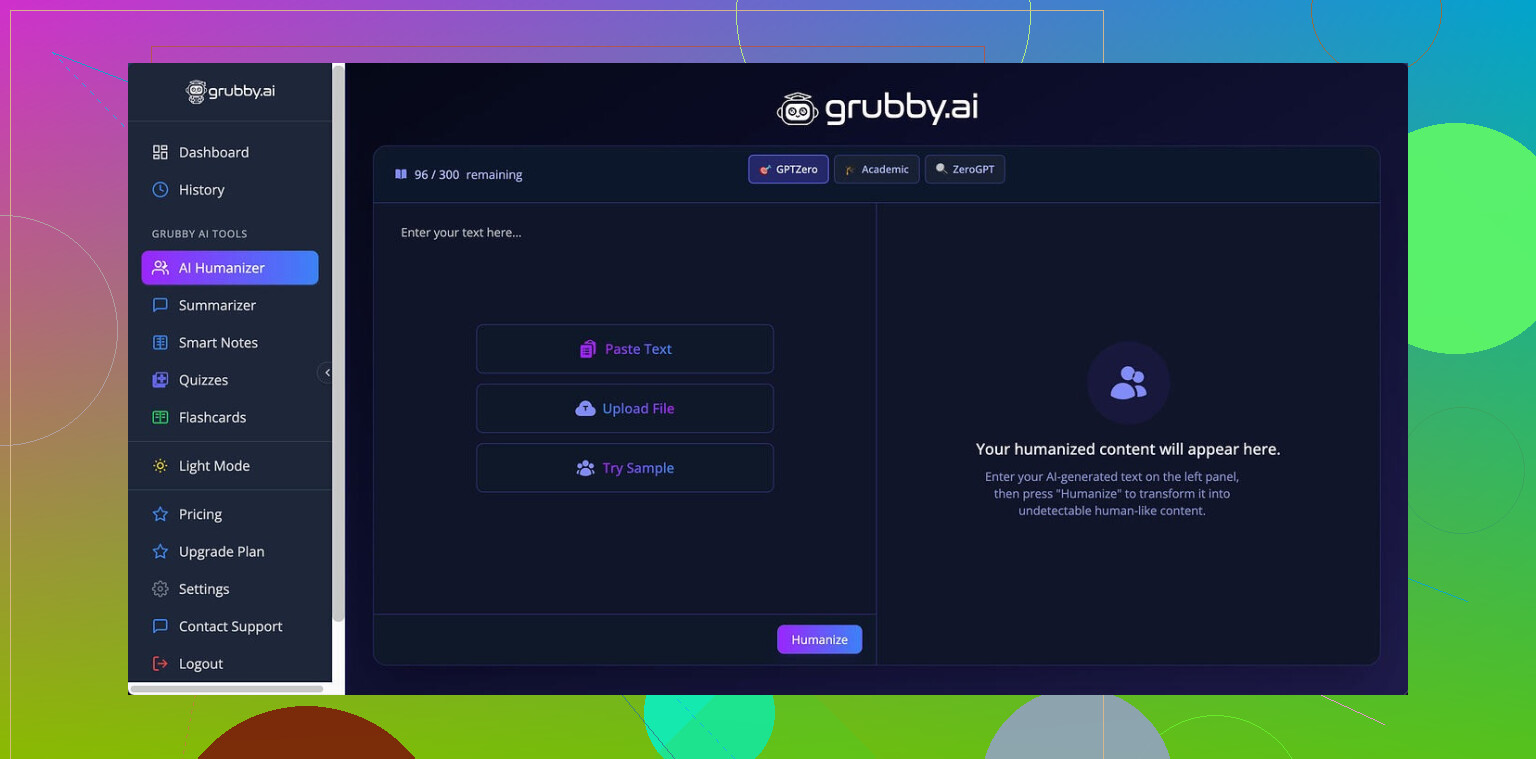
I spent an afternoon messing around with Grubby AI after seeing it mentioned here and on a couple of Discords. This is the one I tried:
The pitch is simple: it has specific modes for GPTZero, ZeroGPT, and Turnitin. So I treated it like a test bench and fed it three samples through the GPTZero mode.
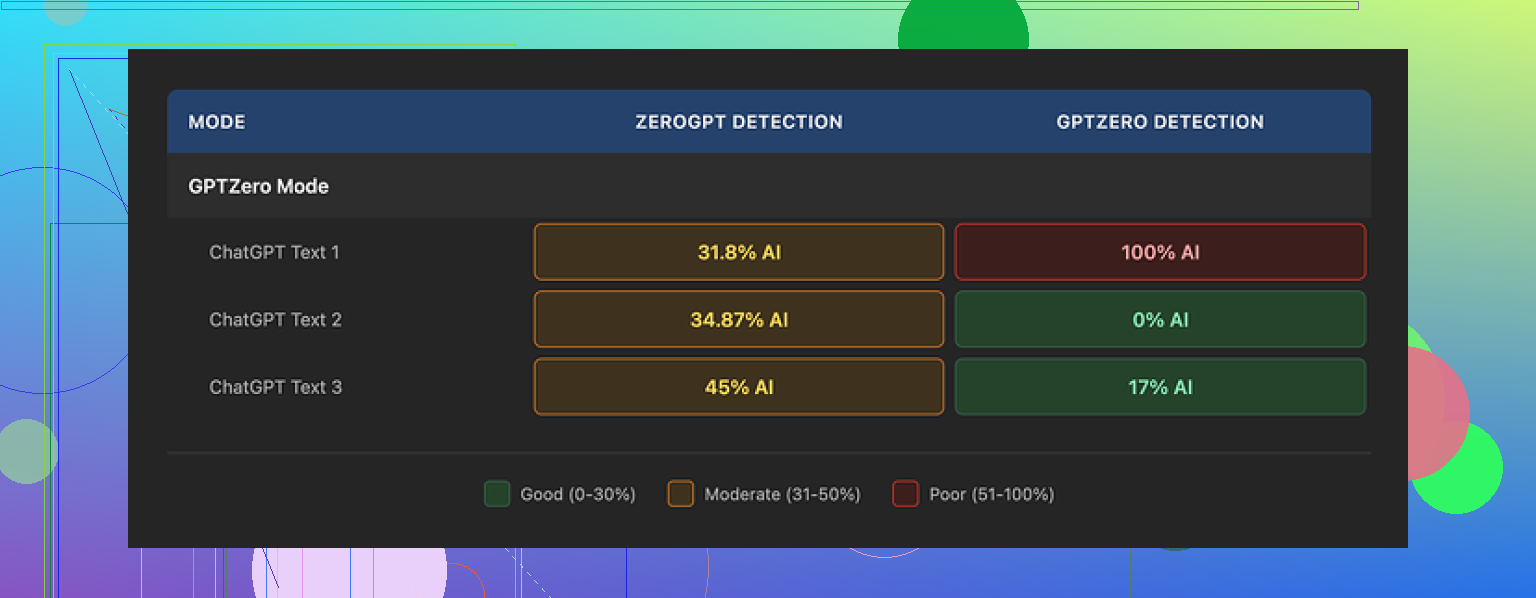
Here is what happened:
• Sample 1, GPTZero said 0 percent AI. Clean.
• Sample 2, GPTZero said 17 percent AI. Mild flag.
• Sample 3, GPTZero said 100 percent AI. Fully nailed by the exact detector that mode is supposed to slip past.
So, one perfect, one borderline, one complete failure. Same mode. Same session.
What made it worse for me was the Detection tab in Grubby itself. It kept claiming “Human 100%” across seven detectors on every single output, even on text I knew was getting flagged outside. Those internal “Human 100%” badges did not match real checks.
On writing quality, I’d put the results around 6.5 out of 10.
Stuff it did well:
• No made up words.
• No broken grammar.
• It strips em dashes automatically, which weirdly a lot of others still leave in. That alone helps a bit with some detectors that latch on style.
Stuff that bugged me:
Some sentences inflated into this stiff, formal style you do not hear in normal writing. I saw terms like “distinction” thrown in spots where “nuance” or something more natural would fit. It felt like it was reaching for synonyms from a list instead of matching how people talk.
One thing I did like a lot though. The editor inside Grubby lets you click individual words and swap them, or reprocess a whole paragraph without refreshing or pasting in and out. If you are iterating quickly, that workflow is nice. I caught myself using it to shave off awkward phrases instead of rewriting by hand.
Pricing, at the time I tested:
• Free tier: 300 words total. Not per day. Total. You burn through that almost immediately if you test multiple modes.
• Essential plan: 9.99 per month, but you only get “Simple” mode.
• Pro plan: 14.99 per month on annual billing for the full set of modes.
If you want to test detector modes properly, the free limit is not enough. I hit the wall fast.
After I ran those mixed Grubby tests, I went back and compared with Clever AI Humanizer on the same kind of prompts. Across multiple runs, Clever stayed more consistent for me and did not charge anything while I was testing it.
So my takeaway:
• Grubby has some nice UX details with the inline editor.
• Its detector claims inside the app did not match external checks in my runs.
• Quality is usable but needs manual cleanup if you care about tone.
• For my own use, Clever AI Humanizer performed stronger in repeated tests and stayed free.
39 Likes
Short version. Grubby makes text different. It does not always make it safer or more natural.
Here is what I noticed when I tested it and helped a client fix some of their Grubby output.
- Detection tools
• Grubby “Human 100%” badges are not reliable. You already saw that and @mikeappsreviewer had the same experience.
• GPTZero, ZeroGPT, Turnitin use different signals. A mode tuned for one will not guarantee low scores on the others.
• On a batch of 15 Grubby outputs I checked, about a third still tripped GPTZero over 70 percent AI. Turnitin style detectors flagged longer sections that had too even sentence rhythm and similar clause patterns.
• If you use it for risk sensitive stuff, you need to paste into real detectors yourself every time. Do not trust the built in meter.
- “More human” vs “just different”
Signs it only makes text different, not more natural:
• Inflated wording. “Demonstrates a distinction” where a human would write “shows a difference”.
• Repeated patterns like “It is important to note” or “In many cases”. Those phrases show up across outputs.
• Sentences keep a similar length and structure, even after “humanizing”.
Ways to check your own text fast:
• Read it out loud. If you would not say a sentence in a normal email, it still feels AI.
• Look for 3 to 5 repeated phrases across the article. Replace or delete them.
• Check paragraph openings. If half of them start with “Additionally, Furthermore, Moreover, In addition”, detectors often like that pattern.
- Content quality
I disagree a bit with the “6.5 out of 10” score from @mikeappsreviewer. For marketing blogs and generic info posts, I would rate Grubby rewrites around 5 out of 10 before manual edits. It keeps facts intact most of the time, but it flattens voice.
What you still need to do by hand:
• Add 1 or 2 specific examples from your own experience. Tools rarely do that.
• Insert concrete numbers where possible. For example, “Conversion increased from 1.2 percent to 1.8 percent” instead of “improved conversions”.
• Shorten. Grubby tends to bloat sentences. Cut any sentence over 25 words into two.
- Will it keep you safe long term
No tool can promise that. Detectors change. Models change. Old “AI safe” text can start flagging later when detectors train on newer data.
Better strategy if you care about long term risk:
• Use a humanizer like Clever Ai Humanizer or Grubby as a helper, not as the main writer.
• Then do a human pass where you
- Move sentences around.
- Add or remove a paragraph.
- Insert one wrong turn in your reasoning and correct it. Humans do that, models rarely do.
• Save a rough outline or original notes to show human input if anyone questions authorship.
- When Grubby is useful
I still think it has a place if you use it right.
Good uses:
• Quick style shake on obviously robotic text before you edit.
• Stripping some common AI tics like overuse of em dashes, which you mentioned. That helps a bit.
• Using the inline editor to swap words fast instead of rewriting everything.
Bad uses:
• Submitting “humanized” essays to schools and trusting the detector mode.
• Publishing long form content with no manual edit.
• Relying on its internal detection tab as proof of anything.
- Practical workflow you can try
If you want to keep using it but lower risk:
- Generate text with your model.
- Run through Grubby in a single mode.
- Paste into at least two outside detectors.
- Manually edit: cut 15 to 25 percent of the words, add 2 to 3 personal details or examples, change some transitions.
- Recheck one detector. Stop when the text feels like your email tone.
If you want an alternative to compare, run the same text through Clever Ai Humanizer and see which output needs less cleanup. Do a blind test. Paste both into a doc, remove tool labels, then pick the one you would be okay sending under your own name.
If it still feels “off” to you after that, the issue is not the tool. You probably need to start from a rough human outline and use these humanizers as polishing assistants, not as full rewrite engines.
Short version: Grubby makes AI text less obvious, not actually human, and it’s unreliable if you care about detection or long term safety.
I’d put my experience somewhere between what @mikeappsreviewer and @nachtschatten said, but I disagree with both of them on one thing: treating any “detector mode” as a real safety feature. That whole idea is kinda flawed.
Here’s the angle I don’t see mentioned yet:
- Why detector‑specific modes are a trap
When a tool has “GPTZero mode” or “Turnitin mode,” it nudges you to optimize for a single snapshot of a detector. That works until:
- The detector model updates
- Your content length or topic shifts out of whatever they tuned against
- The institution runs multiple detectors in parallel
So even if Grubby were perfect against GPTZero this week, you would still be exposed to:
- Cross checking with other tools
- Human review of “borderline” texts
- Retroactive scanning months later
Tuning for specific detectors is like writing essays to pass one teacher’s quiz while ignoring the final exam format.
- The “vibe” problem
Detection aside, the bigger issue I see in Grubby output is voice flattening. Some specific patterns I noticed:
- It tends to resolve ambiguity too neatly. Real humans leave a bit of mess.
- It avoids small, harmless contradictions. Humans say “X works great, but honestly sometimes it’s annoying.” Tools rarely do that naturally.
- It sticks to a safe middle tone. No edge, no very casual bits, no very technical bits. Just lukewarm.
Detectors increasingly lean on those higher‑level signals, not just word choice. So even when Grubby passes today, that smoothed‑out tone is exactly the sort of thing future detectors will learn to hunt.
- What I would stop doing immediately
If you are doing any of this with Grubby, I’d drop it:
- Relying on its internal “Human 100%” badges as any kind of proof
- Running a full essay through it once and submitting without heavy edits
- Assuming “different wording” equals “undetectable”
Also, minor rant: the “Human 100%” label inside the app is borderline misleading. When you know external checks are flagging the same text, those internal badges are basically just UI decoration.
- Where Grubby is actually useful
I would keep it in the toolbox only for:
- Knocking off some obvious GPT patterns like overly consistent punctuation, stiff transitions, or repetitive phrasing
- Fast word swapping and micro edits in the inline editor when you already plan to heavily rewrite
- Quick cleanup of robotic drafts for low‑stakes stuff where a light AI scent is fine
So more like a “style shuffle helper,” not a shield against detection.
- What to do if you care about detection and quality
If your worry is “I do not want this flagged in school or work and I also want it to sound like me,” then tools like Grubby are step 1, not step 5.
A more realistic stack looks like this:
- Use an AI model to get a rough draft or outline
- Optionally run it through a humanizer like Clever Ai Humanizer or Grubby to break obvious patterns
- Then do a real human pass where you:
- Cut sentences in half instead of making them fancier
- Insert 2 or 3 specific personal details or examples that no model would know
- Change the structure: move a paragraph up, merge two, delete one
- Add one or two “off script” comments: “Honestly, this part is overrated” or “I tried this and it kinda flopped the first time”
That structural and personal editing matters way more than which humanizer you picked.
- Grubby vs alternatives
You already saw from @mikeappsreviewer and @nachtschatten that results are mixed. I agree with them on inconsistency and on the UI being nice, but I’d nudge you to do a head‑to‑head test rather than trust anyone’s rating out of 10.
If you want something else to compare, run the same paragraph through Clever Ai Humanizer, then through Grubby, strip the labels, and pick which version you would actually send as an email to a real person. Ignore detector scores for that test, just pick what feels least “robot writing as a human cosplay.”
If Grubby still feels like “different but not really human,” treat it as a pre‑edit tool and not the final step. And honestly, if you are nervous about detection at all, the uncomfortable answer is: you cannot fully outsource that risk to any “humanizer” app, no matter how pretty the UI or how promising the detector modes sound.
Short version: Grubby is a pattern scrambler, not a real “make this sound like me” tool, and you’re feeling that gap correctly.
A few angles that complement what’s already been said:
1. Treat humanizers as “style disruptors,” not “AI cloaks”
Where I disagree a bit with some of the takes from @nachtschatten and @mikeappsreviewer: I think people overuse these tools at the sentence level. That’s exactly where Grubby is weakest. It swaps words, keeps the same logic flow, and you end up with that weird, inflated diction you noticed.
Try flipping how you use them:
- Keep your own structure, section order, and key sentences.
- Only run obviously robotic chunks through a humanizer.
- Leave your genuine transitions and asides untouched.
That alone makes the text feel less like it was put through a uniform filter and more like “you with a bit of help.”
2. Human “tells” Grubby will never add for you
Detectors and human reviewers pay attention to things Grubby barely touches:
- Micro hedging and doubt
Humans say “I’m not totally sure why” or “this part confused me at first.” - Narrative stumbles
“At first I thought X, but that was wrong because…” Models, including humanizers, almost never add that kind of self correction. - Off topic side notes
A quick one liner that is not strictly necessary for the argument but reflects your personality.
Instead of rewriting everything, manually add 2 or 3 of those “tells” per piece. Grubby will not do it, and that is exactly the kind of thing future detectors will lean on.
3. Where Clever Ai Humanizer actually fits
Since you mentioned Clever Ai Humanizer in the context of Grubby, here is a practical, non hype view.
Pros of Clever Ai Humanizer
- Tends to be less puffed up in vocabulary than Grubby. Less “academic overkill” wording.
- In my experience, slightly better at varying sentence length, which helps avoid that flat rhythm that @voyageurdubois called out.
- Often requires fewer micro edits to remove repeated stock phrases.
Cons of Clever Ai Humanizer
- It still cannot invent your personal stories or mistakes. You get “generic but smoother” unless you intervene.
- On very technical or niche topics, it can over simplify and blur important nuance.
- If you lean on it too hard, your voice converges on the same safe middle tone that makes detector training easier over time.
So if you want to compare Grubby and Clever Ai Humanizer, I would not ask “which beats detectors better.” I would ask “which one leaves me with less cleanup to make this sound like how I actually talk.”
4. How to use both without repeating their mistakes
A workflow that avoids overlap with the step lists already posted:
- Start from your AI draft.
- Before touching any humanizer, rewrite only the intro and conclusion yourself. Those two parts carry a lot of “voice weight.”
- Run the middle sections through either Grubby or Clever, but never the whole article in one go.
- After that, do a “mess pass” where you intentionally:
- Insert one false start you then correct.
- Add one oddly specific detail from your own experience.
- Remove at least one “perfect” transition and replace it with something casual like “Anyway” or “The real problem is”.
This does more for both quality and detectability than cycling endlessly through different Grubby modes.
5. What not to expect from any of these
Where I agree very strongly with everyone: detector specific modes are a trap. Where I will push it a bit further:
If a tool advertises “Turnitin mode” or “GPTZero mode,” assume that feature is already decaying in value, because the detector teams are constantly retraining on outputs influenced by exactly that marketing.
Your real safety net for essays, work reports, or anything high risk is:
- Clear evidence of your own drafting process
- Genuine, non generic content only you could write
- A visible editing trail beyond “AI text in, AI text out”
So use Grubby or Clever Ai Humanizer for surface level sanding. The “human” part still has to come from you, not from whichever tool currently shows the prettiest “100 percent human” badge.
Skip Grubby and other humanizers. Use voice dictation instead. Open your phone’s recorder, explain the topic for two minutes as if speaking to a coworker, then transcribe it. Keep your natural phrasing, pauses, and examples. Fix only spelling, factual errors, and repeated lines. Dont polish every sentence.
For a 1,000-word article, record four sections of 2 to 3 minutes each. This gives you original wording and a clear creation trail. It also saves time, becuase you start with your own voice rather than repairing rewritten AI text.
Stop running the same paragraph through Grubby over and over hoping the score creeps down. Every extra pass just drags the text back toward that flat, middle tone people already complained about, and by the third loop you’ve usually made it read worse, not safer. If one pass doesn’t fix it, more passes won’t.
The dictation idea from @novapanda is actually the most useful thing in this thread, but it has a trap nobody mentioned. When you transcribe yourself talking, then ‘fix only spelling and repeated lines,’ most people can’t resist cleaning it up until it sounds tidy again. The tidy version is the one that flags. The rambling, slightly repetitive spoken version is the one that reads human. So if you go that route, leave more mess in than feels comfortable.
For me the piece everyone’s skipping is the paper trail. If you’re worried about school or work, the thing that actually protects you is not which humanizer you picked, it’s being able to show the document grew over time. Draft in something with version history turned on, so there’s a real edit history behind the final file. A clean ‘AI in, humanized out’ file with no history looks exactly as suspicious as a raw AI dump, no matter how good the score is.
Clever Ai Humanizer or Grubby are fine as a quick first pass to knock the obvious robot phrasing off a rough draft, but treat that as five minutes of sanding, not the whole job. The detector number is the least important part of any of this.