I need to move large files from one S3 bucket to another in a different AWS account. I tried using AWS CLI but ran into permission issues. I’m not sure about the best way to set up bucket policies or whether to use cross-account roles. Could someone walk me through the steps or suggest the easiest solution?
Easiest Ways to Migrate S3 Buckets Between AWS Accounts: No-Nonsense Guide
Okay, so if you’ve ever been stuck moving a mess of files from one S3 bucket in Account A to another bucket in Account B, you know it’s about as fun as watching paint dry. I’ve been there, and honestly, it doesn’t have to be that bad—especially if you’re fine using the terminal, or you just want a drag-and-drop solution.
Direct Approach: Using the AWS CLI for Power Users
Let’s be honest: if you’re cool with command lines, AWS CLI is your Swiss Army knife for stuff like this. No fancy UI, just raw power and a bit of setup hassle. Perfect if you’re juggling a few terabytes.
Here’s the game plan:
-
Fix the Permissions. Go to your source bucket policy and make sure the target AWS account is allowed to read (and ideally list) those objects. If permissions are wrong, you’ll chase errors forever.
-
Set Up CLI Profiles. Use the
aws configure --profilefor both accounts. It saves you the headache of constantly swapping creds in your config file. -
Smash the Sync Button (metaphorically). Fire up:
aws s3 sync s3://source-bucket s3://destination-bucket --source-region us-east-1 --region us-west-2 --acl bucket-owner-full-controlDon’t forget to specify the right regions and bucket names. That
--acl bucket-owner-full-controlis magic for fixing those “can’t read” problems in the target account.
There you go. Couldn’t be simpler for bulk moves or automation runs. Plus, it scales up with nary a worry and you don’t have to pay for extra transfer tools.
No-Code Crowd: Transfer with CloudMounter
Look, not everyone wants to stare at the terminal all day. Enter CloudMounter. It turns your S3 buckets into what looks like local drives. You’re basically dragging stuff around like it’s just files on your computer. Seriously, it feels like cheatin’ but it works.
Here’s the drill:
- Connect Both AWS Accounts. Plug your source and destination credentials in, all inside the CloudMounter app.
- Mount Your Buckets. Boom—each S3 bucket now sits alongside your regular drives in Finder (Mac) or File Explorer (Windows).
- Move Those Files. Literally drag from one bucket to the other. I like to toss on a progress bar, grab coffee, and let it go.
- Double-Check. Jump into the AWS Console and look over the target bucket. If the files are there and sizes match, you’re golden.
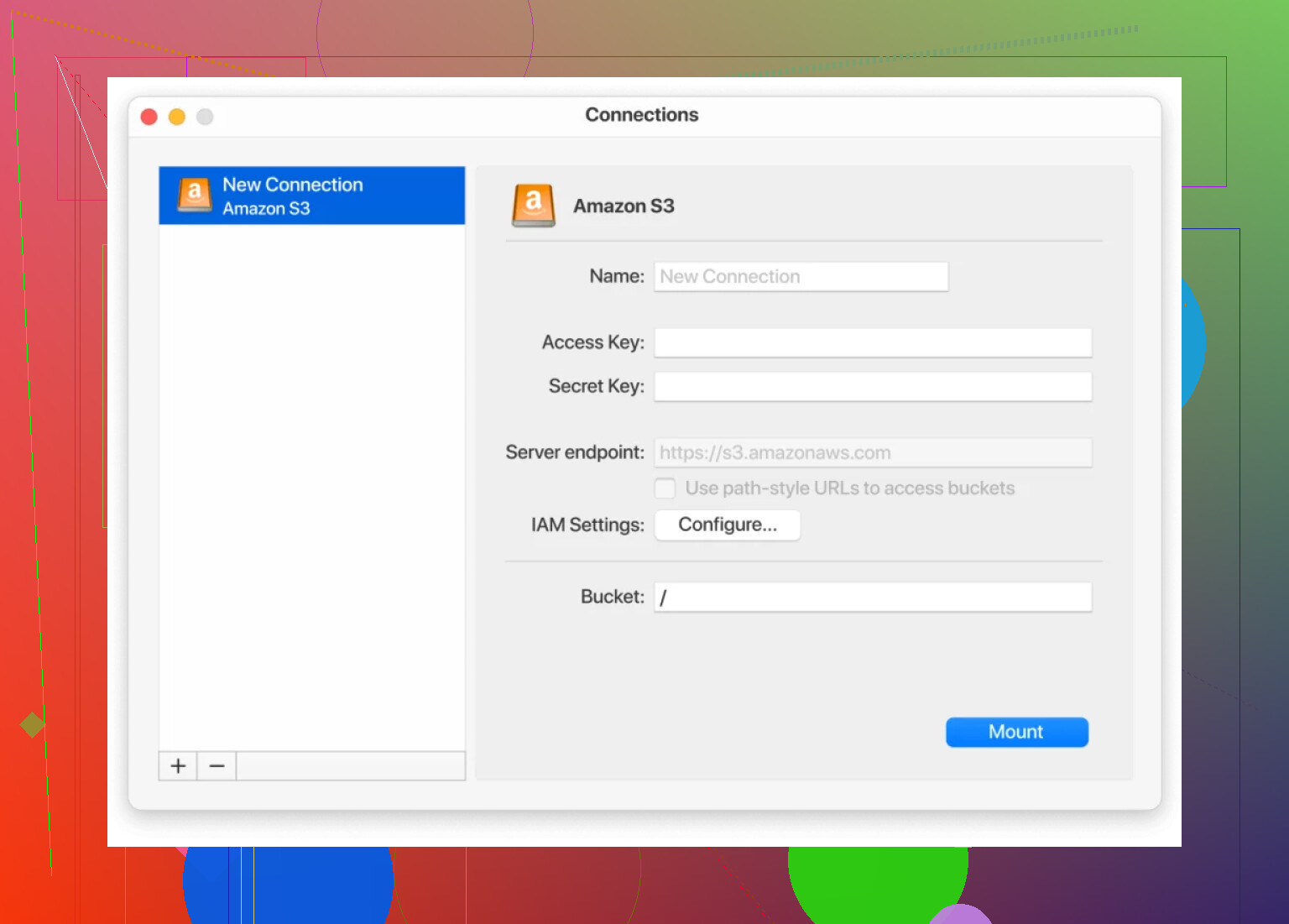
No Python scripts. No shell gymnastics. If you’re not dealing with huge petabytes or need a recurring sync, CloudMounter is honestly a breeze—plus, credentials stay encrypted, and all AWS regions are good to go.
Things Nobody Tells You
- AWS can surprise you with egress costs if your buckets are cross-region. It’s worth keeping your buckets on the same end of the planet if possible.
- Permissions will trip you up 10X more often than you think. The moment you see an access denied, check your policies again, trust me.
- For one-off bulk moves, CLI wins for speed and repeatability—the command above is scriptable and predictable. For daily little stuff, the GUI is pure comfort.
TL;DR – Use CLI for muscle, use CloudMounter for sanity. Both will get your buckets moved, no degree in rocket science required.
12 Likes
So @mikeappsreviewer’s covered the AWS CLI hustle and CloudMounter drag-and-drop route (which, I admit, is slick for non-command-line types). But sometimes both those leave you wanting—CLI gets gnarly with permission configs, and CloudMounter’s easy until you’re mid-transfer at 100GB and Finder reminds you just how potato your laptop is.
Here’s an alternative nobody talks about much: S3 Batch Operations or even kicking off a spot EC2 instance to script the transfer internally. It’s nerdy, but super powerful if you need lots of granular control, retries, or don’t want to sync/download all files locally.
S3 Batch Operations
This AWS-ninja-only feature lets you create a manifest file (CSV of S3 object keys) and basically tell S3 to MOVE ALL THE THINGS on the backend. You just hit go and it handles huge numbers of objects (as long as you’ve got permissions ironed out). You don’t have to mess with CLI throttling, or drag files around all day. But—huge caveat—you’ve got to get your destination bucket policy just right, and sometimes objects with “weird” ACLs or storage classes act up.
Copy via EC2 in Source Account
For massive files where permissions make you wanna throw stuff: spin up a temporary EC2 instance in the same region as your source bucket (key for transfer speed/cost), attach a role with full S3 perms, and do the transfer from there directly to the target account’s bucket. Why? This approach avoids weird cross-account CLI auth shenanigans and leverages internal AWS bandwidth (way faster, cheaper than going out to your laptop and back up).
Permissions Quick Hit
Don’t screw around with trial and error on bucket policies. Go to the AWS “Policy Generator” or try using this boilerplate:
{
    'Sid': 'AllowCrossAccountCopy',
    'Effect': 'Allow',
    'Principal': {
        'AWS': 'arn:aws:iam::TARGET-ACCOUNT-ID:root'
    },
    'Action': [
        's3:GetObject',
        's3:ListBucket'
    ],
    'Resource': [
        'arn:aws:s3:::YOUR-SOURCE-BUCKET',
        'arn:aws:s3:::YOUR-SOURCE-BUCKET/*'
    ]
}
(Tweak as needed and ALWAYS restrict to the min access!!)
tl;dr?
- Huge one-offs: EC2 with good IAM, do aws s3 cp.
- Mega-volume automation: S3 Batch Operations, after manifest and policies nailed.
- GUI-easy, CloudMounter, when dragging files feels fine.
- Permissions, permissions, permissions—99% of AWS S3 headaches, seriously.
If you’re trying to move petabytes or want something repeatable and easily auditable, I honestly wouldn’t just rely on clicking around or hoping CLI commands magically work. And CloudMounter’s great, but for those “set it and forget it” scenarios at scale, AWS-native tools just have more grit.
Lastly: always double check your settings. The number of times I’ve yelled at S3 because I typo’d an ARN, only to find it in audit logs… UGH. And protip—if you get AccessDenied and the policy looks right, make sure you didn’t forget the object ACLs—classic facepalm zone.
That’s my rant. Anyone tried Transfer Acceleration for cross-region? Worth it?
Let’s be real here, transferring S3 files cross-account is classic AWS: conceptually simple, riddled with permission potholes and the occasional buzzsaw when you least expect it. @mikeappsreviewer and @boswandelaar already laid out solid moves—CLI, CloudMounter (never thought drag&drop would feel so good for S3 transfers, but hey, 21st century), S3 Batch Ops, and EC2-relay tricks. But let’s pivot for a sec: what if you don’t want to give even temporary access to Account B, or you just don’t fancy IAM gymnastics?
Cue—pre-signed URLs. Seriously underused in my book for these exact scenarios. Instead of wrangling cross-account policies and hoping you didn’t typo an ARN so you don’t accidentally expose your bucket to the world, just have Account A generate pre-signed GETs, hand those to a process running with Account B’s creds, and have B do the fetching and re-uploading to its bucket. Not always fastest (def egress comes into play big if you’ve got giga-terra sized data, and you do get throttled vs internal AWS traffic), but it’s bulletproof for one-offs, and your permissions stay tight as can be.
Also, minor nitpick: CloudMounter is an awesome option for the GUI crowd, but if you’re pushing anything over a couple hundred gigs the convenience wears thin. Finder choking on 500,000 S3 objects is cosmic-level pain. For everyday “move a dozen big files” use—it’s a lifesaver.
Oh—and y’all talking S3 Batch Operations, but nobody mentioned AWS DataSync? Pricey for one-off jobs, but if you’re transferring regularly or need constant sync across accounts, it’s way less hands-on than scripting S3/EC2 yourself.
Bottom line—want fast + repeatable? Stick to CLI but nail the bucket policies (see above, just double-check your resources/Principals). Want reliable, totally isolated, and don’t mind bouncing thru local/cloud instance? Pre-signed URLs or DataSync. Want literally zero stress, just drag and watch progress bars? CloudMounter, though treat it like a family minivan, not a racecar.
And for the love of all things, watch that egress bill if your buckets aren’t in the same region. S3 has a sneaky way of eating budgets when you’re sleepy.
Anyone have horror stories with S3 Transfer Acceleration? I swear it’s like folklore—everyone talks about how “fast” it is, yet half the time it’s slower than snail-mail. Convince me otherwise…