I’m trying to move files from an SFTP server directly to an AWS S3 bucket, but I’m not sure about the best way to automate this. Has anyone done this successfully or know what tools or scripts work best? Any advice would be appreciated since I need a reliable solution for regular transfers.
So… You Wanna Get Stuff into S3 through SFTP?
Alright y’all, buckle up. Amazon dropped this official write-up on bringing your files over to S3 using SFTP, and it’s thorough—if, like, you’re into endless documentation and could benchpress a coffee table made of PDFs. Anyway, for those brave enough, here’s the deep dive they’ve got: AWS Transfer for SFTP – Fully Managed SFTP Service for Amazon S3.

I Don’t Have Time for Walls of Text – What’s Faster?
Let’s say you’re just trying to throw some files around and not reinvent the wheel or spend a weekend living inside SSH. Here’s what worked for me: there’s this little program floating around called CloudMounter. It connects your SFTP server directly to your computer as a virtual drive, which means your stuff shows up right inside File Explorer (you know, the old-school way you move pics and docs around). No jumping through flaming command-line hoops.
How I Hooked SFTP into Windows in Under 5 Minutes
- Download & pop open CloudMounter. Self-explanatory. I hate installers, but this one’s barely annoying.
- Pick the “FTP & SFTP” option. Giant icons, can’t miss It.
- Plug in your details:
- SFTP for connection,
- your server name or address,
- port (hint: SFTP usually screams “22”),
- your username and password or a private key if you’re fancy,
- and the remote path (just the folder you want over there).
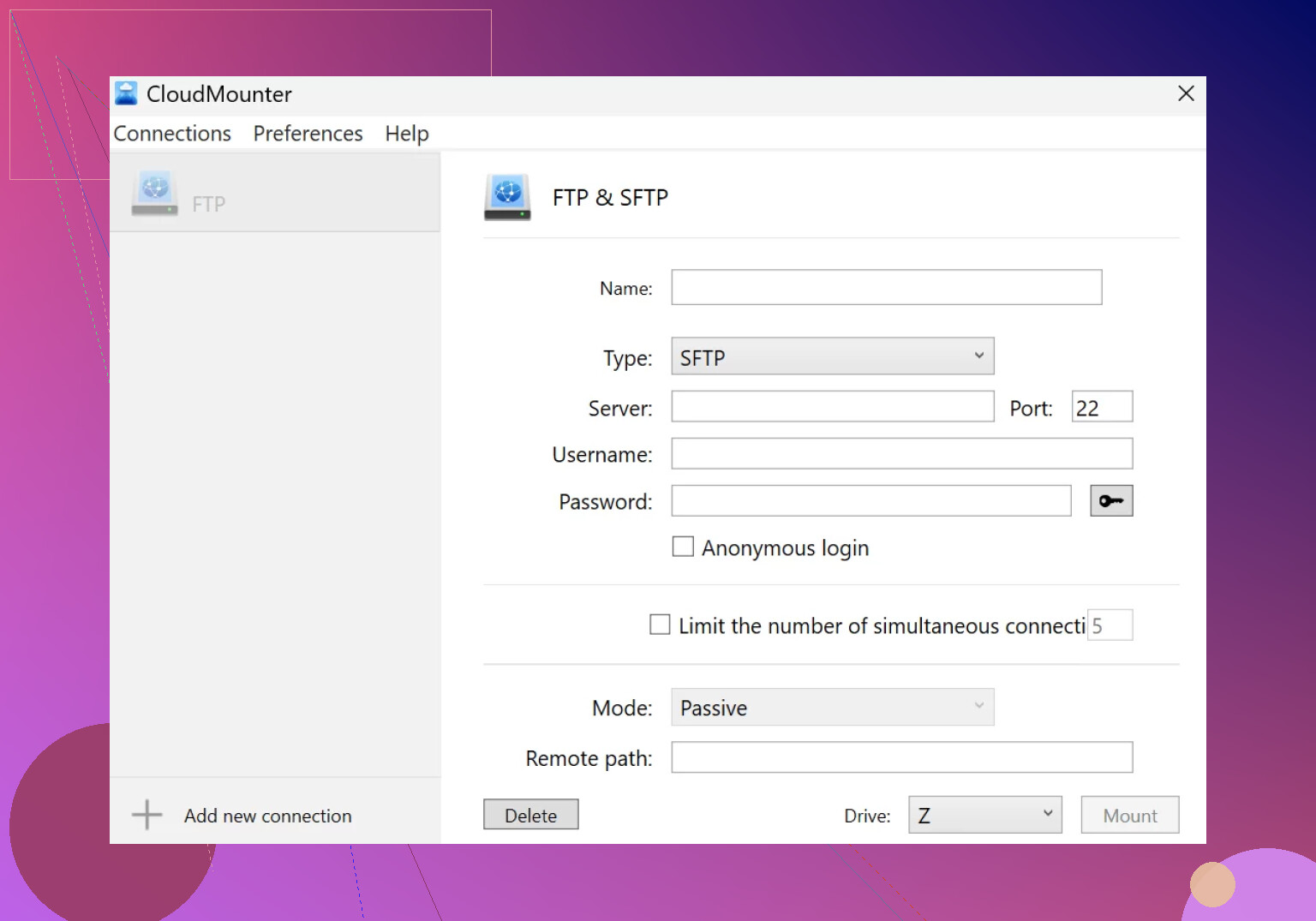
- Smash that “Mount” button.
Seconds later, your remote files show up in File Explorer like it’s all just another USB drive.

Real Talk—Why Not Just Use the Old Way?
Because it’s 2024, and I’m tired of juggling five apps or typing in cryptic commands from 2004. With CloudMounter, your SFTP and cloud storage drop into File Explorer like regular folders. No need to open extra programs every time. Seriously, I had some stuff scattered between a work server and some ancient Dropbox account, and now it’s all in the same window like… magic.
Bottom line: If you need to get data into S3 via SFTP and you want a shortcut, CloudMounter might just be your new best friend. If you love documentation, don’t let me stop you from reading Amazon’s entire guide linked above. Otherwise, this app makes it boringly simple.
Your move, File Explorer.
19 Likes
Here’s my 2c and hopefully it helps you dodge some pain: while @mikeappsreviewer is onboard the CloudMounter train (and honestly, for drag-and-drop folk, it’s not the worst), folks needing anything like reliable automation or scheduled/bulk transfers (think: daily workflows, scripts, CI pipelines) should probably skip “mount your SFTP as a drive” and instead look into AWS-native or third-party scripts.
For automation, I’ve had better luck with a Python + boto3 script that fetches files off SFTP and dumps them in S3. Whole thing runs on a cron job or AWS Lambda. Here’s the bones:
- Use
paramikoto connect to SFTP, loop and download target files. - With
boto3, upload those to S3 (setting folders as needed). - Trigger via cron, Scheduled Task, or stick it in a Lambda if you wanna get cute with event triggers and serverless.
If you want something more “click-and-go,” FileZilla Pro gets honorable mention—it’ll do scheduled SFTP to S3 transfers, though the UI has all the UX polish of a CliffNotes for ‘90s sysadmins.
Also, not to be a wet blanket but AWS Transfer Family (official thing) is way more robust for a direct SFTP-to-S3 bridge, and unlike CloudMounter, you never have to depend on one guy’s Mac being online. So yeah, for one-off transfers, CloudMounter is chill, but if you’re dealing with hundreds of GB, time-based moves, and error handling, scripts or AWS Transfer Family FTW.
Let me know if you want a sample script or pointers, but I’d only “mount as drive” for stuff where you could honestly just email yourself the files and be fine. Automate or die, amirite?
Not gonna lie, I’ve spent way too many late nights trying to wrangle SFTP-to-S3 transfers—so hey, I get the appeal of @mikeappsreviewer’s CloudMounter drag-and-drop route, especially when you just need to shift a handful of files quick and dirty. And then there’s @kakeru getting real in the weeds with code and cron jobs and the whole automation thing, which, yeah, is awesome if you want something repeatable and bulletproof. But honestly, everyone’s making this sound way more fun than it usually is. Most days, it feels less like “brave new cloud adventures” and more like “why doesn’t anything just work.”
But let’s get real for a second: If you’re after hands-free automation and need proof it’ll work at 3am when you’re not watching, the “mount as a drive” solution kinda becomes a non-starter. Network drop? Bye. User logs out? Forget it. And yeah, AWS Transfer Family is robust, but configuring IAM, roles, and all the bells and whistles… let’s just say, hope you have coffee and patience.
Now, if you want one more route most people gloss over: look at managed integration tools like rclone or even Mulesoft/Knime style platforms. rclone can do scheduled SFTP pulls and S3 puts from basically any server, securely, with extensive filters and logging without wrapping everything in Python wrappers (not knocking @kakeru but some ops folks want something you can hand off to junior staff, not a script you have to maintain and debug for life). rclone supports config files, can run as a service, and honestly has bailed me out more than once.
List-style so you don’t get lost in a wall of text:
- For ad-hoc or small batch: CloudMounter is super simple—just mount, drag, drop. It’s real. I grab it when IT is being slow.
- For repeatable automation: Look at rclone. Less maintenance headache than custom code, runs cross-platform, logs everything for audit.
- For enterprise/massive workflows: Suck up the AWS Transfer Family learning curve. It’s ugly, it’s jargon-y, but lets you check “done” and sleep well.
- For UI diehards: FileZilla Pro exists, but, oh boy, it does look like sysadmin 1999 threw up on your screen.
So, really depends if you want “fast and human-relient,” “scripted and pass-the-baton,” or “AWS tattoo required.” Don’t sleep on rclone. Surprising how much pain it saves. And if your transfers are truly one-and-done, ignore all the above and just get CloudMounter (SEO: CloudMounter reviewed highly for SFTP/S3 simplicity).
You know, there’s a lot of love here for automated scripts and big services, but can we talk about good old-fashioned SFTP-to-S3 with a twist? CloudMounter works for “I want it now!” file transfers, and it’s got a gentle learning curve: mount your SFTP as a drive, drag files into your S3 bucket (also mounted), and watch the magic. Pros? Stupidly easy, normal for non-coders, and you can visually track what goes where—perfect for that “I need a folder, not a headache” vibe. Bonus: works on both Mac and Windows.
But honestly, for ALL your files, ALL the time, I’d be nervous—needs your machine ON and logged in, network is a single point of failure, and heavy automation isn’t its home turf. Not to mention, if someone else needs in, it’s licensed per user.
Compare that to the code-your-way-into-oblivion Python schedules or rclone’s robust reliability—they win for pure hands-off uptime and error checking. Meanwhile, AWS Transfer Family brings serious, no-joke integrations, but your brain melts from step three.
Takeaway? CloudMounter wins on simplicity and quick wins. If you’re not locked into enterprise needs, want a GUI, and trust yourself to babysit for a few hours, go for it (drag, drop, coffee time). If you need industrial power and zero handholding, that’s where rclone or full AWS FT lands. In between? There’s always FileZilla Pro if you missed the 90s tech look.