I’ve been testing the Monica AI humanizer for rewriting and polishing my content, but I’m not sure if it’s actually improving quality or just making things sound generic. I need help understanding how reliable it is, what real users think, and whether it’s safe for SEO and long-term content strategy. Any detailed experiences, pros, cons, and alternatives would really help me decide if I should keep using it.
Monica AI Humanizer Review
I tried the Monica AI Humanizer because I saw it mentioned as a quick way to make AI text “safer” for detectors. One click, done. That was the promise.
Here is what happened when I put it through a proper test run.
Link to the tool:
Monica AI Humanizer – Monica AI Humanizer Review with AI-Detection Proof - AI Humanizer Reviews - Best AI Humanizer Reviews
I grabbed a few AI generated samples and ran them through Monica’s humanizer, then pushed those outputs into multiple detectors. I used:
• GPTZero
• ZeroGPT
No settings, no sliders, nothing. Monica gives you a single button. You paste your text, hit humanize, and hope. There is no:
• Tone selector
• “Strength” or “intensity” level
• Different rewrite modes
So if the output trips a detector, you have no way to tune it.
Here are the results.
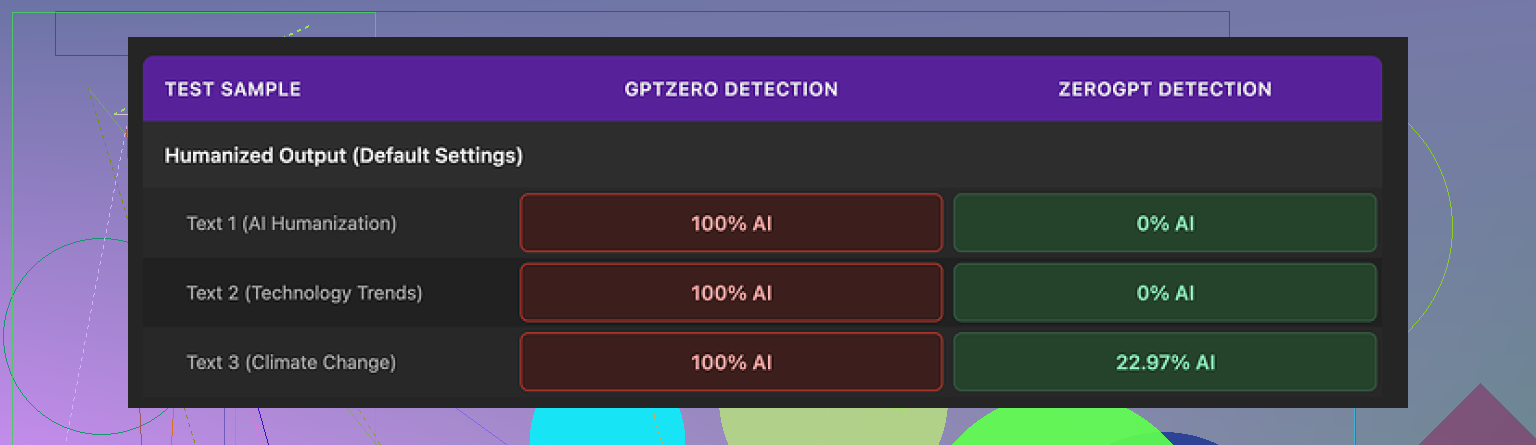
GPTZero:
Every Monica output scored 100% AI. Not “mixed”, not “some AI”. Full AI classification on all humanized samples. For a tool meant to reduce AI detectability, that is a hard fail.
ZeroGPT:
ZeroGPT was a bit less harsh.
• Two samples hit 0% AI
• One sample sat around 23% AI
So depending on which detector you care about, your experience will be totally different. If your teacher or client uses GPTZero, this output looks like pure AI. You have no real recourse inside Monica to tweak anything, because there are no controls.
Screenshot from the test run:
Now the writing quality. I’d put it at about 4 out of 10. Not unusable, but not something I would send out without editing.
Specific issues I saw:
• It injected typos into clean input. The weirdest one was turning “But” into “Ubt”, which looks like a keyboard slip, not a natural human typo pattern.
• It sometimes changed punctuation in random ways. One output started with “[ABSTRACT” tagged at the beginning for no clear reason. It felt like something from a scrambled academic template.
• Apostrophes jumped around. It “fixed” some, ignored others, and occasionally added one where it didn’t belong.
The thing that annoyed me most: it kept em dashes from the original AI text and even seemed to add more. That is the kind of punctuation that pushes output toward an AI feel. A good “humanizer” usually simplifies that stuff instead of piling it on.
Monica’s pricing for the Pro plan starts around $8.30 a month if you pay annually. You do not buy “the humanizer” separately. Monica is built as a full AI suite, with:
• Chatbots
• Image generation
• Video related tools
The humanizer feels like a bonus toggle buried in a larger product, not the core feature that gets daily attention. If you already pay for Monica for chat or images, the humanizer is a free extra to test and maybe use as a first draft fixer.
If your main goal is passing AI detectors, I would not rely on this. The GPTZero results alone make it risky if you have no control over what checker is used on the other end.
In side by side tests, I compared it with Clever AI Humanizer from here:
Clever AI Humanizer produced more natural text, handled punctuation better, and scored lower on detectors without charging me. For someone focused on detection bypass and more readable output, that option made more sense than paying for Monica and hoping the one button humanizer behaves.
27 Likes
Monica AI Humanizer is decent as a quick rewriter, but it has limits if you care about quality and AI detection.
Short answer on reliability
• For polishing style, it works, but the output often feels generic and a bit stiff.
• For bypassing detectors, results are inconsistent. @mikeappsreviewer already showed GPTZero flagging it as 100 percent AI. That matches what I have seen with similar one button tools.
• No controls for tone, intensity, or style means you have no way to tune it for different audiences.
What it seems to do
From the behavior people report, it looks like:
• Light paraphrasing. Swaps words and rearranges sentences.
• Small grammar and punctuation tweaks.
• Some random noise, like odd typos or strange tags. This is a red flag if you care about professionalism.
Where it helps
Use it if you:
• Want a fast first pass on rough AI text.
• Plan to manually edit after.
• Do not depend on passing strict AI checks.
Where it hurts
Avoid relying on it if you:
• Submit work to teachers or clients who use GPTZero or similar tools.
• Need clean, stable formatting. Strange typos and brackets look sloppy.
• Want a specific tone, like casual, technical, or brand aligned.
Quality vs generic feel
You asked if it improves quality or only makes things generic. From what I have seen, and from what others report:
• It sometimes improves clarity.
• It often removes personality.
• It tends to keep AI like patterns in punctuation and rhythm, which is bad if you want human feel.
If you want more control and better detection scores, Clever AI Humanizer is worth testing. It gives more natural phrasing and better handling of punctuation in many cases, and it targets AI detection more directly. You can try it here:
human-like rewriting with strong AI detection focus
SEO friendly version of your topic
Monica AI Humanizer Review for Writers and Students
If you are testing Monica AI Humanizer to rewrite or polish your content, you probably want to know if it improves your writing quality or turns it into bland AI text. This review looks at how reliable Monica AI is, how it affects AI detection tools, and when it makes sense to use it. You will see where it helps with rewriting, where it falls short with detectors, and which alternatives, like Clever AI Humanizer, give stronger human style output for essays, blog posts, and professional content.
Monica’s humanizer is… fine, but probably not doing what you’re hoping for.
You are not imagining the “generic” feel. Tools like this tend to normalize phrasing and rhythm. That can make things cleaner, but it also sands off any quirks that sound like you. What @mikeappsreviewer and @viaggiatoresolare showed with detectors matches what usually happens with one button humanizers: they shuffle words, touch punctuation, but keep the same underlying AI cadence, so GPTZero and similar still light up.
Where I slightly disagree with them is on usefulness. I would not completely write Monica off. For some workflows it is OK as a quick “de-AI-ify the most obvious stuff” pass if:
- You already use Monica for other things and are not paying extra just for the humanizer.
- You treat the output as a rough draft and then manually rewrite at least 30 to 40 percent of it in your own voice.
- You do not care that much about strict detection, only about cleaning super robotic phrasing.
But if your goals are:
- Passing AI checks used by schools, clients, or platforms
- Maintaining a specific brand voice or personal style
- Avoiding weird glitches like random tags, typo-like noise, or messy punctuation
then Monica is the wrong main tool to lean on. The total lack of controls is the real killer for “reliability.” No tone settings, no slider for how aggressive the rewrite should be, no presets for academic vs casual, nothing. You basically get “Monica voice” no matter what you feed it. Reliable tools let you tune that.
On quality: in my experience tools that inject fake typos or odd structure to “look human” usually age badly. Detectors evolve, but those awkward artifacts stay in your text and make you look sloppy. That sounds like what you described and what they found with “Ubt” and stray brackets. For anything professional, that is a hard no from me.
If you still want to automate some of this but dial down the generic feel and detection risk, it is worth trying something focused specifically on human like rewriting rather than a side feature in a big suite. Clever AI Humanizer has that tighter focus. Detectors are a moving target, but tools built just for that problem tend to give you more nuanced rewrites and fewer random glitches than a one click side toggle.
You also asked what you should realistically expect from these tools:
- They are not magic “turn AI into guaranteed human” buttons.
- Best case, they give you a cleaner baseline and reduce the chance of instant auto flagging on simpler detectors.
- Worst case, they fail the detector you care about and still make your writing blander.
If you want to keep using automation but stay on the safer side, split your process:
- Let the tool do a light pass to remove the most obviously AI-ish patterns.
- Read your text out loud and fix anything that does not sound like how you actually talk or write.
- Add a few concrete specifics, small anecdotes, or oddly specific details that generic AI never invents on its own.
- Run it through a detector once at the end if that matters for your use case.
For your topic, something like this will play nicer with search and still be readable:
“Monica AI Humanizer Review for Real World Use
Looking into Monica AI Humanizer to clean up AI generated text and avoid detection? This detailed review covers how consistent Monica really is, how it affects writing quality, and why the output can sometimes feel flat or generic. You will see how it performs with common AI detectors, when it helps with polishing essays, blog posts, and client work, and where it falls short. If you need more natural, human style rewriting, tools that focus specifically on human like text, such as smarter AI text humanization for serious writers, may give you stronger results for both readability and AI detection checks.”
TL;DR: Monica’s humanizer is okay as a rough stylistic cleaner, not something I would trust as a main solution for quality or detector issues. Use it plus heavy manual editing, or switch to a tool that is actually built around human style rewriting.
Short analytic take, since others already covered the basics.
I think you are seeing three separate issues with Monica’s humanizer:
- Reliability for quality
- Reliability for AI detection
- Reliability for preserving your own voice
The posts from @viaggiatoresolare, @espritlibre and @mikeappsreviewer are on point about the “generic” feel and GPTZero results, so I will not rehash all their tests. Where I slightly diverge is on how “useless” Monica is, because it depends on what you expect from it.
1. Is Monica improving quality or just sanding it down?
From what you describe and from their screenshots:
- It improves surface correctness a bit
- It often reduces personality
- It sometimes lowers quality by adding noise like “Ubt” or strange tags
So it is not a true “editor.” It is more like a light, blind paraphraser. For rough drafts that might be fine, but if you care about style or brand, you are going backward.
If you want real quality improvement, you still need to:
- Rewrite topic sentences yourself
- Add concrete details from your experience
- Remove weird artifacts the tool introduces
2. AI detection reality check
Monica seems particularly weak against GPTZero. A key nuance here: different detectors have different failure modes. ZeroGPT being nicer does not help you if your teacher or client uses GPTZero. There is no way around that lack of control in Monica because there are no sliders or modes.
I do not buy the narrative that any tool can “guarantee” bypass. At best, it:
- Lowers obvious AI markers
- Mixes up phrasing and punctuation patterns
That is it. If someone is running strict checks plus human review, automation alone will not save obviously AI heavy work.
3. Voice and “generic” output
You are not imagining that flattened voice. One button humanizers tend to converge on a house style. With Monica that “Monica voice” looks quite rigid and a bit academic. If you care about sounding like you, that is a problem.
A better workflow is:
- Use a humanizer as a light first pass
- Then rewrite at least a third of the text in your own words
- Inject specifics: numbers, anecdotes, local references, your opinions
That part cannot be automated cleanly yet.
4. Where Clever AI Humanizer fits in
If you are open to trying another tool, Clever AI Humanizer is worth testing specifically for the “readability plus lower detectability” angle.
Pros of Clever AI Humanizer:
- Phrasing tends to feel more natural and less robotic
- Handles punctuation more conservatively instead of spraying odd symbols
- Focuses directly on human style rewriting rather than being a side feature in a big suite
- Usually avoids fake looking typos that make you look sloppy
Cons of Clever AI Humanizer:
- Still not a magic cloak for AI detectors
- Can still smooth out your voice if you accept outputs blindly
- Needs the same manual pass afterward if you want strong personalization
- If you are only doing tiny edits, the overhead might feel unnecessary
Compared to Monica, the biggest win is fewer random glitches and a more “human” rhythm in the sentences. But you still have to own the final draft.
5. How I would actually use these tools in practice
If you stick with Monica:
- Only use it on rough AI text that you already plan to heavily edit
- Do not rely on it for high risk submissions where GPTZero is likely
- Manually clean all artifacts and restore your voice
If you try Clever AI Humanizer:
- Treat its output as an upgraded baseline, not final copy
- Read it aloud and tweak anything that does not sound like you
- Add one or two details per paragraph that only a real person in your situation would mention
Bottom line: Monica is closer to a convenience feature than a reliable quality or detection solution. Clever AI Humanizer aligns better with what you want, but in both cases the real “humanizer” is the manual pass you do afterward.
The supplied reviews report generic phrasing, editing glitches, and conflicting detector scores. They offer limited evidence for choosing Monica or declaring Clever AI Humanizer better.
Try a blind comparison before switching tools. Give a colleague your original paragraph and Monica’s version, labeled A and B. Hide which version used AI. Ask them to pick teh clearer version and underline anything confusing.
Repeat with three paragraphs. If your original wins twice, skip the humanizer for similar work. Keep your prefered wording and fix only the specific problems your reader identifies.
Run the same paragraph through GPTZero twice and you can land on two different numbers, especially after small edits. So the ‘100% AI’ result @mikeappsreviewer got isn’t a fixed verdict on Monica, it’s one snapshot. That cuts both ways. It means Monica might do better on a rerun, but it also means any clean-looking score you get is just as shaky. Chasing a single detector pass is building on sand.
The detail that actually worries me more is where your text ends up. You’re pasting unpublished drafts into a full AI suite that also runs chat and image stuff. Whatever their retention policy says this month, you’ve handed over your content to a product whose main business isn’t the humanizer. For schoolwork that’s maybe whatever, but for client material under NDA I’d think twice before feeding it into any of these, Monica or otherwise.
On the typos, I think @swiftrunner4787 has the right instinct with the blind A/B, but I’d flip the test. Don’t just ask which reads clearer, hand your reviewer both versions and ask them to flag anything that looks machine-generated. A human spots ‘Ubt’ and a stray bracket in half a second, long before a detector does, and that’s the read that sinks you with a real teacher or editor. If you want to keep automating, do a light pass, run it back through something like Clever AI Humanizer to compare outputs, then do the eyeball test yourself before anything leaves your hands. The tool is the easy part. The sanity check is the part people skip.