My SD card suddenly stopped working after I moved photos and videos from my phone, and now it shows as corrupted on my computer. I’m trying to find free SD card data recovery tools that are safe and actually work because I really need to recover important files that weren’t backed up. Looking for recommendations and any tips on the best way to recover data from a corrupted SD card without making it worse.
Losing files off an SD card is bad, but it isn’t always the end. I’ve had cards look empty and still pull stuff back, mostly when I stopped using the card right away. What usually happens is the card drops the file record first. The data often sits there until something new lands on top of it. New photos, video clips, app downloads, any of it, that’s what ruins recovery.
Before I touched any recovery app, I’d do these first.
- Stop using the SD card. No new recordings. No file transfers. No random repair prompts.
- Plug it in with a card reader, not through the camera or phone.
- If the card keeps disconnecting, freezes, shows up as RAW, or feels flaky, make a byte for byte image first. Scan the image, not the card.
- Save recovered files somewhere else. Your PC drive is fine. Another external drive is fine. Do not write them back to the same SD card.
For software, here’s how I’d sort it.
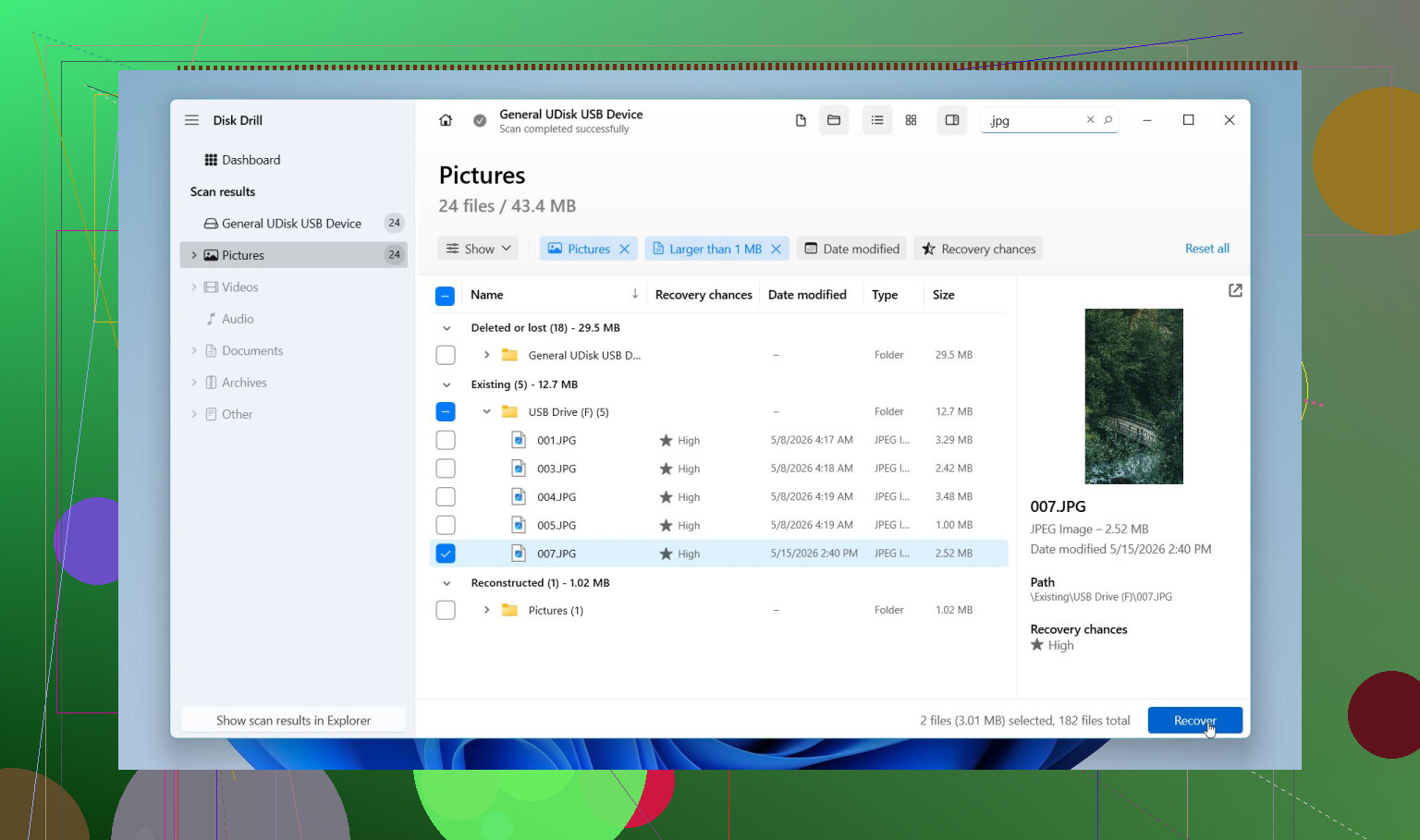
This is the one I’d start with for most SD card messes. I found it easier to work through than a lot of the older tools. You get previews before recovery, which saved me time because I didn’t have to restore piles of junk first. It handles deleted files, formatted cards, RAW cards, and some corruption cases. It also recognizes common camera RAW formats, like CR2, CR3, NEF, ARW, RAF, and more.
The part I’d pay attention to is Advanced Camera Recovery. If your missing stuff is from action cams, drones, dashcams, GoPros, DJI gear, Insta360, Canon, Nikon, Sony, and similar devices, this matters. Fragmented video is where many tools fall apart. They find pieces. Then the recovered file won’t open, or plays half a second and dies. This one tends to do better with those broken up video files. On Windows, you also get up to 100 MB free recovery, and preview is there before you commit.
PhotoRec
If you need a free option and don’t mind rough edges, this is the one people keep going back to. For good reason. It scans even when the file system is badly messed up, and it supports a huge pile of file types. I’ve seen it pull files from cards other tools skipped.
The catch is the workflow. It isn’t friendly. File names and folders usually don’t come back the way they were. You end up with a heap of recovered files with renamed outputs, then you sort the mess by hand. It works. It’s not pretty.
Recuva
This one fits smaller, simpler recoveries on Windows. If you deleted common files from a normal working FAT32 or exFAT card not long ago, it’s worth a shot. It’s light, free, and quick to run.
I would not pick it first for damaged cards, newer camera RAW formats, or chopped up video from cameras. That’s where it starts feeling thin.
UFS Explorer
This is for the cases where the card situation gets uglier. Damaged file system. Formatted card. Need more control over scan settings. Need to work from a disk image. It does a lot, and I’ve seen people get good results from it when simpler apps didn’t do enough.
The downside is obvious after five minutes. The interface is more technical. If you want something easy, this isn’t the easy one.
R-Photo
On Windows, this is a solid free pick if all you care about is photos and video. It’s free for personal use, cleaner than PhotoRec, and the previews help a lot. I liked it more than I expected the first time I used it, mostly because it wasted less time.
Limit is simple. It focuses on media recovery, not every file type under the sun.
If you want the least painful route, start with Disk Drill, preview what it finds, and recover to a different drive. If you want free first, try PhotoRec or R-Photo. If the SD card is unstable, don’t keep hammering it with repeated scans. Make a byte for byte copy first, then work from the copy. That step matters more than people think.
10 Likes
If the card shows as corrupted, I’d split your options by what kind of failure you have.
If Windows still shows the card size, even as RAW or unallocated, start with a scan tool. If the size shows wrong, or the card drops out, you’re dealing with hardware wear too. In those cases, free tools often hit a wall fast.
I slightly disagree with @mikeappsreviewer on one point. Recuva is often too limited for SD card corruption. Fine for plain deletions, not my first pick for a broken card.
Free tools worth trying:
- TestDisk, for partition repair and boot sector fixes. More for getting the card readable again than pulling files one by one.
- Windows File Recovery, free from Microsoft, but command line only. Better on NTFS than SD cards, so I’d rank it lower here.
- DMDE, free tier is solid for folder-level recovery and file system work. Underrated tool.
- R-Photo, if your lost stuff is mostly pics and videos.
If you want the easiest path, Disk Drill is still one of the safer choices because the preview helps you check file health before recovery. Tha matters on damaged cards.
Also, don’t run CHKDSK first. People do this and then wonder why files came back mangled.
If you want a solid roundup for top image recovery software for photos and SD cards, that list is worth a look too.
If the files matter a lot, make one clean read attempt, then stop. Repeated scans on a dying card are how recoverable turns into gone.
If the card shows corrupted, I’d actually avoid starting with “repair” tools first. Small disagreement with @mikeappsreviewer and @suenodelbosque there, because sometimes people jump into fixing the filesystem and end up changing the card before they’ve copied anything off it. That’s how a bad day gets worse.
What I’d do instead:
- try a different card reader and a different USB port first
- check if the SD card appears in Disk Management with the correct capacity
- if it does, use a recovery tool that can preview files before restoring them
For free stuff, my shortlist would be:
- PhotoRec if you want totally free and don’t care about filenames/folders
- DMDE if you’re comfortable with a more technical interface
- R-Photo if it’s mostly pics/videos
- Disk Drill if you want the easiest scan + preview workflow and don’t mind the free recovery cap on Windows
Honestly, for phone photos/videos, Disk Drill is usually the least annoying option. Not saying it’s magic, just less of a headache than some old-school tools. Preview matters a lot, because some apps “recover” files that are basicly dead anyway.
Also, if the card came from an Android phone, check whether some files were stored in app-specific folders or encrypted storage. Recovery software can find files, but it can’t magically decrypt stuff if the phone wrote it that way. People miss that part alot.
One more thing, do not format the card even if Windows nags you. Ignore that bait.
If you want a quick explainer, this short video on SD card data recovery software covers the basics pretty well.