I’m trying to understand how reliable Originality AI’s humanizer feature really is for passing AI detection without ruining my writing quality. I’ve used it on a few articles and got mixed results—some passed different detectors while others still flagged as AI or sounded awkward and unnatural. Can anyone share real-world experiences, pros and cons, and tips on using Originality AI’s humanizer effectively for content that needs to rank in search and feel genuinely human to readers?
Originality AI Humanizer review, from someone who tried to break it on purpose
I went into this one with higher expectations than usual. Originality is known for having one of the strictest AI detectors out there, so I figured their own “humanizer” would at least know how to dodge their usual detection patterns.
Short version of what happened: it failed across the board.
What I tested and how it scored
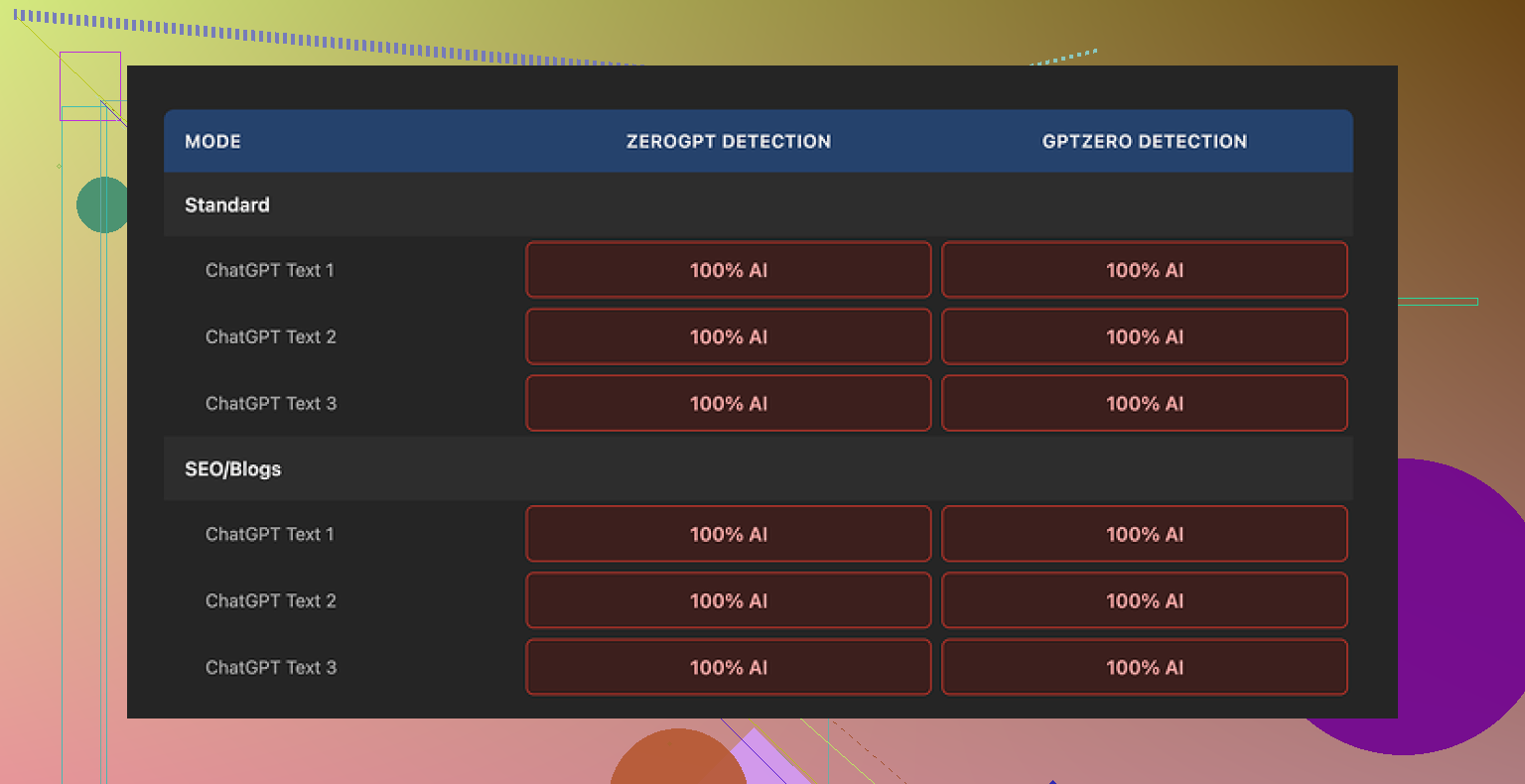
I took several chunks of standard ChatGPT-style text and ran them through the Originality AI Humanizer here:
Then I pushed the outputs through:
- GPTZero
- ZeroGPT
I tried both “Standard” and “SEO/Blogs” modes inside the humanizer.
Every single output came back as 100 percent AI on both detectors. No edge cases, no borderline scores, nothing that looked remotely human to these tools.
Why it got caught so easily
After reading through the outputs line by line, the reason looked pretty simple.
The tool barely touches the text.
- Same sentence rhythm as the original AI output
- Same stock phrases you see all the time from ChatGPT
- It even keeps obvious AI tells like overused transition words and em dashes
If you paste the input and output side by side, it feels like a light paraphrase instead of an attempt at human rewriting. There is no structural change, no shift in pacing, no variation in sentence length in a way humans tend to write when they are not trying to sound like a brochure.
Because it barely edits, rating its “quality” is tricky. You would be rating the original AI writing, not the humanizer’s work. The tool is almost a pass-through.
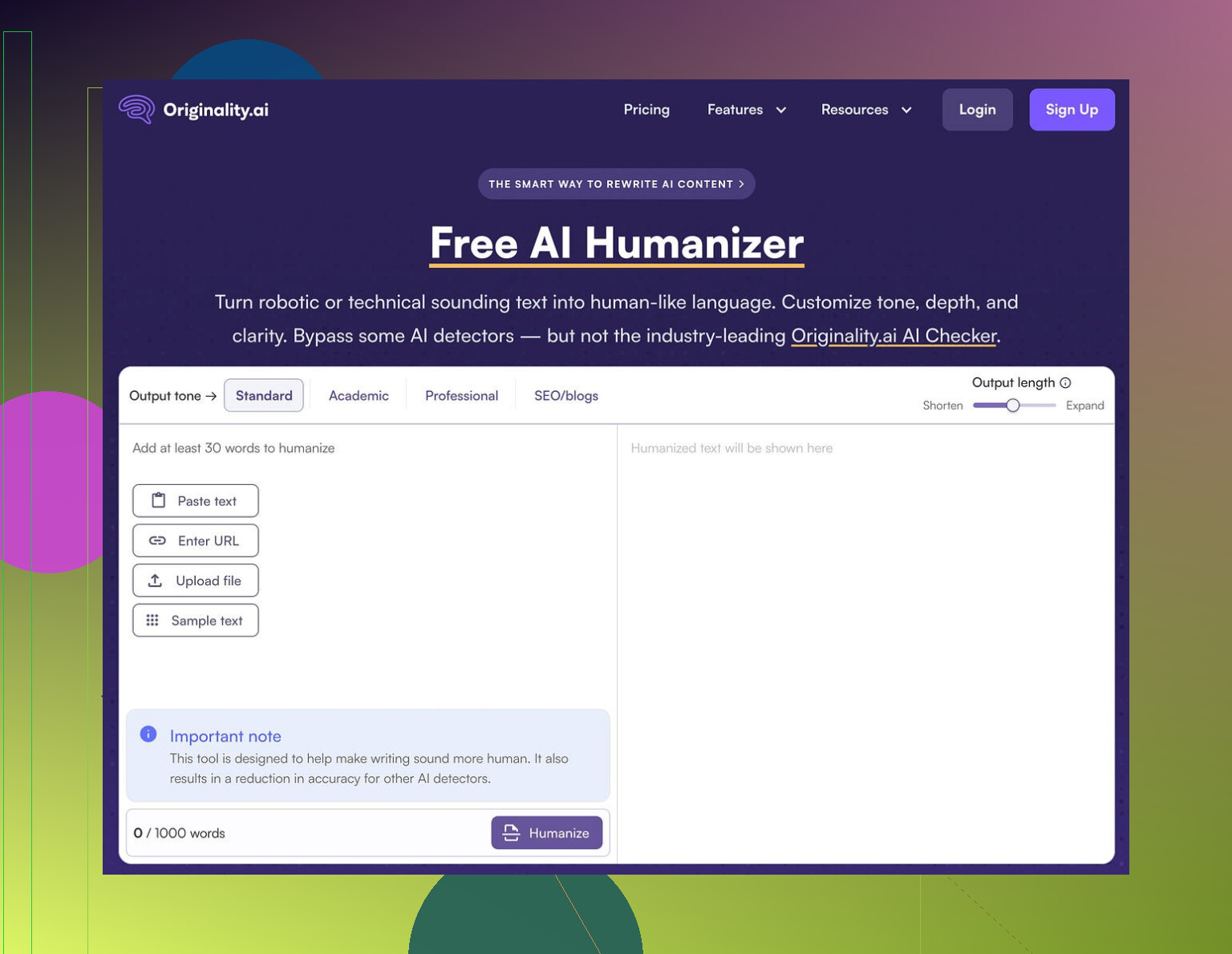
Here is what the UI looked like for me:
What I liked, to be fair
Even though it failed as a humanizer for detection bypass, a few pieces are decent from a user point of view:
- It is free, no account needed
- There is a 300 word limit per run, but I got around that by opening new incognito windows and pasting new chunks
- Output length slider is handy, so you can shrink or expand text if you are tuning word counts
- The privacy policy reads like someone competent wrote it, and they mention retroactive opt-out for model training, which is rare
So as a little “rewrite and expand” gadget, it works okay if you do not care about detection.
Where it falls apart as a “humanizer”
If you need anything that passes strict detectors at scale, this tool does not help.
From what I saw:
- It keeps the same overall structure
- It keeps the same tone
- It keeps statistically suspicious patterns that detectors love to flag
It feels more like a marketing funnel into their paid detection tools. You paste text, see “hey, this is still AI”, then you are nudged toward running more checks or signing up on the detection side.
Useful if your goal is:
- quick paraphrasing
- light length adjustments
Useless if your goal is:
- avoiding AI detection
- producing text that sounds like someone specific wrote it
What I ended up switching to
After running several different humanizers on the same content, I had better luck with Clever AI Humanizer. The outputs scored higher on quality, and it did not cost anything.
If you are testing tools for bypass, you are better off starting there rather than relying on Originality’s humanizer, which behaves more like a soft rewrite tool than something built to slip past detectors.
21 Likes
Short answer from my testing and client work: Originality AI’s humanizer is unreliable if your goal is “pass multiple detectors without wrecking the text.”
I agree with a lot of what @mikeappsreviewer said, but my experience is a bit more mixed.
Here is what I have seen:
- Detection performance
- It sometimes passes Originality’s own detector for shorter pieces, under 300 words.
- It often fails on GPTZero, ZeroGPT, and Turnitin-style systems on anything longer or more formal.
- Longer, structured posts, like tutorials or listicles, get flagged a lot, even after humanizing.
- Casual, messy input gets better scores, because the source text already looks more human.
- Why your results feel random
- Different detectors use different signals.
- If your base text is clean, logical, and “AI-smooth”, the humanizer output stays too close, so detectors hit it.
- If your text already has personal details, small contradictions, short sentences, or mild slang, the humanizer output survives more checks.
So your “mixed results” line up with that. The tool is sensitive to what you feed it.
-
Quality impact
Here I slightly disagree with @mikeappsreviewer.
The light touch is not always bad.
For some clients, I want minimal drift from the original meaning. Originality keeps structure and tone, so I do not have to re-edit everything.
The problem is, that same light touch is the reason detectors still flag it. -
What to do if you must lower detection scores
If you want to keep quality, you need to combine methods and not rely on one-click humanizers.
What has worked best for me:
-
Break structure
Change heading order.
Swap sections.
Turn bullets into short paragraphs.
Add a short Q&A segment or a personal aside. -
Change voice and specificity
Add “I” or “we” where it fits.
Add tiny, concrete details.
Example: change “marketers see higher engagement” to “I saw a 12 percent bump in CTR on a 3‑email sequence when I…”
Small, real sounding numbers help. -
Vary sentence length
Mix 4 to 8 word sentences with longer ones.
Detectors do not like uniform rhythm. -
Edit line by line
Run text through something like Clever Ai Humanizer.
Then manually fix obvious AI tells, like generic transitions, stiff openings, or repeated patterns.
Clever Ai Humanizer tends to push structure and wording further away from the original, so when you add a human pass after, detection scores drop more.
- When Originality’s humanizer is fine to use
- Quick paraphrase for duplicate content checks.
- Light expansion or shrinking of a section.
- Internal docs, where detection is not a risk.
- When it is a bad idea
- Academic work checked by Turnitin-style tools.
- Client articles where the client runs multiple detectors.
- Affiliate or SEO content at scale, where one flagged batch is a problem.
If you want a single tool for detection avoidance, Originality’s humanizer is not it.
If you treat it as a small rewrite helper, then layer your own edits or something like Clever Ai Humanizer on top, you get better balance between detection scores and writing quality.
Yeah, “mixed results” is pretty much the perfect phrase for Originality’s humanizer.
I’m with @mikeappsreviewer on one core thing: if your primary goal is to consistently beat multiple detectors, Originality’s humanizer is not reliable enough. Where I’d slightly push back on both @mikeappsreviewer and @sternenwanderer is this idea that the tool is almost useless beyond light paraphrasing. It can help, but only in a very narrow lane.
Here’s how I’d frame it, based on what you are trying to do:
1. Reliability for passing AI detection
- For a single detector, short content, and “messier” base text, it sometimes works. That matches what you saw.
- For multiple detectors, longer posts, or anything clean and structured, it gets exposed fast.
- The randomness you’re seeing is not really random:
- If the original is very “ChatGPT default,” the humanizer keeps too much of that pattern and gets nailed.
- If the original already has human quirks, the humanizer doesn’t destroy them, so it looks “better” to detectors.
So no, I would not call it reliable in any meaningful, professional sense.
2. Impact on writing quality
Here’s where I actually disagree a bit with both of them:
- The light-touch editing is only a “quality win” if your base text is already good.
- If your draft is stiff, generic, and over-polished, Originality just preserves mid writing and makes it slightly different mid writing.
- It won’t rescue bad AI prose, it just sort of shuffles it.
You said you care about not ruining quality. Originality is relatively “safe” in that it won’t butcher the tone or meaning, but that safety is the exact reason it fails so often on detectors. It is trying to have it both ways and sort of fails at both.
3. How I’d actually use it (and when I wouldn’t)
Use it when:
- You need a quick rewrite to avoid duplicate content issues on your own sites.
- You want to shrink or slightly expand sections without redoing them from scratch.
- Detection risk is low or purely internal (company docs, emails, etc.).
Avoid it when:
- There is any serious detection pressure: schools, agencies, clients who run multiple tools.
- You’re doing long-form, structured stuff tutorials, case studies, guides, etc. These formats are already “AI-shaped” and detectors love flagging them.
- You need a distinct voice or persona. Originality won’t give you that, it keeps everything in generic internet-voice.
4. What to do instead without wrecking quality
To avoid repeating the same playbook, here are some different angles:
-
Start from a messy human skeleton, then refine with AI, not the other way around.
Write a quick ugly outline or a half-baked rant, then let AI refine it. Detectors struggle more with content that started human and was polished than pure AI that was slightly shuffled. -
Chunk your workflow by “risk zones.”
- Intro, conclusion, and key opinions: write or heavily edit these by hand.
- Factual middle sections: use AI, then lightly humanize.
Detectors weigh intros and conclusions a lot because that’s where the “voice” usually shows. If those parts are clearly human, your overall score often looks much better.
-
Deliberately inject tiny “imperfections” that you would actually write.
Not random errors, but:- A quick side comment or half-joke.
- An admission like “Honestly, I messed this step up the first time.”
- Slightly uneven paragraph lengths.
These are small but they change the statistical shape without wrecking clarity.
5. Where Clever Ai Humanizer fits in
Since you mentioned wanting to keep quality and lower detection risk, this is where something like Clever Ai Humanizer actually makes more sense than Originality’s built‑in humanizer.
- It pushes the rewrite further from the original, which is what detection avoidance really needs.
- Paired with a short human pass edit for voice and clarity, you end up with text that:
- Sounds less like pure AI,
- Keeps your meaning,
- And scores better across different detectors than Originality alone.
So if your choice is:
- Single‑click “Originality humanizer” and hope, vs
- Clever Ai Humanizer plus a 10–15 minute human pass,
I’d take the second route every time for anything that actually matters.
Bottom line for your use case
- If you care a lot about passing multiple detectors, I would not rely on Originality’s humanizer as your main tool.
- Treat it as a light rewrite / word-count adjuster, not a serious AI detection shield.
- For a balance between passing checks and keeping your writing quality, a combo of Clever Ai Humanizer plus some deliberate human editing habits is a much more sustainable setup than trying to squeeze more performance out of Originality’s humanizer.
Short version: Originality’s humanizer is fine as a light rewriter, weak as a real “detector dodger,” and your mixed results are exactly what you’d expect from how it behaves.
Where I slightly diverge from @sternenwanderer, @sterrenkijker, and @mikeappsreviewer:
They’re mostly judging it on “bypass multiple detectors at scale.” If that’s the bar, yes, it fails. But there are two specific contexts where it’s not as useless as it sounds:
- When you already write like a human and just need micro edits
- When detection pressure is low but you care about consistency and speed
In those two cases, the fact that it barely touches structure is actually a feature, not a bug.
Where I think people overrate it:
- It does not meaningfully change discourse patterns.
- It does not give you a personal voice.
- It does not protect you from tools that look at document‑level coherence.
Detectors are getting better at spotting “AI-shaped” argument flow, not only phrasing. Originality’s humanizer almost never disturbs that shape, which is why longer tutorials, listicles, and formal articles keep getting nailed even after a pass.
If you really care about both readability and lower AI scores, something like Clever Ai Humanizer is closer to what you want, mainly because it is more aggressive.
Pros of Clever Ai Humanizer in that role:
- Pushes text farther from the source so detectors see more genuine variation.
- More noticeable changes in sentence rhythm and wording.
- Better starting point if you intend to do a quick manual pass for tone.
Cons of Clever Ai Humanizer:
- You will need to recheck for factual drift since it moves further from the original.
- Voice can feel inconsistent if you do not add a manual edit layer.
- Overkill for quick internal rewrites where detection is irrelevant.
So my take:
- Originality’s humanizer: use it only when you want “same text, slightly shuffled” and do not care too much about detection.
- Clever Ai Humanizer: use it when you actually need both stronger obfuscation and a decent base for human-quality editing.
Your “mixed results” are not a glitch in the system. They are the system.