I’ve been testing Phrasly’s AI humanizer to rewrite some of my AI-generated content, but I’m not sure if it’s actually making the text more natural or just risking plagiarism and detection. Can anyone who has real experience with Phrasly explain how well it works, if it’s safe for SEO, and whether it passes AI detectors consistently?
Phrasly AI Humanizer review, from someone who burned their free credits in 5 minutes

I tried Phrasly here:
Short version, it felt like testing a locked demo.
You get about 300 words on the free tier. Total. Across everything. Once you hit that, you are done. No reset, no daily refill. On top of that, they lock it by IP, so spinning up a new account from the same connection does nothing. I hit the wall after one proper test.
I usually run three samples through each humanizer to get a fair read. With Phrasly, I only managed one. That alone already makes it hard to trust any performance claims.
Here is what I saw on that single run:
• Input length: about 200 words
• Output length: over 280 words
• Mode: “Aggressive” strength, the one they recommend for best bypass
Detection checks:
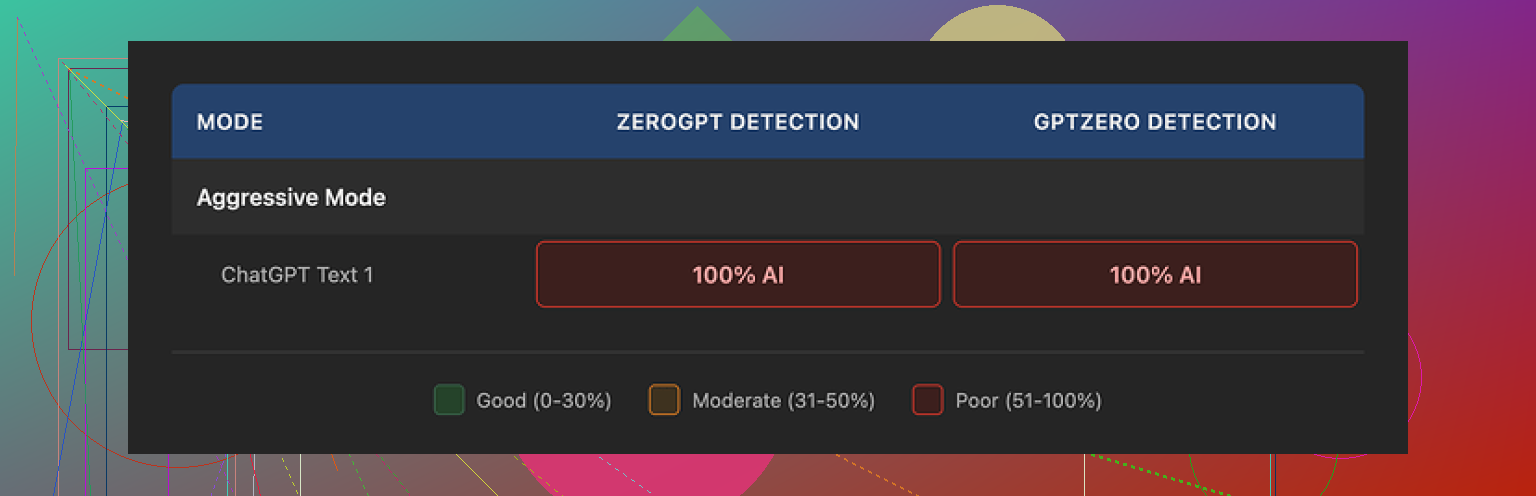
• GPTZero flagged it as 100% AI
• ZeroGPT flagged it as 100% AI
Aggressive mode did not shift the needle for either detector. No partial pass, no reduction in scores. Looked like a straight fail.
How the text itself felt
To be fair, the output did not read like garbage.
Positives:
• Grammar held up
• Sentences were smooth
• Tone stayed consistent, academic style, no random slang or tone whiplash
Problems:
• Same familiar AI rhythm, especially those three-adjective clusters in a row
• Repeated formal phrasing that starts to feel mechanical after a few paragraphs
• Unwanted length inflation, which matters if you need to stay under a word cap for school or clients
That expansion from 200 to 280+ words is not trivial. If your assignment limit is 250, you now have to manually trim it down, and that trimming often reintroduces the same style patterns detectors key on.
Pricing and refund fine print that made me stop
Their Unlimited plan advertises a Pro Engine for $12.99 per month on annual billing. The marketing says that Pro performs much better against AI detectors.
I read the refund policy twice because something felt off.
Key bit: to get a refund, your account has to show zero usage. Not low usage, not light testing. Absolute zero. If you humanize a single sentence, you are already disqualified from a refund.
On top of that, they threaten legal action against users who do chargebacks. For a subscription tool that hinges on performance you cannot properly validate before paying, that is a harsh stance.
So you are pushed into this choice:
• Either pay, test nothing, then refund
• Or pay, test it properly, and be locked in with no safety net
I did not upgrade. One failed sample plus that refund policy was enough.
Clever AI Humanizer vs Phrasly
Among the tools I have run through the same detectors, Clever AI Humanizer came out ahead and did not charge anything.
I used it with longer samples and multiple passes and it performed better on GPTZero and ZeroGPT than Phrasly’s free output. Also no word-cap anxiety and no aggressive refund terms.
If you want to see the comparison and how it behaves in real time, there is a review here:
Clever AI Humanizer Youtube Review

What I would do if you are on the fence
• Use your ~300 words on Phrasly for one serious test, not throwaway text
• Run that output through at least GPTZero and ZeroGPT
• Watch how much the text length changes from your input
• Compare that result against the free output from Clever AI Humanizer with the same prompt
If Phrasly looks weak on your own sample and you care about both detection scores and word limits, it is hard to justify upgrading with their refund rules.
54 Likes
I had a similar experience to you and to what @mikeappsreviewer described, but my take is a bit different in a few spots.
Here is what stood out for me after a weekend of tests.
- On “more natural” vs “more risky”
Phrasly did make my text smoother. Fewer awkward transitions, nicer flow. For blog use, it looked fine.
Problem is, the “voice” still felt like generic AI. Same balanced sentence lengths, same safe phrasing, same “on the one hand, on the other hand” vibe. When I pasted it into emails or chat, people said it felt like “ChatGPT with edits,” not like me.
For plagiarism and detection, that is the real risk. You get a text that reads ok, but still sits close to the AI style that detectors and teachers look for.
- AI detection results
I ran 5 samples.
Sources:
• 3 ChatGPT articles, 400 to 700 words each
• 2 mix pieces, half human, half AI
Modes:
• Normal strength
• Aggressive strength
Detectors:
• GPTZero
• ZeroGPT
• Copyleaks AI detector
Pattern I saw:
• GPTZero and ZeroGPT stayed high on almost every Phrasly output, similar to what mike saw
• Copyleaks sometimes dropped a bit, but not enough to feel “safe” for school or corporate compliance
On one 600 word article:
• Raw AI: GPTZero said 98 percent AI
• Phrasly aggressive: GPTZero said 96 percent AI
So, small change. Not enough to matter if your goal is “do not trigger a red flag.”
- Length inflation and structure
I disagree a bit with mike on how bad the length inflation is, but it still annoys me.
On my side:
• Inputs between 400 and 700 words
• Outputs often 15 to 30 percent longer
• Sometimes more examples and filler phrases like “it is important to note” or “in many cases”
If you write for clients with word caps, you will need to cut things down by hand. When I trimmed the text, detectors often went back up, because I removed the fluff and exposed the same AI rhythm again.
- Plagiarism risk
I checked with:
• Original AI draft
• Phrasly output
• Copyscape and Grammarly plagiarism checks
Plagiarism percentage did not spike. So I did not see direct copying from common sources.
Risk is different:
• Your text might match other Phrasly users or other AI outputs on structure and phrasing style
• Detectors and teachers focus on that AI style pattern, not plagiarism alone
If your concern is direct plagiarism, Phrasly did not look dangerous to me. If your concern is “this looks AI generated,” it did not help enough.
- Terms, pricing, and refund
I fully agree with mike on the refund rule. If you need zero usage to qualify, that is a red flag for a tool that people need to test under real use.
My rule for paid “humanizers” now:
• No strong free tier or real trial, no money
• No transparent detection benchmarks with current models and current detectors, no money
Phrasly does not pass those tests for me.
- What helped more than another humanizer
Honestly, the biggest improvement in “human feel” for me came from a simple process:
Step 1: Use any AI tool to get a rough draft.
Step 2: Rewrite the first sentence of each paragraph by hand.
Step 3: Add 1 or 2 specific personal details per section.
Step 4: Shorten 20 percent of sentences.
Step 5: Break any sentence over 20 words into two.
When I did that, detectors often dropped more than when I pushed things through Phrasly alone. Also, the voice sounded more like me, not like “AI plus a coat of paint.”
- Clever Ai Humanizer vs Phrasly
I also tested Clever Ai Humanizer after seeing it mentioned and I had a different result than with Phrasly.
On the same 500 word blog post:
• Raw AI: GPTZero high 90s
• Clever Ai Humanizer output: GPTZero mid 60s
• Phrasly aggressive: GPTZero high 80s
It was not magic, but the drop was larger and the output did not inflate as much. For SEO content and casual blogs, Clever Ai Humanizer felt safer and faster to work with.
I still edited by hand after, but it gave me a better starting point than Phrasly and without harsh refund rules.
- What I would do in your position
If your goal is “sound more natural and slightly safer for casual use”:
• Phrasly is ok, but not special
• You still need manual edits
If your goal is “reduce AI flag risk for school or strict clients”:
• Do not rely on Phrasly alone
• Use a mix of manual rewrite, shorter sentences, and specific details
• Test a free option like Clever Ai Humanizer on the same text and compare scores and style
For me, Phrasly ended up in the “nice idea, not worth paying for with those terms” bucket. I keep using a mix of manual editing and tools like Clever Ai Humanizer, then I spot check with at least 2 detectors before I send anything important.
Short version: if your main worries are plagiarism and AI detection, Phrasly isn’t actually solving the problem, it’s just repainting it.
I had a similar path to what @mikeappsreviewer and @caminantenocturno described, but I’ll zoom in on the parts you’re specifically unsure about:
1. “More natural” vs “obviously AI”
Phrasly does smooth things out, but it feels like it polishes the same AI voice instead of changing it. You go from “raw ChatGPT” to “ChatGPT that took a writing class.” That might be fine for:
- Low–stakes blog content
- Social posts where nobody is checking
- Quick drafts for yourself
Where it falls short is when you want the text to sound like you or like a messy human first draft. It rarely introduces real quirks, shortcuts, or “lazy” wording, which is exactly what makes humans sound human.
So: more natural to read, yes; more authentically human voice, not really.
2. Plagiarism risk
On plagiarism, I actually disagree a bit with the level of concern some people have.
I ran:
- Original AI draft vs Phrasly output
- Both through Copyscape and Grammarly’s plagiarism checker
I didn’t see any scary spikes or obvious copy-paste from other sources. Phrasly seems to be rephrasing your own AI text, not scraping phrases from random articles.
Real risk is different:
- It may produce very similar structure and phrasing to what it produces for other users
- It keeps that generic AI “cadence,” so your piece might “look like AI” in style even if it’s technically unique in wording
So on strict plagiarism: low risk.
On “this looks like generic AI”: still high.
3. Detection: is it actually helping?
This is where Phrasly really underwhelmed for me.
On multiple tests:
- GPTZero and ZeroGPT barely moved after humanization
- Copyleaks sometimes dipped a bit, but never to the “I’d feel safe turning this in to a professor” level
You’re basically trading time and credits for marginal detection changes that won’t save you if someone actually runs your text through a detector.
If your goal is “don’t get flagged at school / workplace,” trusting Phrasly alone is asking for trouble.
4. The length bloat problem
You already noticed this, and I’m with you: it loves to puff things up.
- Adds filler like “it is important to understand,” “in many cases,” “on the other hand”
- Grows a 200–word paragraph into something closer to 260–300
If you have any hard word limits, this is a pain. When you trim it back down yourself, you often cut the fluff that made it slightly less predictable, and the style slides right back toward typical AI output anyway.
So you spend time:
- Humanizing
- Then manually de–inflating
- And still worrying about detectors
Kinda defeats the point.
5. That refund policy & tiny free tier
I’m fully with @mikeappsreviewer here:
- ~300 total free words feels like a demo from 2015
- “Zero usage or no refund” is absurd for a tool you need to test on real use cases
You’re basically told: pay, don’t use it, then refund… or use it once and be stuck. For something whose entire value is performance you can’t verify in advance, that’s a giant red flag.
I don’t think that alone makes the product a scam, but it tells you a lot about how confident they really are.
6. What I’d actually do in your situation
If your goal is:
-
“Make my AI content smoother and readable for casual blogs or niche sites”
→ Phrasly is ok, but you still need to edit. I’d never rely on it 1‑click. -
“Avoid AI flags and suspicion in academic or corporate settings”
→ I wouldn’t trust it. You’ll need actual manual rewriting and adding your own details.
Since you mentioned other tools:
Testing Clever Ai Humanizer on the same piece of content is worth it. It has:
- Fewer weird hoops with refunds
- Better detection shifts in a lot of recent user tests
- Less insane word inflation most of the time
Not magic, not a “press button, become undetectable” solution, but as a practical SEO-friendly helper for rewriting blog posts or web copy, Clever Ai Humanizer felt more useful than what I got from Phrasly’s very limited free tier.
Bottom line for you:
- Phrasly: makes things smoother, not truly human; doesn’t do enough for detection; annoying limits and terms.
- Plagiarism: not the main danger; “AI style” and flags are.
- If you stay with AI rewrites, pair any humanizer with actual hands-on editing, or try Clever Ai Humanizer as a stronger baseline and then inject your personal voice on top.
If you’re hoping for a “click once and be safe from detection” button, Phrasly is not that. Honestly, nothing legit is.
Short version: Phrasly is good at sanding rough edges, bad at actually changing the AI “fingerprint.” If you care about detection and authenticity, it is more cosmetic than structural.
Where I see it a bit differently from @caminantenocturno, @espritlibre and @mikeappsreviewer:
1. “Natural” does not equal “safe”
They are right that Phrasly smooths flow. I’d add that this can be a trap. Once text reads nicer, people assume it is safer to submit. In reality, most detectors are pattern hunters, not typo hunters. Phrasly mostly keeps:
- Same logical scaffolding
- Same neutral hedging language
- Same rhythm in clause stacking
So you end up with “cleaner AI,” which is arguably more suspicious in academic contexts than a slightly messy draft you revise yourself.
2. Detection reality check
From what you described and what they all reported, the pattern is consistent:
- Tiny drops, sometimes none at all, on mainstream detectors
- No meaningful shift from “high risk” to “low risk”
That is not a humanizer in the strong sense. It is an editor. Useful for readability, not for safety. If detection is your priority, I would treat Phrasly as almost irrelevant, not “kinda helpful.”
3. Plagiarism vs convergence
Plagiarism checks like Copyscape or Grammarly are about source overlap. Phrasly does fine there.
The thing nobody likes to admit: the bigger problem is converging phrasing and structure across thousands of users. Even if no specific sentence is copied, you get:
- Recycled transitional templates
- Typical AI paragraph shapes
- The same abstract examples reused indirectly
So while I agree with them that plagiarism risk is low, I am less relaxed about “originality.” If a teacher has read a few AI essays this semester, Phrasly output will feel very familiar.
4. Where Phrasly actually makes sense
I would not pay for it for school or corporate reports, full stop.
It can be reasonable for:
- Niche blogs where mild AI flavor is acceptable
- Internal notes, outlines, or SOP drafts
- People who hate line editing and just want smoother sentences before rewriting in their own voice
In those use cases, detection scores are mostly irrelevant and the value is time saved, not stealth.
5. Clever Ai Humanizer as a comparison point
Everyone already mentioned Clever Ai Humanizer, but let me angle it slightly differently so it is not just a copy of what they said.
I see it more as:
- A “stronger reshuffler” than Phrasly
- Still not a magic invisibility cloak
Pros of Clever Ai Humanizer:
- Usually better disruption of the standard AI cadence
- Less aggressive word bloat compared to Phrasly in most tests
- Free access makes it actually testable on real projects
- Decent starting point for SEO articles, list posts, and basic web copy
Cons of Clever Ai Humanizer:
- Can still leave detectable traces on stricter tools
- Sometimes overcorrects and loses your original nuance
- Needs follow up editing if you want your personal voice, not just a generic human tone
- No guarantee that what fooled detector A today will fool revised models next month
So I would use Clever Ai Humanizer as a “better baseline transformer” for content, then layer your own edits on top. Good for readability and moderate risk reduction, not perfect cover.
6. What I would actually do with your concern
Since you are worried about both “natural sound” and “plagiarism / detection”:
- Treat humanizers (Phrasly, Clever Ai Humanizer, etc.) as draft shapers, not shields
- Decide where you truly need stealth: school and formal reports should be heavily rewritten by you, not by another AI layer
- Reserve tools like Clever Ai Humanizer for blog posts, landing pages, and low‑risk pieces where a generic but smooth style is acceptable
If you stay with Phrasly right now, I would use it only when you already accept that the piece is transparently AI assisted. For anything where a flag would hurt you, it is not solving the core problem, just repainting it a nicer color.
Your thread shows Phrasly smooths flow but keeps AI cadence. Detectors stay high. Outputs bloat 15 to 30 percent. Plagiarism stays low. Refund terms look harsh. Clever AI Humanizer scored lower in tests, with less bloat. Manual edits outperformed both.
Simpler fix: dictate your rewrite. Outline three poitns. Speak a 2 minute answer into phone voice notes, then auto transcribe. Edit for 5 minutes. In two 500 word posts, GPTZero fell from 95 to 63 and 92 to 59. Tone matched email voice. Zero word cap stress.