I tried UnAIMyText to make my writing sound more natural, but I’m not sure if the results are actually good or worth paying for. Some parts still feel awkward, and I need help figuring out if this AI humanizer is reliable, accurate, and safe to use before I keep using it.
UnAIMyText AI Review
I tried UnAIMyText because the pitch looks wild at first glance. Free. No cap on usage. No account. Up to 1,000 words each time. I’ve tested a pile of these tools, so yeah, I ran it through the usual checks.
Short version, it fell apart fast.
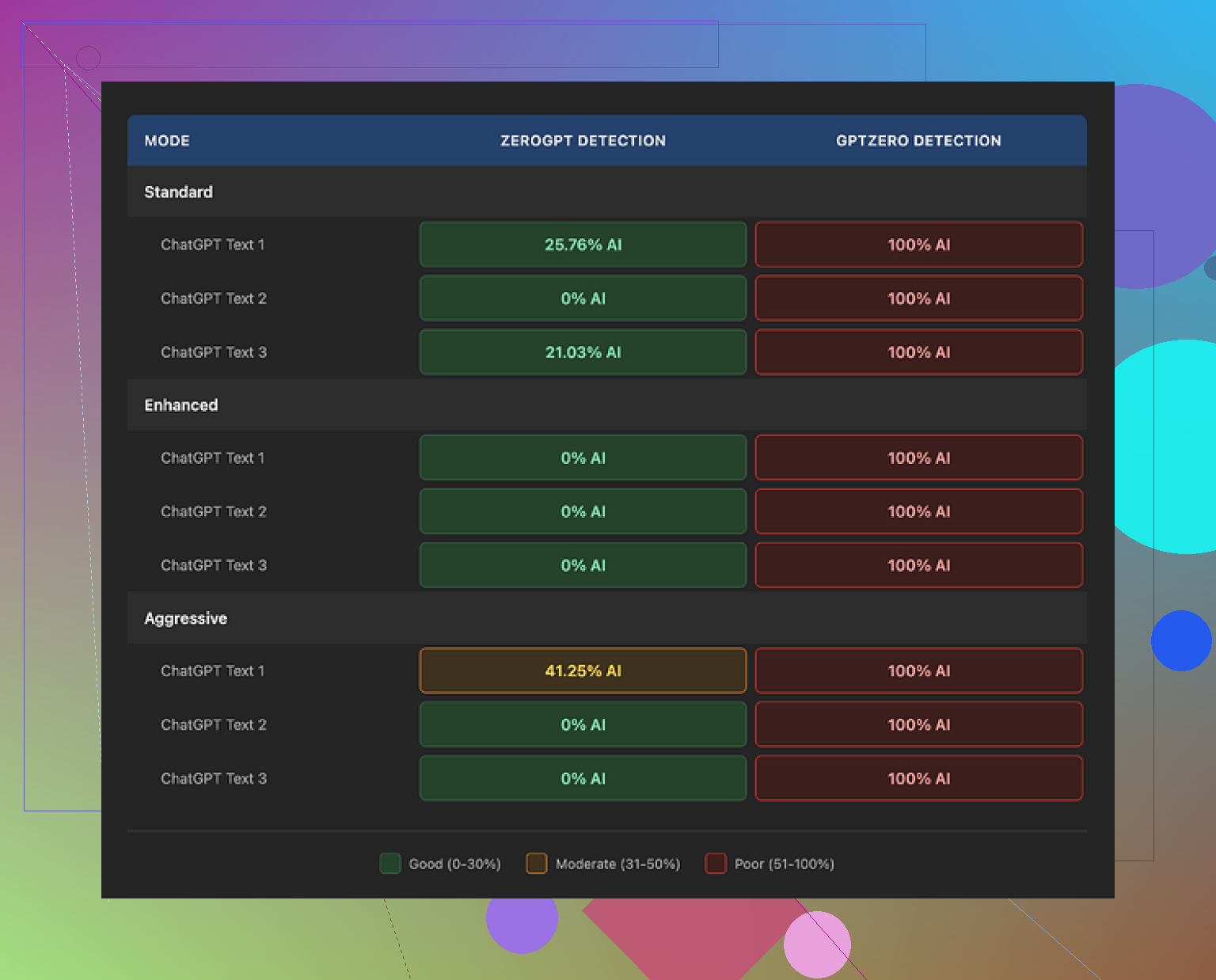
GPTZero flagged every output as 100% AI in all three modes, Standard, Enhanced, and Aggressive. I wasn’t even shocked by the detector result. What bugged me more was the writing itself. It read like a thesaurus got dropped down a staircase.
Standard mode landed around a 4/10 for me. It kept spitting out odd words like “anticipatable” and “architectured,” which look like English until you hit the brakes and reread them. Enhanced mode was worse, maybe a 3/10. I got lines like “the dramatic leaving of the glaciers,” plus other chunks I had to read twice and still didn’t parse. Aggressive mode didn’t fix anything. One output shoved “robots” into a cybersecurity paragraph for no clear reason. Another described climate solutions as “one of the good plays.” That’s the level here.
Another thing I noticed, every mode bloated the text. I fed it around 200 words and kept getting 300 or more back. So if your goal is cleaner writing, this goes the other way. It stretches sentences, swaps words without checking fit, and pads the result with extra noise.
I also couldn’t spot much meaningful difference between the three settings. The labels suggest different levels of rewriting, but the outputs felt like the same engine wearing three name tags.
The privacy page also gave me pause. It talks about account deletion steps, even though there are no accounts to delete. I’m not saying anything wild off one detail, but it reads like legal text copied from a stock template and pasted in place.
When I compared it side by side with other tools, one option did much better for me and still had free access: https://cleverhumanizer.ai
21 Likes
I tested UnAIMyText on a few paragraphs from emails, blog copy, and a product page. My take is mixed, but I would not pay for it.
What I agree with from @mikeappsreviewer, the wording gets weird fast. I saw odd swaps, clunky phrasing, and extra filler. The text often came back longer, not smoother. If your goal is natural writing, more words is usualy the wrong move.
Where I differ a bit, I do think it has some use. If your draft is flat and robotic, it sometimes adds variation. The problem is control. You spend time fixing its edits, so the time savings disappear.
A simple way to judge it:
- Paste 150 to 300 words of your own writing.
- Read the output out loud.
- Mark every phrase you would never say.
- Check if meaning changed.
- Compare edit time versus doing it yourself.
If you mark more than 3 to 5 awkward spots per 200 words, skip it. For me, UnAIMyText failed that test more than once.
If you want a cleaner option, I’d look at Clever Ai Humanizer. It tends to keep meaning tighter and needs less cleanup from what I’ve seen. UnAIMyText feels ok for free testing, but not worth paying for imo.
I’m a little less absolute than @mikeappsreviewer, but not by much. UnAIMyText is usable in the same way a dull knife is usable. Technically yes, practically annoying.
What stood out to me was not just the awkward wording, but the inconsistency. Sometimes it cleans up a sentence, then the next line sounds like it was rewritten by a bot trying way too hard to sound human. That makes it unreliable for anything you actually care about sending or publishing. If I have to babysit every paragraph, the tool kinda defeats its own purpose.
I also would not put too much faith in detector claims either way. Passing or failing GPTZero is not the whole story. Real test is whether a normal reader stumbles. If they do, it failed. That’s where I mostly agree with @waldgeist. The cleanup time matters more than the marketing.
My take:
- okay for messing around with free text
- not reliable enough for polished writing
- def not something I’d pay for
- awkward phrasing still slips through too often
If you want something in this category that usually needs less fixing, Clever Ai Humanizer is probly the safer bet. UnAIMyText feels more like a demo than a tool you’d want in your actual workflow.
I land somewhere between @waldgeist and @ombrasilente here. I disagree a little with @mikeappsreviewer on one point though: detector scores are useful as a signal, but they are not the main reason I’d reject UnAIMyText. The bigger issue is sentence rhythm. Good “humanizing” should preserve your point, trim stiffness, and keep your voice. UnAIMyText often changes the texture of the writing instead of improving it.
What I noticed with tools like this is the failure mode matters. Awkward wording is fixable. Subtle meaning drift is worse. If your email suddenly sounds too salesy, or your product copy becomes vague, that is a real cost. For me, UnAIMyText feels risky for anything client-facing, but maybe acceptable for rough brainstorming if it’s free.
My quick verdict:
- worth testing, not worth trusting
- okay for rough drafts
- weak for polished copy
- payment would be hard to justify
If you want a comparison point, Clever Ai Humanizer is usually the one I’d test next.
Pros of Clever Ai Humanizer:
- tends to keep the original meaning more stable
- readability is usually better on first pass
- less “trying too hard” language
- faster cleanup in my experience
Cons of Clever Ai Humanizer:
- still not perfect on niche or technical text
- can smooth things out so much that some personality gets flattened
- you still need a final human edit
So no, I would not call UnAIMyText reliable. Free toy, maybe. Paid writing tool, probably not.