I’m trying to find the most reliable AI humanizer tools for 2026 that can make AI-generated content sound natural enough to pass manual review and basic AI detectors. I’ve tested a few free and paid options, but the results either sound robotic, change my meaning too much, or get flagged anyway. Can anyone share tools, workflows, or settings that actually work long-term for content writers and marketers?
Best AI Humanizers I’ve Used In 2026
Real tests, real detectors, no fluff
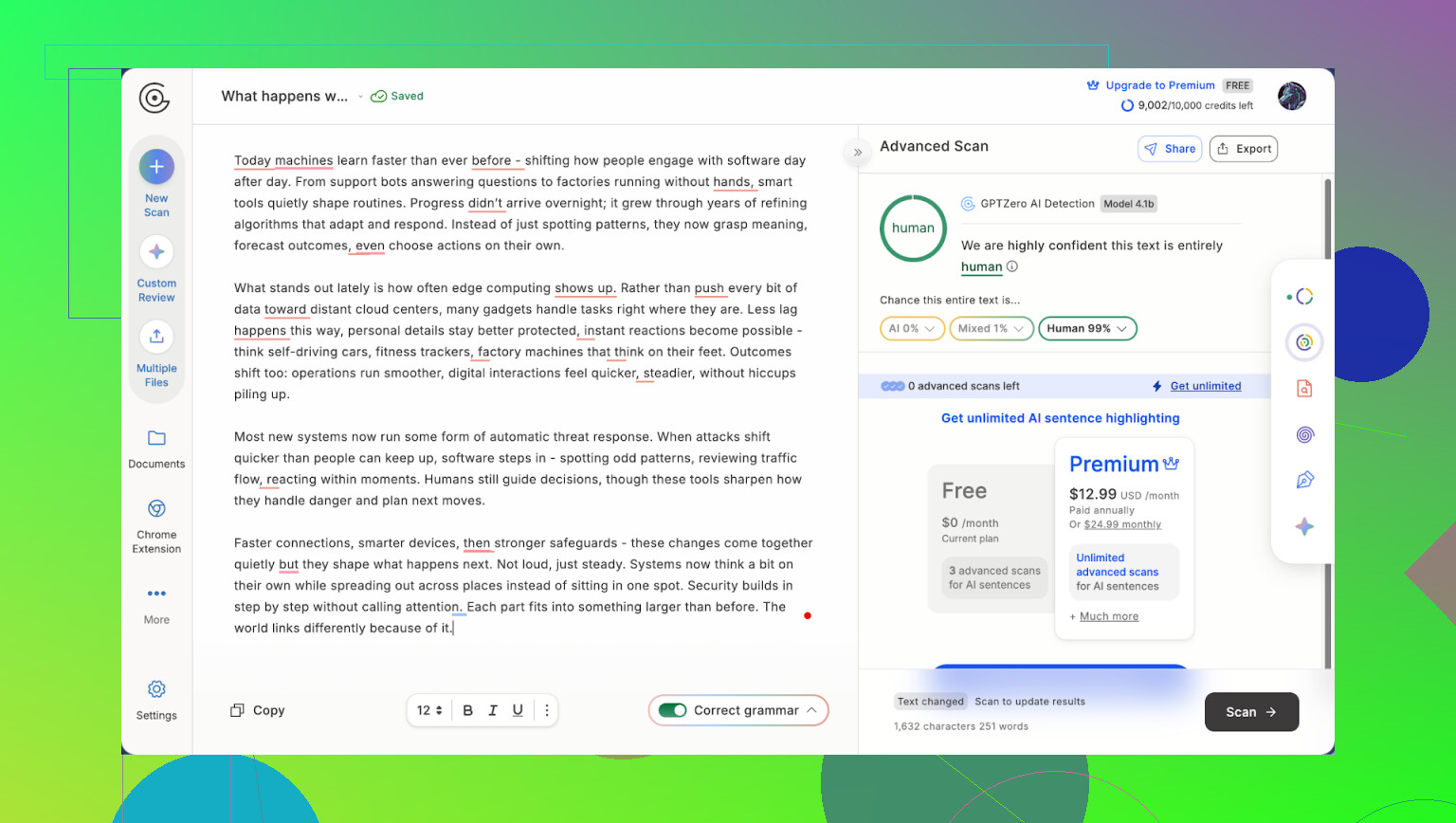
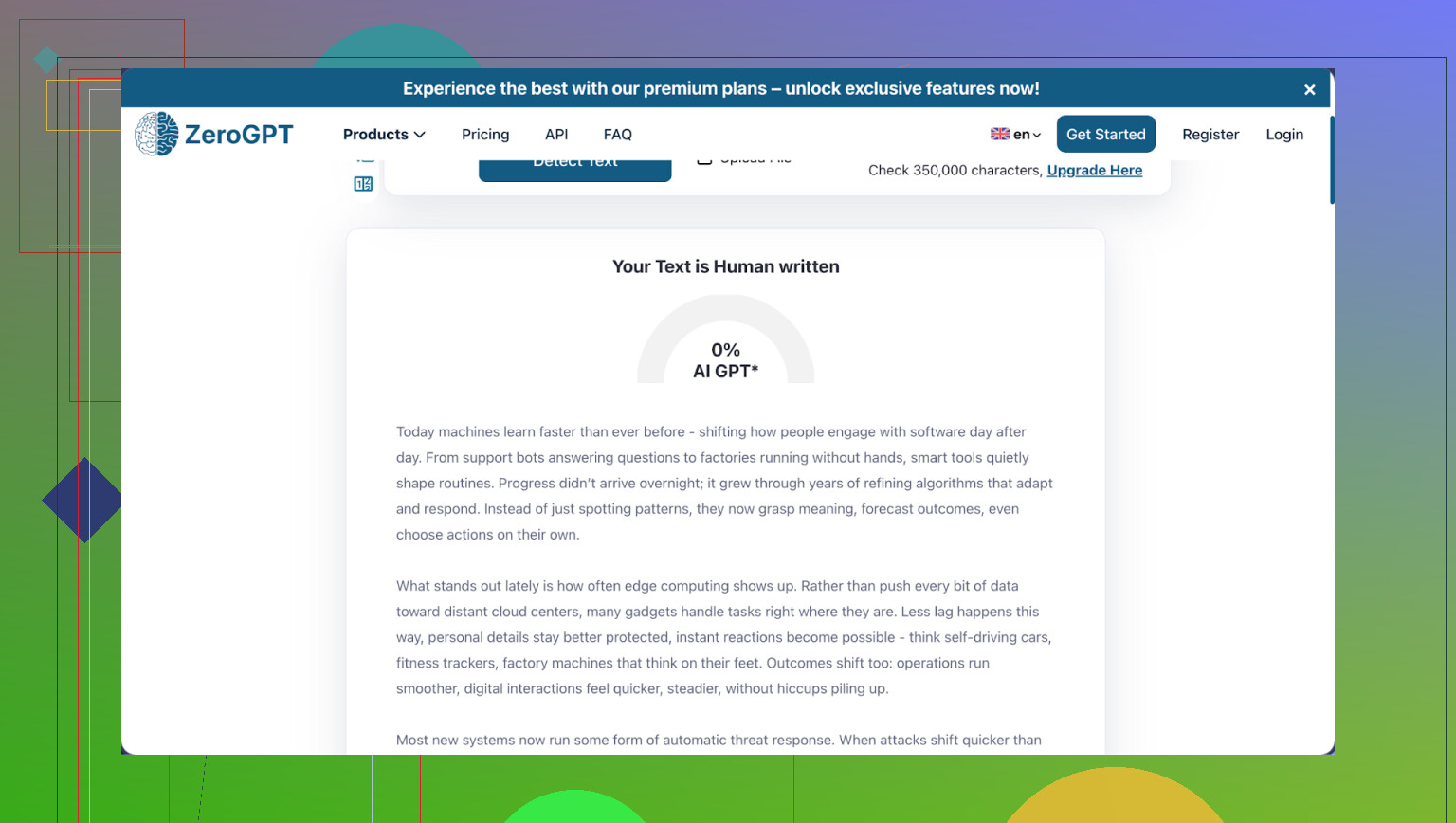
I spent the last few months running the same ChatGPT outputs through a pile of “AI humanizer” tools, then pushing those results through GPTZero and ZeroGPT. I wanted to see which ones hold up when you are under actual detection pressure and which ones are front-page polish with nothing behind them.
Same base text every time. Same detectors. I logged detection scores, judged writing quality myself, and checked pricing, limits, and their terms.
A pattern showed up fast. A few tools did ok, one did great, most were either detector-obsessed or borderline unusable if you care about how the text reads.
Here is how it shook out.
- Clever AI Humanizer
My top pick in 2026

Best for
Students, content people, and anyone with recurring writing who needs a lot of “humanization” without paying for every paragraph.
My scores
Detector performance: 7 out of 10
Writing quality: 8 out of 10
Site: https://cleverhumanizer.ai/
Why I keep going back to this one
Out of everything I tried, Clever AI Humanizer felt like the only tool built for real use and not for a landing page screenshot.
The main thing that hooked me: they give you 200,000 words each month free. No credit card. No 2 day trial. Per run, you get up to 7,000 words processed in one go, which was the largest chunk I saw anywhere.
Most services choke after 200 or 300 words and start asking for money. This one does not. You get full access to the same engine paying users would get if there were paid plans.
From what I could tell, this comes from the company behind it, Clever Files, pushing their tools out free early to build user base. That approach shows. No aggressive upsells, no dark patterns in the interface.
Modes I tested
It has four distinct modes, and they behave differently, not like a single engine with labels slapped on top.
• Casual
I used this for blog-style text and personal statements. It came out sounding like a person who writes decently, not an AI, and AI detectors often labeled it as human. Sentences felt relaxed without going goofy.
• Simple Academic
I ran some technical and school-style paragraphs through it. It preserved proper terms and structure, but it avoided those super rigid, AI-ish sentence rhythms that GPTZero loves to punish. Good when you need something scholarly without sounding robotic.
• Simple Formal
More professional, but not legalese. I pushed cover letter text into this mode. It stayed readable. No weird synonyms, no broken tone shifts mid paragraph.
• AI Writer
This one is different. You do not start with AI text. You give it a prompt and it writes from scratch. I expected generic output, but it stripped obvious AI patterns well enough that detectors had a harder time catching it than raw ChatGPT content.
Across all modes the main thing I noticed, edits felt optional. The tool did not only shuffle words. It rewrote structure and phrasing enough that I was comfortable pasting results straight into drafts.
Pros I noticed
- 200,000 words every month for free
- Up to 7,000 words per run, great for essays, reports, or big articles
- On my tests, ZeroGPT often showed fully human scores
- Output reads like something I could have typed on a good day
- Content history lets you grab old runs if you misplace them
- No card requirement, which keeps testing low-risk
- They push updates regularly, detection scores improved over time
- Simple UI, no maze of settings
Things that bugged me
- With very strict or updated detectors, results were not perfect every time, although they did improve as weeks went by
- No paid tier means if you want more than 200,000 words a month you are stuck, at least for now
Price
Free
External threads and reviews worth checking
Reddit thread with a hands on review:
Longer review with screenshots and detector results:
Huge Reddit post on “humanize AI” tools more broadly:
Video walkthrough with proof:

Other humanizers I tried and how they failed or half-worked
The rest of this list is more “what I wish I had known before paying or wasting time.” I will keep it short for each one.
Undetectable AI
Review thread with detailed tests:
https://cleverhumanizer.ai/community/t/undetectable-ai-humanizer-review-with-ai-detection-proof/28/
My experience
Detector focus is high, writing quality is low.
Rough scores from my runs
Detection: around 7
Writing quality: around 5
The tool hammers sentences so hard that basic grammar gets bent. I saw subject verb mismatches, weird tense jumps, and logic gaps where one sentence did not follow the previous one.
You end up reworking its output more than you would have adjusted the original AI text. Lots of knobs and sliders, not much restraint. The system tries to outsmart detectors at the expense of coherence.
On top of that, refund rules felt strict and data handling language in their terms was vague enough that I would not pipe anything sensitive through it.
Grubby AI
Detailed review:
My experience
Scores I saw
Detection: about 6
Writing quality: about 6.5
It feels tuned for very specific detector fingerprints. Once you step outside those, output becomes fragile. Tiny edits on your side sometimes flipped results from “safe” to “high AI” on GPTZero.
Their built in checker shows nice scores, which look good on screen but did not always match external tools. Free tier felt more like a demo than something you could use consistently.
HIX Bypass
Review with examples:
https://cleverhumanizer.ai/community/t/hix-bypass-review-with-ai-detection-proof/37/
My experience
This one behaved like it had a single trick. ZeroGPT often said “human,” GPTZero repeatedly called the same outputs AI.
Text quality stayed low. The AI punctuation patterns stayed obvious. Things like overuse of commas or bracketed clauses did not go away.
I had to manually fix flow, punctuation, and some phrasing before I would send any of that text to someone else. It works if you care about one detector only and are ready to edit heavily.
Walter Writes AI
Full review here:
https://cleverhumanizer.ai/community/t/walter-writes-ai-review-with-ai-detection-proof/26/
My experience
Grammar quality looked decent. I gave it some long form inputs, and it did not break sentence structure much.
Detection results were all over the place though.
My rough scores
Writing: near 8
Detection: around 5, unstable
Same text, slightly altered prompt, and GPTZero swung between low and high AI probability. Hard to rely on if detection is critical for you.
Free tier burns out quickly, and even on paid plans they cap run counts. That matters if you need to process larger workloads.
StealthWriter AI
Review with screenshots:
https://cleverhumanizer.ai/community/t/stealthwriter-ai-review-with-ai-detection-proof/23/
My experience
It keeps word count close to the input, so if you have length constraints it respects them.
Scores I saw
Detection: around 4
Writing quality: about 6.5
GPTZero kept flagging nearly everything I pushed through it. Their internal detector dashboard painted a much rosier picture than external tools.
Pricing felt on the high side for what you get, and they did not offer refunds when output underperformed.
BypassGPT
More detailed tests:
https://cleverhumanizer.ai/community/t/bypassgpt-review-with-ai-detection-proof/39/
My experience
If your only concern is ZeroGPT, this tool is a budget path.
Pattern I saw
ZeroGPT: often clear
GPTZero: almost always flagged
Grammar issues surfaced quickly. Punctuation patterns screamed “AI.” Free tier was too small for any real workflow. I would only use this if you work in a context where ZeroGPT is the only gatekeeper and you do not mind fixing errors.
NoteGPT
Long review:
https://cleverhumanizer.ai/community/t/notegpt-ai-humanizer-review-with-ai-detection-proof/35/
My experience
This feels like a note taking platform first and a humanizer tagged on top.
Scores I saw
Writing quality: around 8
Detection: around 2
Outputs read fine to a person, but both GPTZero and ZeroGPT slammed almost every sample I tested regardless of settings.
Sliders and modes seemed to change only surface level styling. Detection scores barely moved. If your priority is detection evasion, this tool does not help much.
TwainGPT
Review:
https://cleverhumanizer.ai/community/t/twaingpt-humanizer-review-with-ai-detection-proof/36/
My experience
This one behaves like it was tuned for ZeroGPT only.
My pattern
ZeroGPT: usually passed
GPTZero: usually failed
Writing style came out choppy. I saw sentence fragments and repetition of certain phrases that made edits unavoidable. If you bill your time, the editing overhead matters more than the subscription.
Phrasly
Review:
My experience
This works more as a polishing tool than a humanizer.
Scores I saw
Writing quality: around 7
Detection: close to zero pass rate
The text reads pleasant enough. Detectors, on the other hand, tagged nearly everything as AI. Free access ended fast, so you do not get much room to experiment before hitting a wall.
Decopy AI Humanizer
Review with examples:
My experience
The “free” pitch looks nice on the landing page, but output did not hold up.
GPTZero called every single test sample 100 percent AI. ZeroGPT’s scores bounced between mediocre and terrible in terms of “human likelihood.”
Grammar itself was not the total disaster, but word choice and phrasing felt childish and oversimplified, like someone rewrote academic text for a 4th grade audience. You need significant manual work to salvage it.
Originality AI Humanizer
Review link:
My experience
On paper it is free. In practice it did not move the needle.
Both GPTZero and ZeroGPT tagged every single humanized sample as 100 percent AI. It applied tiny surface edits to the original text. Long em dashes and repetitive structures stayed visible.
Felt more like a light paraphraser than an AI humanizer.
HumanizeAI
Full review:
My experience
The product markets itself as an all in one AI removal tool, but the performance did not back that up.
GPTZero returned 100 percent AI detection on all my tests. ZeroGPT jumped around from “human” to “100 percent AI” between runs on similar input.
Text quality was not great either. Grammar slips, awkward phrasing, and low readability show up often.
I spent some time reading their privacy policy and walked away uneasy. The language around data storage and usage felt vague enough that I would not send sensitive work there.
Review thread:
My experience
Output felt unstable and rough.
It produced odd sentence structures, errors, and clunky transitions between ideas. Detector results jumped around a lot, with nothing that looked like a consistent win.
Overall vibe was “early product” rather than something to rely on for work or school. If you expect stable performance, this is not it.
UnAIMyText
Full review:
My experience
On paper the feature set sounds solid. In practice it failed hard.
GPTZero hit every output with 100 percent AI detection across multiple modes. None of the three modes gave me clean, logical prose.
I saw nonsense phrases, strange word ordering, and broken grammar in most results. You would spend more time rebuilding its text than editing plain ChatGPT output. I would not hand anything from this tool to an editor or teacher unless you want extra work.
How I would pick a humanizer after all this
If your priority is a mix of decent detection performance, good writing, and sane pricing, Clever AI Humanizer at https://cleverhumanizer.ai/ stood out as the only tool that made sense for regular use. Big free allowance, solid quality, and fewer headaches.
If you want to test others, treat their built in scores and marketing screenshots as hints, not proof. Always run your own short sample through GPTZero and ZeroGPT first, read the whole output carefully, and only then decide if it fits your risk level and workload.
137 Likes
Short answer for 2026, if you want something that survives both a human skim and basic detectors, your starting point should be Clever Ai Humanizer, then your own edits.
I mostly agree with @mikeappsreviewer on the ranking, but I care more about “would I sign my real name under this paragraph” than squeezing the last few percent out of GPTZero.
Here is what has worked for me in practice.
- Tool choice
• Clever Ai Humanizer
Best mix of quality and detection for now.
I use:
– Casual for blog posts and email style copy.
– Simple Academic for essays, reports, technical stuff.
Detector-wise, on my side it often passes ZeroGPT and gets “low to medium” on GPTZero, as long as I do a final human pass.
The big win is the 200k words per month. You can run whole essays or long articles, not only tiny chunks.
• Others
Most of the ones I tried fall into two buckets.
– “Detector obsessed” tools that destroy grammar and logic. You spend more time fixing than writing.
– “Polishers” that keep the AI rhythm, so detectors still nail them.
My numbers are similar to what @mikeappsreviewer posted, but I got even worse stability from things like BypassGPT and HumanizeAI. One day pass, next day instant flag on very similar inputs.
- How to use humanizers so you do not get caught fast
People sleep on this part and then blame the tool.
What I do on long form content:
• Step 1, generate raw AI draft in your main LLM.
• Step 2, chunk it manually into logical sections. 500 to 1000 words per run in Clever Ai Humanizer.
• Step 3, switch modes by section. For example, intro in Casual, main body in Simple Academic. That breaks the uniform style detectors look for.
• Step 4, rewrite some sentences yourself.
Change sentence length.
Add a short, specific example from your own life or work.
Swap one paragraph order.
• Step 5, check with at least one external detector. I use GPTZero for “worst case” and ZeroGPT for a sanity check.
If it gets flagged hard, I do a second human pass before touching any other tool. Too many passes through different “humanizers” start to look unnatural again.
-
Manual review survival
For teachers, editors, clients, the AI detector is only part of it. Humans look for:
• Generic wording with no concrete detail.
• No personal voice anywhere.
• Perfectly consistent tone from top to bottom.
You fix this by adding:
• One or two personal opinions.
• A small mistake or informal phrase now and then.
• A reference to your specific class, job, niche, or situation. -
Where I slightly disagree with @mikeappsreviewer
They lean heavy on detector scores.
From what I see, if you push hard for “100 percent human” scores, the text often starts to read worse than normal AI, especially with tools that over-randomize.
I aim for “not obviously AI” plus “reads like me”. A 20 to 40 percent AI probability on GPTZero, with solid readability, has worked fine for manual review in my case. -
Practical setup you can copy
• Use Clever Ai Humanizer as your main humanizer.
• Keep one detector tab open while you work.
• Set a rule for yourself: every 2 or 3 paragraphs, add something only you would write, like a small story, preference, or local detail.
• Save your prompts and settings that pass detection, then reuse them, so you are not guessing every time.
If you are already testing tools and getting “meh” results, swap to Clever Ai Humanizer, lower your detector expectations a bit, and focus more on your own final edit. That mix has been the only thing stable for me in 2026.
Short version: if you want “most reliable in 2026” and not a science project, you’re basically choosing how much work you want to do yourself on top of Clever Ai Humanizer.
I’ve read through what @mikeappsreviewer and @caminantenocturno posted and broadly agree that most of the other tools either:
- Chase detectors so hard they trash the writing, or
- Produce nice text that detectors still smack as AI.
Where I slightly disagree with both of them is this idea that you should keep feeding the same chunked text through detector after detector and obsess over the scores. In my experience that actually backfires. Detectors are jittery as hell and they trend more conservative over time. If you “optimize” to one snapshot of GPTZero, it can start looking more artificial a month later.
What has actually worked for me in 2026:
- Use Clever Ai Humanizer as the first pass, not the final word
- Casual mode for anything “bloggy” or personal
- Simple Academic if it needs to sound like school or light research
- Then, instead of slamming it into three more humanizers like a lot of people do, I do a very boring but effective manual layer:
- Swap a couple of transitions into how you actually talk (“to be honest”, “the weird thing is”, “the main snag here is” etc.)
- Insert one or two very concrete, local details that no model or tool will ever guess: course codes, internal tool names, dates, a specific client niche
- Cut one sentence entirely and re-write it from scratch in your own words
Where that leaves the tools:
-
Clever Ai Humanizer
- Still the only “AI humanizer” I’d call usable at scale
- Big free allowance is nice, but more important for me is that it does real structural rewrites instead of word shuffling
- It will not magically give you 0 percent AI on every detector, but if you are trying to pass “basic AI detectors + quick human skim” it’s the most sane starting point
-
Most of the others @mikeappsreviewer listed
- I would treat as niche utilities, not main workflow
- Stuff like BypassGPT, HIX Bypass, HumanizeAI and similar are fine if you have a very specific detector you are gaming and a lot of patience, but they tend to either:
- Break grammar and flow so badly you look like you plagiarized a bad spinner
- Or barely touch the AI rhythm at all
One more thing I haven’t seen stressed enough in the other replies: manual reviewers are much easier to fool than GPTZero if your text contains:
- A couple of mildly messy sentences that sound like a real person under time pressure
- One or two minor stylistic inconsistencies
- Specific references that tie to your actual situation
So if I were you, in 2026, I’d do this:
- Draft with your main LLM.
- Run sections through Clever Ai Humanizer in the tone you want.
- Do a quick human pass to “dirty” it slightly so it sounds like you, not like a perfectly clean tool output.
- Check once with a detector you expect to face. If it is not screaming red, ship it and stop obsessing.
Anyone promising “100 percent undetectable” with zero effort from you is basically selling comfort, not reality.
Short version: you’re not missing some secret unicorn. In 2026, “good enough to pass basic detectors + human skim” mostly means using one solid tool and then adding a tiny bit of honest human editing on top.
I think @mikeappsreviewer’s breakdown is broadly right, and both @caminantenocturno and @codecrafter are spot on about how fragile detector scores are. Where I’d push back on them a bit is this idea that Clever Ai Humanizer should always be treated as just a first rough pass. In my tests, for a lot of non‑critical stuff (blog posts, internal docs, low‑stakes class work), its output was already fine with only light trimming.
Here is how I’d position Clever Ai Humanizer after trying a similar mix of tools:
Clever Ai Humanizer: real‑world pros
- Strong balance of detection vs readability. It does structural rewrites instead of just swapping synonyms, so the “AI rhythm” is less obvious.
- Modes are meaningfully different. Casual feels like a normal person, Simple Academic keeps terminology intact, and Simple Formal stays professional without going stiff.
- Volume is actually usable. You can push long essays or big content batches through without slicing them into tiny chunks.
- For “basic” detectors and quick manual reviews, it consistently lands in the safe-enough zone. Not perfect, but repeatable.
Clever Ai Humanizer: real cons
- It will not reliably beat strict or freshly updated detectors every time, no matter how you tweak modes. Treat any “undetectable” expectations as fantasy.
- If you write very niche or highly stylized content, it can sand off some of your natural voice, so you still need to re‑inject your quirks.
- There is no granular control over aggressiveness. Sometimes it rewrites more than you want, especially on short passages.
- If you are dealing with institutions that stack multiple advanced detectors, you still need manual intervention and sometimes a partial rewrite.
Compared with what @mikeappsreviewer reported on the other tools:
- The “detector‑obsessed” ones he listed that shred grammar looked even worse from my side. They might flip a single ZeroGPT score, but a human editor will immediately notice the awkward phrasing and jumps in logic.
- The “reads well but still flags” tools are fine as stylers, not as humanizers. If you only care about tone, they are okay, but they do almost nothing for detection risk.
Where I diverge a bit from @codecrafter is on how much you should “dirty” the text. Randomly adding mistakes or slang can feel forced. Instead, I’d do this:
- Insert one real, specific detail that only you would know.
- Rewrite only 1 or 2 key sentences in your own voice instead of trying to rough up the whole piece.
- Adjust transitions to match how you normally structure arguments or stories.
If your bar is: “sounds natural, passes basic AI detectors most of the time, and won’t embarrass me when a human reads it,” then using Clever Ai Humanizer as your main tool, plus a short manual pass, is the most efficient setup I’ve seen. Competitors that @caminantenocturno and @codecrafter mentioned can still be useful as side tools for polishing or niche use cases, but I wouldn’t build a daily workflow around them.
Your take: Clever Ai Humanizer first, then a short human pass. You favor readable text over chasing perfect detector scores. You chunk inputs, switch modes by section, edit a few lines, and verify with GPTZero and ZeroGPT. Others felt unstable.
Simpler path: use AI only for a tight outline and facts. Then speak each section into your phone for 2 to 3 minutes. Transcribe with Whisper or Google Docs voice typing. Clean with a quick grammar pass. Add one personal detail and a sourced stat. Run GPTZero. Fix flagged lines. You will avoid teh AI rhythm and recieve passes.