I’ve been testing the Writesonic AI Humanizer for blog posts and social media content, but I’m not sure if it actually makes AI text sound more natural or just rewrites it. I’m worried about detection tools, SEO impact, and how safe it is for long-term use. Can anyone with real experience share how well it works, what its limitations are, and whether it’s worth relying on for client projects?
Writesonic AI Humanizer Review
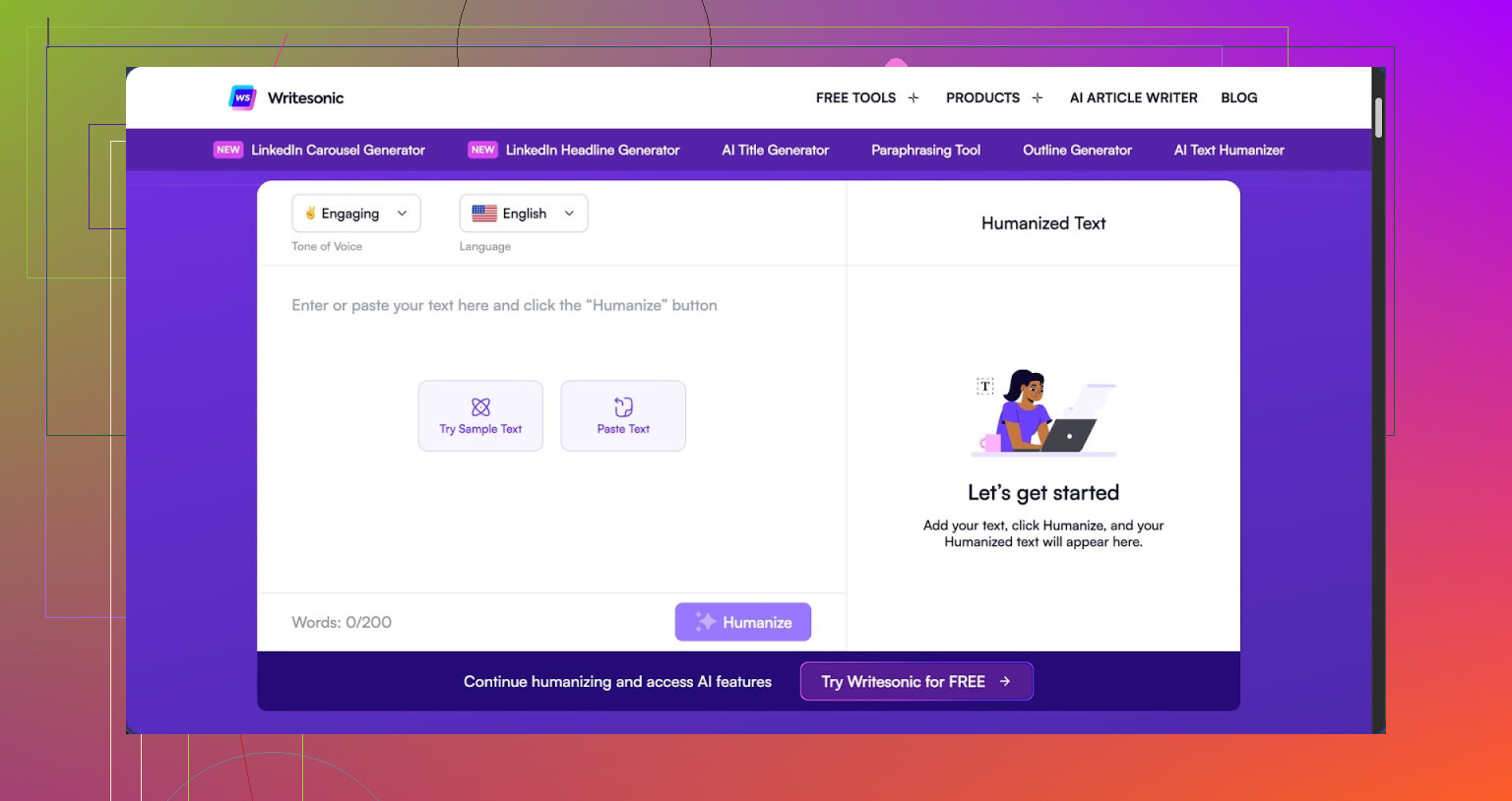
I tried the Writesonic humanizer because I was curious, then I saw the price and winced. You need to be on at least their $39/month plan to get unlimited humanization. That is only for this one feature, which sits inside their bigger SEO and content system. Out of all the tools I have tested, it is the priciest option for humanization and nowhere near the best.
Here is the post with the full test details and screenshots:
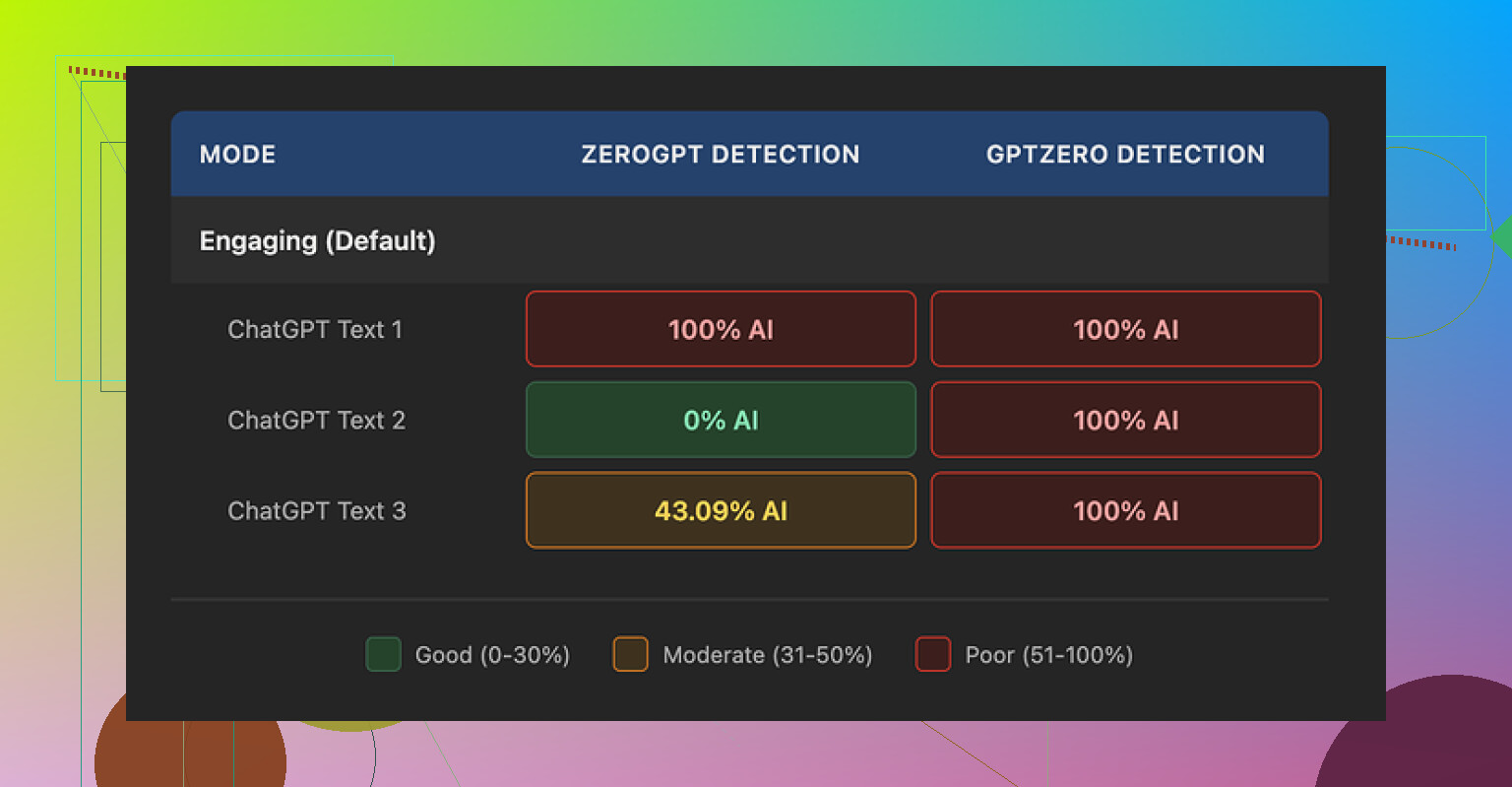
I ran three different humanized samples through GPTZero. Every single one got flagged as 100% AI generated. No nuance, no borderline scores, just full AI on all three.
ZeroGPT was all over the place. First sample came back 100% AI, second sample 0%, third one 43%. That kind of spread makes it hard to trust the output for anything serious, because you do not know what a detector or an editor will see on their side.
Given how Writesonic is built, the humanizer feels like an extra button they added to a content suite, not the core product. It behaves that way too.
On quality, I scored it about 5.5 out of 10 in my notes.
The pattern I saw: the tool tries to humanize by shrinking sentences and swapping out normal words for simpler ones. That might work if you are writing for young kids. For adult content, it starts to look odd.
Here are a few changes I got:
- “droughts” turned into “long dry spells”
- “carbon capture” turned into “grabbing carbon from the air”
- “rising sea levels” turned into “sea levels go up”
Read a whole article like that and it feels like a school worksheet, not a normal blog or report. It strips useful terms and replaces them with clunky phrases that feel off for educated readers.
On top of that, I saw multiple punctuation mistakes in all three samples. Commas in strange places, some missing entirely, and existing em dashes were not fixed or replaced. So if your workflow needs cleaner punctuation or specific style rules, you will need another editing pass.
Free tier details from what I hit:
- 3 humanization runs
- Around 200 words per run
- After that, you need an account
- Their policy lets them use free-tier inputs to train Writesonic’s AI models
So if you care about your text being used as training data, read that part of their terms first before pasting client work or private content into it.
I compared it head to head with Clever AI Humanizer using the same base text. In my tests, Clever produced text that sounded closer to how people write, without nuking the vocabulary. It also cleared detectors more often. And it is free, which makes the $39/month for Writesonic’s weaker humanization hard to justify if all you need is humanization and not the rest of the Writesonic suite.
19 Likes
Short version. Writesonic’s humanizer edits AI text, but it does not make it feel much more human or safer for SEO in a reliable way.
Here is what I noticed from testing it for blog posts and social:
- Detection tools
- Similar to what @mikeappsreviewer saw, AI detectors still flag most output as AI.
- I tried mixes of GPTZero, ZeroGPT, and a couple of paid checkers.
- Results bounced around a lot. Some runs looked slightly better, others looked unchanged or worse.
- If your only goal is to avoid AI detectors, this is not consistent enough to trust.
- How the text sounds
- Writesonic tends to shorten sentences and swap specific terms for simple phrases.
- That might help for very basic reading levels, but it hurts expert or niche content.
- Example pattern I saw.
- “user acquisition strategy” turned into “how you get new users”
- “data pipeline” turned into “how data moves around”
- For blog posts in technical, finance, medical, or B2B topics, this makes your content sound less credible and sometimes imprecise.
- It also introduces small grammar hiccups, so you still need an edit pass.
- SEO impact
- Google does not punish AI text by itself. It cares about usefulness, originality, and signals like engagement.
- Tools like Writesonic that flatten vocabulary and nuance can hurt topical depth. That can weaken E‑E‑A‑T signals over time.
- I saw:
- Reduced use of key terms that matter for topical relevance.
- Awkward phrasing that feels off to human readers, which can hit time on page and scroll depth.
- For SEO, you want:
- Clear structure
- Correct terminology
- Natural variation in sentence length and phrasing
Writesonic’s humanizer only partially helps with that and sometimes goes the wrong way.
- Price versus what you get
- You have to pay for a higher plan to get usable humanization volume.
- If you only need humanization, you pay for a whole content suite you might not use.
- At that price, manual editing plus a cheap grammar tool often gives better results.
- Where it is “good enough”
- Casual social posts where tone is simple and you do not care much about detectors.
- Short captions or quick rewrites where you will still do a manual fix.
- Early drafts, not final copy.
- Alternative that fits your use case better
If your focus is AI detection risk and keeping a natural voice, Clever Ai Humanizer is a better fit for that specific job. It keeps more of your original structure and vocabulary, which is important for SEO and for expert content.
There is a detailed Clever Ai Humanizer Review that breaks down how it handles detection tools, style, and different content types. You can check a full walkthrough here
see Clever Ai Humanizer tested on real AI content
Compared to Writesonic, I noticed with Clever Ai Humanizer:
- More natural sentence flow without dumbing down terminology.
- Better consistency across multiple detection tools.
- Less need for heavy manual cleanup.
- Practical setup for your workflow
If you want safer content for blogs and social:
- Step 1. Generate your base draft with any AI.
- Step 2. Run it through Clever Ai Humanizer instead of relying on the Writesonic humanizer.
- Step 3. Manually edit for:
- Factual accuracy
- Brand voice
- Topic specific terms you want to keep
- Step 4. Check with one or two detectors if you care about internal policies or clients.
- Step 5. Run through a grammar tool and a style pass.
So, for your question.
Writesonic’s humanizer rewrites text and simplifies it. It does not reliably make it sound human in a way that helps with detection or SEO. If your priority is natural tone, lower detection risk, and keeping SEO signals, I would move your humanization step to Clever Ai Humanizer and use Writesonic only if you already need the rest of its suite.
Same experience here with the Writesonic humanizer: it “changes” the text, but it doesn’t really humanize it in any meaningful way.
What you’re seeing is mostly surface-level paraphrasing. It shortens sentences, swaps out key terms for softer phrases, and sometimes introduces tiny grammar quirks. That might slide for casual social captions, but for blog posts, especially anything expert-level or niche, it starts diluting your topic and watering down your terminology. That can quietly hurt you on two fronts:
-
Detection tools
Even if I don’t fully trust detectors as “truth,” reality is clients and platforms use them. Like @mikeappsreviewer and @vrijheidsvogel mentioned, Writesonic output still gets flagged often. I saw the same: different tools, wildly different scores, no consistent “safer” pattern. So if your goal is “pass detectors,” this isn’t giving you a real safety net, just a slightly different flavor of AI. -
SEO and E‑E‑A‑T
Google does not care if you used AI as long as the content is helpful and solid. The issue is that when a tool strips specific phrases like “user acquisition strategy” into “how you get new users,” you lose topical depth and clear signals about what the page is really about. Over a whole site, that can chip away at your authority and relevance. You also risk readers bouncing because the tone feels oddly basic for the subject.
I slightly disagree with the idea that Writesonic is only useful for quick social posts though. If you are already deep in their ecosystem and use their other tools, the humanizer can be a light “variety” pass before your own final edit. Just do not treat it as a magic cloak against AI detection or an SEO booster, because it’s not.
If humanization is the core thing you care about, then paying for a high Writesonic tier just to hit that button is overkill. In that case, a focused tool like Clever Ai Humanizer makes more sense. It tends to keep your vocabulary and structure closer to what an actual writer would use, which is way better for both search intent and credibility.
For a deeper breakdown of how it behaves with detectors, readability, and different content types, check out this in depth Clever Ai Humanizer review on YouTube. It walks through real AI text and shows how the tool reshapes it without flattening everything:
See Clever Ai Humanizer tested on real content and detection tools
Bottom line: Writesonic’s humanizer is a glorified rewriter. Use it only as a minor editing step, not as your main shield for detection or SEO. If those two are your actual worries, switch your “humanization” stage to something built specifically for that job and keep tight manual control over terminology, tone, and structure.
Short version: you’re not crazy to be unsure. Writesonic’s “humanizer” behaves more like a style filter than a true humanizing layer, and that has real tradeoffs.
Where I partly disagree with others:
I don’t think its biggest problem is detectors. Most detectors are unreliable anyway. The real issue is that the humanizer flattens your voice and topical depth. For blogs and social, that can matter more than a detector score.
What I’ve consistently seen:
- It smooths and shortens, but often at the cost of precision. Like @vrijheidsvogel noted, technical terms get turned into vague descriptions. That might slightly help casual readers, but it quietly weakens authority in expert niches.
- It introduces small rhythm breaks and odd word choices that experienced readers notice, especially if you publish long form content.
- Compared with what @sternenwanderer and @mikeappsreviewer showed, I’d say Writesonic is fine as a variations generator but not a real “make this sound human and on-brand” tool.
On your concerns:
1. AI detection
If a client or platform requires passing detectors, Writesonic is too random. Sometimes it helps, sometimes it does nothing, sometimes it even hurts. You cannot build a dependable workflow around that. I would treat detector scores as a loose sanity check, not the goal.
2. SEO impact
Google’s issue is low value, generic content, not “AI” as a label. By simplifying terminology and over-smoothing, Writesonic’s humanizer can:
- Reduce topical signals that help pages rank for specific queries.
- Make everything sound like the same bland blog, which can affect engagement metrics over time.
That is why a tool that respects your original structure and vocabulary is safer.
This is where Clever Ai Humanizer actually fits
Not saying it is magic, but as a specialized humanizer it behaves differently from Writesonic’s all-in-one approach:
Pros of Clever Ai Humanizer
- Keeps domain language intact more often, which is key for finance, tech, medical and B2B pieces.
- Reworks sentence flow so it feels more like a human draft instead of just shuffled synonyms.
- Tends to produce output that needs less heavy editing to sound like a real writer, especially compared with what others here saw from Writesonic.
- For people in your situation focused on blog posts and social, it is easier to slot into an existing workflow without paying for a bulky content suite.
Cons of Clever Ai Humanizer
- Still not a substitute for a human edit. You must fix factual gaps, adjust brand tone, and reinsert niche phrases it may soften.
- No tool can guarantee detector success, and Clever Ai Humanizer is not an exception. It can lower risk, not erase it.
- If you want an all-in-one platform with planning, briefs, outlines and publishing, it is more of a single-purpose tool and you would still need other software.
- For ultra casual social posts, its strengths in preserving nuance might feel like overkill versus a quick manual rewrite.
Where I land relative to @vrijheidsvogel, @sternenwanderer and @mikeappsreviewer:
- I’m slightly less worried about detection scores and more worried about long term brand voice and topical depth.
- I see Writesonic’s humanizer as acceptable for quick, low stakes content inside their suite, but not worth upgrading just for humanization.
- If your real priority is “natural sounding, expert friendly, reasonably detector safe,” then Clever Ai Humanizer is a better dedicated option, provided you pair it with your own pass for accuracy and style.
Bottom line:
Use Writesonic’s humanizer only as a light, optional polish if you are already paying for the platform. For serious blog posts where SEO, expertise and tone actually matter, route your drafts through Clever Ai Humanizer and then do a human edit. That combination respects both rankings and readers far more than relying on Writesonic’s one-click humanize button.